Increasing-Decreasing Number Pyramid in Python

Beginner
⏱️ 10 min read
📚 Updated: Sep 2026
🎯 3 Code Examples
🚀 Live Preview
Nested Loops + Palindrome Rows

What You’ll Learn

Program 52 prints an increasing-decreasing number pyramid: each row is palindromic — count up from i to the peak, then back down — a natural step after Program 51’s alternating number triangle. This tutorial covers two inner loops per row, peak step-back with m -= 2, a live preview, worked Python examples, edge cases, and complexity.

Shape Rule

Palindromic row

Row i prints i..(2i-1) ascending, then back down to i — always 2i-1 digits.

Outer Loop

i = 1..rows

for i in range(1, rows + 1): sets m = i as the starting number each row.

Increasing Half

j = 1..i

for _ in range(i): print(m, end=""); m += 1 prints up to the peak.

Peak Step-Back

m -= 2

Step back before the decreasing loop so the peak digit is not printed twice.

Decreasing Half

k = 1..(i-1)

for _ in range(i - 1): print(m, end=""); m -= 1 mirrors the ascending half.

O(n²)

Complexity

Total prints = 1+3+5+…+(2n-1) = n² — each row grows by 2 digits.

Introduction

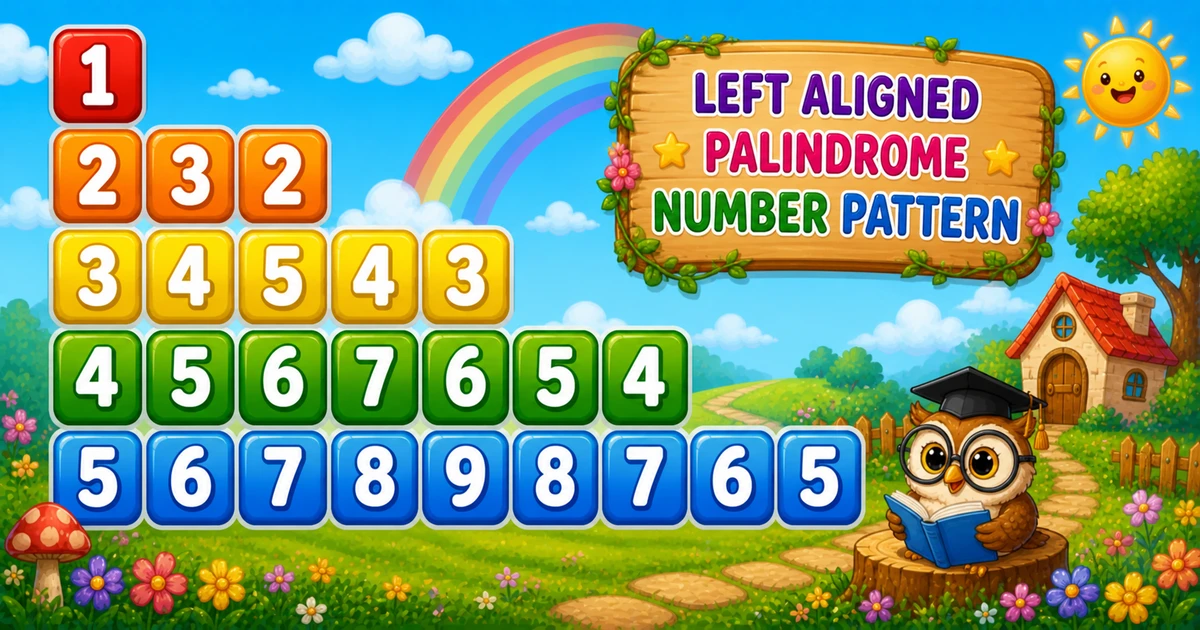
An increasing-decreasing number pyramid pattern prints row i as a palindrome — count up from i to the peak 2i-1, then back down to i. With rows = 5, you get 1, 232, 34543, 4567654, 567898765.

In Python, set m = i each row, print the increasing half with m += 1, step back with m -= 2, then print the decreasing half with m -= 1 before print().

Why it matters?

It bridges Program 51’s alternating triangle to palindromic rows — combining two inner loops with a peak step-back trick.

Key Highlights

Increasing half

m starts at i; print i times with m += 1.

Peak step-back

m -= 2 skips repeating the peak digit.

vs Program 51

Program 51 uses a continuous counter; Program 52 resets m = i and builds a palindromic row.

Series Foundation

Follow Program 51; continue to Program 53 next.

In short: set m = i, print increasing with m += 1, step back m -= 2, print decreasing with m -= 1, then print().

📝 Problem & Approach

Given row count rows = 5, print an increasing-decreasing number pyramid — row i shows a palindromic sequence from i up to 2i-1 and back.

Python
# rows = 5
//1
//232
//34543
//4567654
//567898765

Inputs & Outputs

ItemTypeDescription
rowsintHow many triangle rows to print.
i (outer)intCurrent row index — runs from 1 to rows.
mintCurrent print value — starts at i each row; incremented then decremented.
j (increasing)intPrints i ascending digits with m += 1.
k (decreasing)intPrints i-1 descending digits with m -= 1 after m -= 2.
Row lengthintRow i prints exactly 2i-1 digits.

Minimal workflow

Pseudocode
for i from 1 to rows:
    m = i
    for j from 1 to i:
        print m; m += 1
    m -= 2
    for k from 1 to i - 1:
        print m; m -= 1
    print newline

Approach comparison

ApproachIdeaBest for
Two inner loopsIncreasing m += 1, then decreasing m -= 1 after m -= 2Learning and interviews
Peak step-backm -= 2 skips repeating the peak digitPalindromic row construction
User-input rowsint(input())Flexible row count
Compact tracerows = 3 on paper firstQuick dry-runs before full demo
Spaced variantprint(m, end=" ")Easier reading per row

⚡ Quick Reference

GoalPattern
Outer loopfor i in range(1, rows + 1):
Init m per rowint m = i;
Increasing halffor _ in range(i): print(m, end=""); m += 1
Peak step-backm -= 2
Decreasing halffor _ in range(i - 1): print(m, end=""); m -= 1
End rowprint()
Program 51 contrastProgram 51 uses a continuous counter; Program 52 builds palindromic rows with m = i

📋 Fixed Rows vs User Input vs Compact Trace

Same triangle — three ways to set row count and format output.

Fixed rows
rows = 5

Hard-coded height for demos

User input
int(input())

Read row count from console

Compact trace
rows = 3

Quick dry-run on paper

Peak step-back
m -= 2

Skip repeating the peak digit

Palindrome
2i - 1

Digits per row i

Context

When This Pattern Shows Up

Reach for this pattern when teaching palindromic sequences, two inner loops per row, and the peak step-back trick.

  1. Post Program 51 exercise

    Natural follow-up after Program 51’s alternating triangle — introduces palindromic rows per line.

  2. Palindrome drills

    Each row reads symmetrically — good bridge to string palindrome problems.

  3. Two halves per row

    Total prints = 1+3+5+…+(2n-1) = n² — classic nested-loop complexity.

  4. Gateway to variants

    Compare Program 51 (alternating triangle) with this palindromic pyramid, then continue to Program 53.

  5. Not a UI layout tool

    This is a console teaching pattern — not how you build modern app screens.

Key benefit: one small program that locks in palindromic rows, peak step-back, and O(n²) thinking.

🔮 Live Preview

Choose row count between 3 and 9 and draw the increasing-decreasing number pyramid in the browser.

Try 4, 5, or 7. Max up to 9 in this preview.

Live result
Press "Draw pattern".

Examples Gallery

Three complete Python programs — fixed rows, user input, and a compact trace demo. Click View Output to reveal sample console results.

📚 Getting Started

Print five rows of the palindromic number pyramid with increasing then decreasing halves per row.

Example 1 — Fixed rows = 5

Hard-coded row count — print ascending with m += 1, step back with m -= 2, then print descending with m -= 1.

Python
rows = 5

for i in range(1, rows + 1):
    m = i

    for _ in range(i):
        print(m, end="")
        m += 1

    m -= 2

    for _ in range(i - 1):
        print(m, end="")
        m -= 1

    print()

How It Works

When i = 3, m prints 345, then m -= 2 gives 3, and the second loop prints 43 — output 34543. When i = 1, only the increasing loop runs and the decreasing loop is skipped.

📈 User Input

Read row count with int(input()) and validation.

Example 2 — User Input Rows

Read rows with int(input()) and validate the result.

Python
try:
    rows = int(input("Enter the number of rows: "))
except ValueError:
    print("Please enter a positive integer.")
else:
    if rows <= 0:
        print("Please enter a positive integer.")
    else:
        for i in range(1, rows + 1):
            m = i

            for _ in range(i):
                print(m, end="")
                m += 1

            m -= 2

            for _ in range(i - 1):
                print(m, end="")
                m -= 1

            print()

How It Works

Same palindromic two-loop core as Example 1; only the source of rows changes from a literal to user input.

⚡ Compact Trace

Smaller row count for quick tracing on paper or in interviews.

Example 3 — Compact rows = 3

Use rows = 3 to trace the increasing half, peak step-back, and decreasing half before scaling to 5 rows.

Python
rows = 3

for i in range(1, rows + 1):
    m = i

    for _ in range(i):
        print(m, end="")
        m += 1

    m -= 2

    for _ in range(i - 1):
        print(m, end="")
        m -= 1

    print()

How It Works

With only three rows you can trace every m += 1 and m -= 1 step on paper before running the full rows = 5 demo.

🧠 How the Algorithm Prints Rows

1

Set m = i each row

Before each row, m = i — the starting digit for the palindromic sequence.

Setup
2

Print increasing half

for _ in range(i): print(m, end=""); m += 1 — counts up to the peak.

Increase
3

Step back from peak

m -= 2 — avoids printing the peak digit twice in the decreasing half.

Peak
4

Print decreasing half

for _ in range(i - 1): print(m, end=""); m -= 1 then print().

Decrease
=

Palindromic pyramid complete

Total prints = 1+3+5+…+(2n-1) = n²O(n²) time, O(1) extra memory.

🔎 Worked Walkthrough — rows = 5

Trace each row’s increasing half, peak step-back, decreasing half, and full line output.

iPeakIncreasingAfter m-2DecreasingRow output
111(skip)(skip)1
232322232
3534534334543
47456756544567654
595678978765567898765

Row i always prints exactly 2i-1 digits — a palindromic line built from two inner loops.

Use Cases

Where this tiny pattern (and its loop structure) shows up beyond the homework prompt.

1. Teaching Nested Loops

Inner bound grows with outer index — classic nested-loop exercise.

Example: trace row i = 4 in the walkthrough table.

2. Palindrome Drills

Each row reads symmetrically — good bridge to string palindrome problems.

Example: row 5 ends with 567898765 — nine digits on a palindromic line.

3. Output Formatting Drills

Practice print(m, end="") vs print() with two inner loops per row.

Example: put print() inside the inner loop by mistake.

4. Continuous Counters

Total prints = n(n+1)/2 — links loops to summation formulas.

Example: 10 rows print 55 values total.

5. Complexity Intuition

Growing inner bound makes O(n²) concrete — count prints for n rows.

Example: 5 rows = 1+2+3+4+5 = 15 prints.

6. Input Validation Labs

Pair the pattern with int(input()) and positive-row checks.

Example: reject rows <= 0 and re-prompt.

Pro Tip: when an interviewer asks for patterns, explain outer/inner roles first — then write the loops. The story matters as much as the code.

Advantages

Why this pattern earns a permanent spot in beginner C courses.

  1. 1. Instant Visual Feedback

    Wrong inner bounds show up immediately as a broken triangle.

  2. 2. Real Math Connection

    Each row is a palindromic sequence — not abstract loop drill.

  3. 3. Easy to Extend

    Change rows, use fixed-width format, or switch to full rectangular table.

  4. 4. O(1) Extra Memory

    Streaming output needs no storage beyond loop counters.

Pro Tip: trace row i = 3 on paper — watch m print 345, step back to 3, then print 43.

Usage Tips

Small habits that keep number-pattern code clean.

  1. 1. Inner bound = i

    Row i prints exactly i values — use for _ in range(i):.

  2. 2. Prefer try/except

    Avoid crashes when the user types letters instead of a number.

  3. 3. print() After Inner Loop

    Only call print() after both inner loops finish the row.

  4. 4. Fixed-Width Formatting

    Trace rows = 3 on paper before coding the full rows = 5 demo.

  5. 5. Dry-Run rows = 5

    Trace five rows on paper before coding the full 10-row demo.

Pro Tip: if the output is a vertical list of single numbers, you almost certainly put print() inside the inner loop.

Common Pitfalls

Mistakes that commonly break increasing-decreasing number pyramid patterns.

  1. 1. print() Inside Inner Loop

    Each number lands on its own line — you get a column, not a triangle.

    → Use print(m, end="") in both loops; print() only after both inner loops.

  2. 2. Wrong Inner Bound

    Using range(rows) every row makes a full rectangle, not a triangle.

    → Use for _ in range(i): — inner bound depends on outer i.

  3. 3. Forgetting m -= 2

    The peak digit prints twice — row looks like 2332 instead of 232.

    → Always step back with m -= 2 before the decreasing loop.

  4. 4. Forgetting print() After Row

    All numbers print on one long line without row breaks.

    → Add print() after both inner loops complete.

  5. 5. Blind int(input())

    Letters or empty input raise ValueError when int(input()) is unchecked.

    → Wrap in try/except ValueError and re-prompt on failure.

Edge Cases

Check these inputs before calling the solution done.

rows = 1

Single row

Output is just 1 on one line.

rows = 0

Empty output

Outer loop never runs — print nothing or show a message.

Negative

rows < 0

Treat as invalid; re-prompt instead of silent empty output.

rows = 5

Compact trace

Five rows ending with 567898765 — good for dry-runs.

Bad input

Non-numeric input

Unchecked int(input()) raises ValueError — use try/except.

Large rows

Wide output

Row 9 has 9 numbers — total prints grow as n(n+1)/2.

🎯 Practice Problems

Try these variations to lock in the pattern.

1. Compare with Program 51

  • Program 51 uses a continuous counter with alternating direction
  • Program 52 resets m = i and builds palindromic rows

2. Change rows

  • Try rows = 4 or rows = 8 in the live preview
  • Same palindromic logic, different pyramid size

3. Next in series

  • Continue with Program 53
  • Build on palindromic number patterns

4. Add spacing

  • Print with print(m, end=" ")
  • Same loops, wider visual spacing

Notes

  • Two inner loops. Set m = i. Increasing: for _ in range(i) with m += 1. Decreasing: for _ in range(i - 1) with m -= 1 after m -= 2.
  • print(m, end="") stays on the line; print() advances — call it only after both inner loops finish.
  • Validate rows > 0 for interactive programs; rows = 1 prints a single 1.
  • Total prints = 1+3+5+…+(2n-1) = n² for n rows — each row has 2i-1 digits.

Quick Takeaway: set m = i, print increasing with m += 1, step back m -= 2, print decreasing with m -= 1, then print().

⏱️ Time and Space Complexity

ProgramTimeExtra space
Nested loops (Examples 1–3)O(n²)O(1)
Total prints for n rowsn(n+1)/2 values2i-1 digits on row i
Wrap Up

🎉 Conclusion

The increasing-decreasing number pyramid is a natural follow-up to Program 51: palindromic rows built with two inner loops and a peak step-back. Master the fixed-rows version, then try user input and the compact 3-row trace.

Practice the three examples above, then continue to Program 53 for the next pattern in the series.

Row i prints 2i-1 palindromic digits — ascending to the peak, then back down.

💡 Best Practices

✅ Do

  • Set int m = i at the start of each row
  • Increasing: for _ in range(i): print(m, end=""); m += 1
  • Peak step-back: m -= 2
  • Decreasing: for _ in range(i - 1): print(m, end=""); m -= 1
  • Call print() after both inner loops

❌ Don’t

  • Skip m -= 2 — the peak prints twice
  • Use range(i) in the decreasing loop when you meant range(i - 1)
  • Call print() inside either inner loop
  • Ignore bad input in user-facing demos
  • Skip the rows = 3 dry-run before coding rows = 5

Key Takeaways

Knowledge Unlocked

Five things to remember about this increasing-decreasing number pyramid

Print the pattern the beginner-friendly way.

5
Core concepts
02

Start m

m = i each row

Code
03

Peak step

m -= 2

Code
04

Row length

2i - 1 digits

Logic
O 05

Complexity

O(n²) time

Analysis

❓ Frequently Asked Questions

Row 3 starts at 3, prints up to 5 (345), then prints back down to 3 (43) after m -= 2 — producing 34543.
Each row counts up from i to the peak 2i-1, then counts back down to i. The sequence reads the same left-to-right on each line.
After the increasing loop, m is one past the peak. Subtracting 2 moves it to the value just before the peak so the decreasing loop does not repeat the peak digit.
Step back with m -= 2 before the decreasing loop. The decreasing loop then runs i-1 times, skipping the peak.
Change rows or read it from user input with int(input()) — see Example 2.
O(n²) for n rows because row i prints 2i-1 digits and 1+3+5+...+(2n-1) = n² total prints.
Program 51 uses a continuous counter with alternating direction across rows. Program 52 resets m = i each row and builds a palindromic line per row.
Yes. Print with print(m, end=" ") in both loops and omit the trailing space on the last digit if needed.
Use try/except ValueError around int(input()). Bare int(input()) raises ValueError on bad input.
One row prints 1 — the decreasing loop range(i - 1) never runs when i = 1.

Did you Know? 🔊

Each row is palindromic: print i..(2i-1) ascending, then back down with m -= 2 to skip the peak. Row 3 prints 34543 — total digits = 1+3+5+…+(2n-1) = n² for n rows.

Continue to Program 53

Move on to the next pattern in the Python number-pattern series.

Program 53 tutorial →

About the author

Mari Selvan M P
Mari Selvan M P 🔗

Developer, cloud engineer, and technical writer

  • Experience 12 years building web and cloud systems
  • Focus Full Stack Development, AWS, and Developer Education

I write practical tutorials so students and working developers can learn by doing—from databases and APIs to deployment on AWS.

12 people found this page helpful
