JavaScript Number Triangle Pattern (Diagonal Fill)
Beginner
5 min read
Updated: Sep 2026
3 programs
Live preview
Definition
What Is This Pattern?
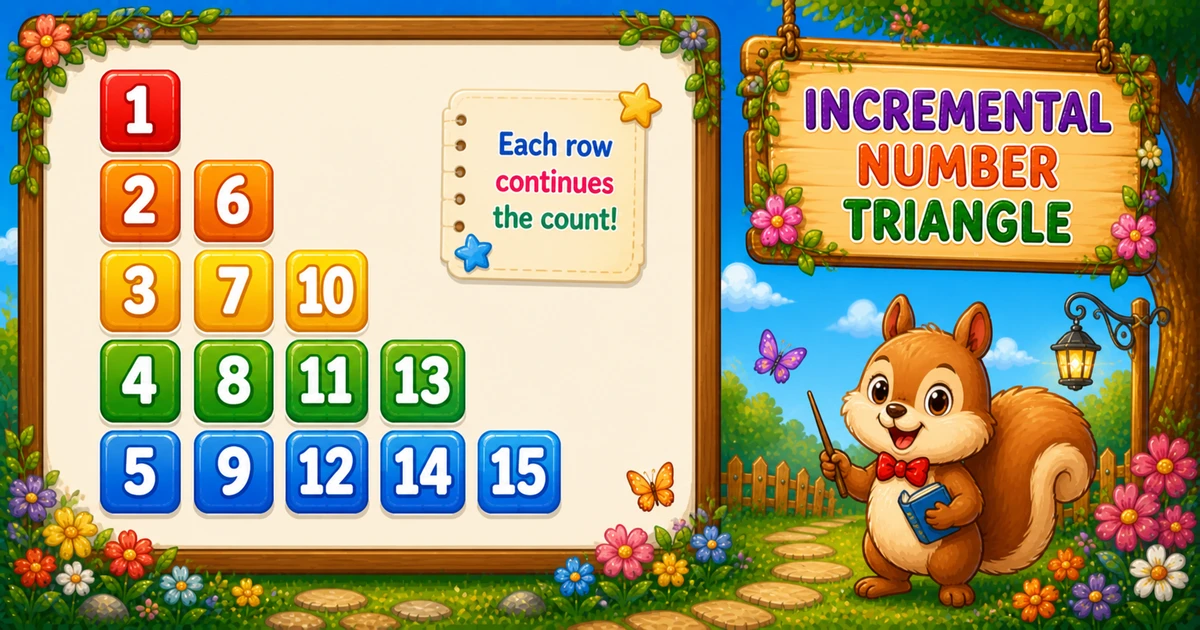
A column-wise number triangle fills numbers into a 2D array by columns, then prints the lower triangle row by row — creating jumps like 2 6 and 3 7 10.
Unlike Program 54 (diagonal spaces), this uses a grid — total values = n(n+1)/2.
Approach
How to Solve It
Allocate a grid, fill with col outer / row = col..n inner, then log with row outer / col = 1..row inner.
Method
Idea
Best for
2D fill + print
Store column-wise, read row-wise
Classic column-wise demos
Compact
Same logic with fewer rows (e.g. 3)
Quick dry-runs
Pseudocode
Pseudocode
create tri[rows+1][rows+1]
num = 1
for col from 1 to rows:              // fill
    for row from col to rows:
        tri[row][col] = num; num += 1
for row from 1 to rows:              // print
    line = ""
    for col from 1 to row:
        append tri[row][col] (+ space if needed)
    print line
for (col…) for (row = col; row <= rows; row++) tri[row][col] = num++;
Print row-wise
for (row…) for (col = 1; col <= row; col++) line += tri[row][col];
Spaces
if (col < row) line += " ";
End the row
console.log(line);
Total numbers
rows * (rows + 1) / 2
Printing Numbers vs Starting a New Line
API
Effect
Use for
line += …
Stays on the same row
Each stored value (and space)
console.log(line)
Ends the current row
After all columns for that row
Append without a newline, then end the row once.
Try it
Live Preview
Change the row count and the column-wise triangle updates instantly.
Whole numbers from 1 to 9. Tap a chip or type a value — the preview redraws as you go.
Live resultrows = 5 · 15 numbers
1
2 6
3 7 10
4 8 11 13
5 9 12 14 15
Trace
Worked Walkthrough
Trace fill vs print when rows = 5 — column order creates the jumps.
Column
Rows filled
Values stored
1
1..5
1 2 3 4 5
2
2..5
6 7 8 9
3
3..5
10 11 12
When printed, row 2 reads tri[2][1] and tri[2][2] → 2 6.
Code
JavaScript Programs
Three complete programs: fixed rows = 5, prompt input, and a compact rows = 3 demo. Use View Output for samples, or Try It Yourself to edit and run live.
Example 1 — Fixed rows = 5
Fill with col outer, then log with row outer.
JavaScript
const rows = 5;
const tri = Array.from({ length: rows + 1 }, () => Array(rows + 1).fill(0));
let num = 1;

for (let col = 1; col <= rows; col++) {
  for (let row = col; row <= rows; row++) {
    tri[row][col] = num;
    num++;
  }
}

for (let row = 1; row <= rows; row++) {
  let line = "";
  for (let col = 1; col <= row; col++) {
    line += tri[row][col];
    if (col < row) line += " ";
  }
  console.log(line);
}
1. Shrink the size. Only rows changes — still fill by column, print by row.
2. Easier to trace. Six numbers total — useful while learning why row 2 is 2 4.
3. Same triangular count. Largest value is still rows(rows+1)/2.
Edge Cases & Pitfalls
Check these before calling the solution done.
Loop order
Keep col outer when filling
Swapping to row-outer fill produces the standard 1 / 2 3 / 4 5 6 triangle instead.
Start row
Inner fill starts at row = col
Starting at 1 would write above the diagonal and break the lower-triangle shape.
rows = 1
Single-row case
Output is just 1 — one fill and one print.
Bad input
Validate parseInt
Check Number.isFinite(rows) and require rows >= 1 before allocating the grid.
Analysis
Time and Space Complexity
Program
Time
Extra space
Fixed / compact (Examples 1, 3)
O(n²)
O(n²) for the grid
User input (Example 2)
O(n²)
O(n²) for the grid
Fill and print each touch n(n+1)/2 cells — quadratic time and space for the array.
Remember
Key Takeaways
Rule: fill column-wise, print row-wise.
Jumps: come from finishing one column before starting the next.
Break the row: call console.log(line) only after all columns for that row.
Complexity:O(n²) time and space for n rows.
One line: store numbers down each column, then read across each row to print the triangle.
Frequently Asked Questions
The triangle is filled column-wise: after column 1 stores 1..5, the next number is 6 for column 2 — so row 2 shows 2 6.
Column-wise filling creates the distinctive jumps (6, 10, 13). Row-wise logging shows the familiar triangle shape.
Program 54 uses diagonal conditions with spaces. Program 55 uses a 2D array filled column-wise then logged row-wise.
line += appends values on the same row. console.log(line) ends the row after all columns for that row finish.
Not strictly, but it keeps fill order and print order separate — clearer for beginners.
O(n²) for n rows because total filled and logged values equal n(n+1)/2.
For rows = n, the largest number is n(n+1)/2 — the triangular cell count.
One row prints a single 1 — fill and log loops each run once.
🤔
Did you know?
Numbers are filled column-wise into a 2D array — column 1 gets 1..n, column 2 gets the next block — then logged row-wise. Total values = n(n+1)/2, so O(n²).