Powers of 11 Pattern in JavaScript

Beginner
⏱️ 9 min read
📚 Updated: Sep 2026
🎯 3 Code Examples
🚀 Live Preview
Loops + Number Sequence

What You’ll Learn

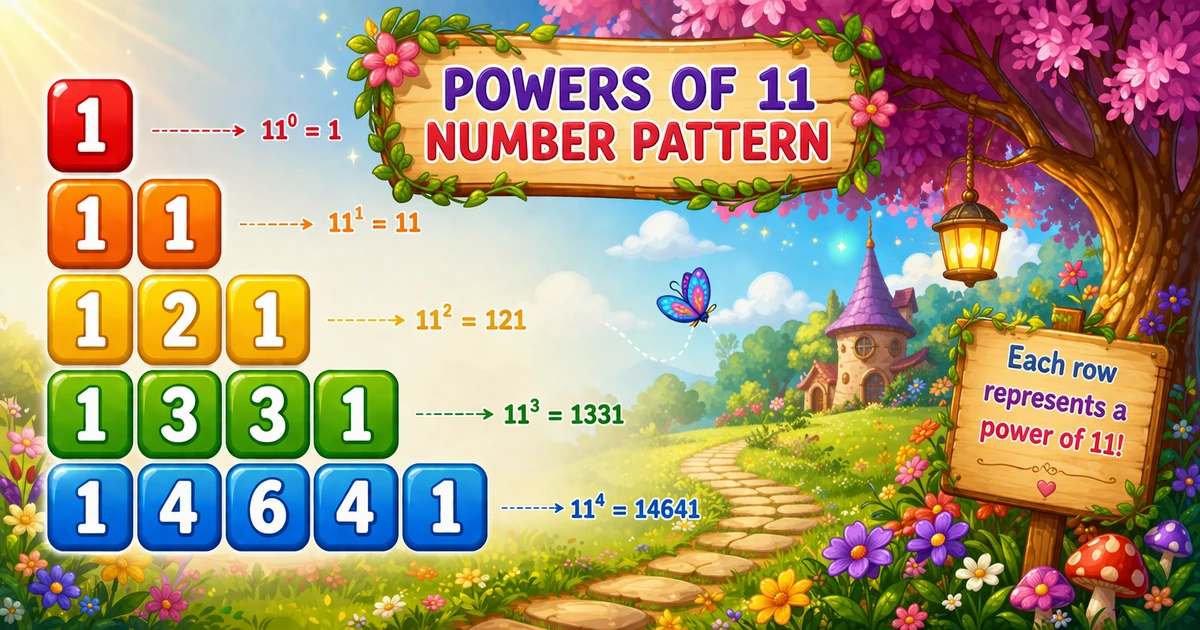
Program 48 prints the powers-of-11 sequence: 1, 11, 121, 1331, 14641 — a natural step after Program 47’s 2D concentric diamond. This tutorial covers a simple loop with running state (res *= 11), a live preview, worked JavaScript examples, edge cases, and complexity.

Shape Rule

Multiply by 11

Each row is the previous value times 11 — starting from 1.

Single Loop

loop n times

for (let i = 0; i < n; i++) logs one value per row.

Running State

res variable

res holds the current number — update with res *= 11 after each print.

Pascal Link

Early rows only

First few values mirror binomial coefficients until base-10 carries break the pattern.

Live Preview

n = 3..8

Pick row count and generate the sequence in the browser.

O(n)

Complexity

One value per row — n prints total; extra memory stays O(1).

Introduction

A powers-of-11 sequence prints one growing number per row: start at 1, then multiply by 11 for each next line. With n = 5, the output is 1, 11, 121, 1331, 14641.

In JavaScript a single loop runs n times, a variable res holds the current value, and you console.log(res) then update with res *= 11.

Why it matters?

It teaches running state in a loop — a simpler pattern after Program 47’s nested diamond grids.

Key Highlights

Start at 1

res = 1 first row.

Times 11

res *= 11 each step.

vs Program 47

Program 47 is a 2D diamond; Program 48 is a 1D sequence.

Series Foundation

Follow Program 47; continue to Program 49 next.

In short: loop n times, console.log(res), then update with res *= 11.

📝 Problem & Approach

Given row count n = 5, print the powers-of-11 sequence — one growing number per line, starting at 1 and multiplying by 11 each step.

JavaScript
// n = 5
// 1
// 11
// 121
// 1331
// 14641

Inputs & Outputs

ItemTypeDescription
nnumberHow many rows (values) to print.
resnumberRunning value — starts at 1, updated with res *= 11.
powernumberLoop counter from 0 to n - 1 (exponentiation variant).
Printed outputtextOne number per line — 1, 11, 121, …

Minimal workflow

JavaScript
let res = 1;
for (let i = 0; i < n; i++) {
  console.log(res);
  res *= 11;
}

Approach comparison

ApproachIdeaBest for
Print-then-multiplyconsole.log(res); res *= 11Cleaner loop body — see Example 1
User-input nparseInt(prompt())Flexible row count
Exponentiationconsole.log(11 ** power)Direct power per row — see Example 3

⚡ Quick Reference

GoalPattern
Initializelet res = 1
Loop rowsfor (let i = 0; i < n; i++)
Print valueconsole.log(res)
Update stateres *= 11
Exponentiation formconsole.log(11 ** power) for power = 0..n-1
Cleaner variantPrint first, multiply after — no special-case if needed
Program 47 contrastProgram 47 is a 2D diamond; Program 48 is a 1D sequence

📋 Multiply Loop vs User Input vs Exponentiation

Same sequence — three ways to structure the loop and set row count.

Multiply loop
res *= 11

Running state updated each row

User input
parseInt(prompt())

Read row count from prompt()

Exponentiation
11 ** power

Direct power per row — no state variable

Large n
BigInt

Use BigInt for very large row counts

Multiplier
* 11

Each step grows by one power of 11

Context

When This Pattern Shows Up

Reach for this pattern when teaching running state, sequence growth, and single-loop output.

  1. Post Program 47 exercise

    Natural follow-up after Program 47’s nested diamond — simpler 1D sequence with one loop.

  2. Running state

    res carries value from row to row — core loop-state pattern.

  3. Pascal connection

    Early rows mirror binomial coefficients until base-10 carries break the match.

  4. Gateway to variants

    Compare Program 47 (2D diamond) and Program 49 (next in series) next.

  5. Not a UI layout tool

    This is a console teaching pattern — not how you build modern app screens.

Key benefit: one small program that locks in loop state, multiply-update logic, and O(n) thinking.

🔮 Live Preview

Choose row count n between 3 and 8 and generate the powers-of-11 sequence in the browser.

Try 3, 5, or 8. Max up to 8 in this preview.

Live result
Press "Generate sequence".

Examples Gallery

Three complete JavaScript programs — fixed n = 5, prompt() input, and exponentiation with 11 ** power. Click View Output to reveal sample console results, or Try it Yourself to run the code live.

📚 Getting Started

Print five rows of the powers-of-11 sequence with print-then-multiply.

Example 1 — Fixed n = 5

Hard-coded row count — print first, then multiply by 11.

JavaScript
let res = 1;

for (let i = 0; i < 5; i++) {
  console.log(res);
  res *= 11;
}
Try it Yourself

How It Works

res starts at 1 and prints on each iteration. After printing, res *= 11 prepares the next row — producing 11, 121, 1331, and 14641.

📈 User Input

Read row count n with prompt() instead of hard-coding 5.

Example 2 — User Input n

Read n with prompt() and reject non-positive values.

JavaScript
const nInput = prompt("Enter number of lines:");
const n = parseInt(nInput, 10);

if (!Number.isFinite(n) || n < 1) {
  console.log("Please enter a positive integer.");
} else {
  let res = 1;
  for (let i = 0; i < n; i++) {
    console.log(res);
    res *= 11;
  }
}
Try it Yourself

How It Works

Same multiply logic as Example 1; only the source of n changes. JavaScript handles large values for typical row counts; use BigInt for very long sequences.

⚡ Exponentiation

Use 11 ** power directly — no running state variable needed.

Example 3 — Exponentiation

Print 11 ** power for each power from 0 to n - 1.

JavaScript
const n = 5;

for (let power = 0; power < n; power++) {
  console.log(11 ** power);
}
Try it Yourself

How It Works

11 ** 0 is 1, 11 ** 1 is 11, and so on — same sequence without a running res variable.

🧠 How the Algorithm Prints Rows

1

Initialize result

res = 1 holds the current value to print on each row.

Setup
2

Loop rows

for (let i = 0; i < n; i++) runs once per printed line.

Loop
3

Update state

Log res first, then res *= 11 — or use console.log(11 ** power) directly.

State
4

Print value

console.log(res) outputs one number per row.

Output
=

Sequence complete

One value per row — O(n) time, O(1) extra memory.

🔎 Worked Walkthrough — n = 5

Trace each iteration — what res holds before and after the multiply step (print-then-multiply variant).

iPrintsAfter res *= 11
1111
211121
31211331
4133114641
514641161051 (next row if continued)

Row 6 would print 161051 — the first value where digit carries break the Pascal-triangle visual match, but the multiply loop still works correctly.

Use Cases

Where this tiny pattern (and its loop structure) shows up beyond the homework prompt.

1. Running State in Loops

Classic intro to carrying a value from iteration to iteration.

Example: trace the walkthrough table for n = 5.

2. Pattern Series Base

Follow Program 47’s diamond; continue to Program 49 next.

Example: compare 2D vs 1D pattern complexity.

3. Console Formatting Drills

Practice console.log() with one value per row.

Example: use console.log(res) for one value per line.

4. Pascal / Binomial Link

Early rows mirror binomial coefficients — great math tie-in.

Example: row 5 prints 14641 = coefficients of (a+b)&sup4;.

5. Complexity Intuition

n rows, one print each — O(n) is easy to count.

Example: 5 rows = 5 prints total.

6. Big Integer Support

Values grow fast — use BigInt when numbers exceed safe integer limits.

Example: print 20+ rows — watch precision for very large values.

Pro Tip: when an interviewer asks for patterns, explain the state variable first — then write the loop. The story matters as much as the code.

Advantages

Why this pattern earns a permanent spot in beginner JavaScript courses.

  1. 1. Single Loop Simplicity

    No nested loops — easier after Program 47’s diamond grid.

  2. 2. Minimal Concepts

    Only one loop, one variable, and console output — no arrays needed.

  3. 3. Easy to Extend

    Change n, swap to exponentiation, or print many rows — use BigInt when needed.

  4. 4. O(1) Extra Memory

    Streaming output needs no storage beyond res and loop counter.

Pro Tip: trace the walkthrough table on paper — watch how res grows by one power of 11 each row.

Usage Tips

Small habits that keep number-pattern code clean.

  1. 1. Initialize res = 1

    Start with 1 so the first printed value is correct.

  2. 2. Validate with Number.isFinite()

    Avoid crashes when the user types letters instead of a number.

  3. 3. Print Then Multiply

    Cleaner than special-casing the first row — see Example 1.

  4. 4. Try Exponentiation

    11 ** power is a clear alternative — see Example 3.

  5. 5. Dry-Run n = 3

    Trace three rows on paper before coding the full n = 5 demo.

Pro Tip: if values look wrong after row 1, check whether you multiply before or after printing.

Common Pitfalls

Mistakes that commonly break powers-of-11 sequence patterns.

  1. 1. Multiplying Before First Print

    First row prints 11 instead of 1 if you multiply before printing.

    → Print first, then res *= 11.

  2. 2. Forgetting to Update res

    Every row prints 1 if you never multiply.

    → Add res = res * 11 or res *= 11 each iteration.

  3. 3. Floating-Point Exponentiation

    Using pow(11, p) without casting can produce floats for large p.

    → Use 11 ** power with integers — switch to BigInt for very large powers.

  4. 4. Wrong Multiplier

    Using 10 or 12 instead of 11 produces a different sequence.

    → Confirm the pattern requires multiply-by-11.

  5. 5. Bare parseInt(prompt())

    Letters or empty input return NaN with bare parseInt(prompt()).

    → Catch ValueError and re-prompt on failure.

Edge Cases

Check these inputs before calling the solution done.

n = 1

Single row

Output is just 1 on one line.

n = 0

Empty output

Loop never runs — print nothing or show a message.

Negative

n < 0

Treat as invalid; re-prompt instead of silent empty output.

n = 5

Classic demo

1, 11, 121, 1331, 14641 — last row before carry breaks Pascal match.

Bad input

Non-numeric input

Bare parseInt(prompt()) returns NaN — use Number.isFinite() first.

Large n

Large n

Values grow exponentially — use BigInt for very large row counts.

🎯 Practice Problems

Try these variations to lock in the pattern.

1. Compare with Program 47

  • Program 47 uses nested loops for a 2D diamond
  • Program 48 uses one loop and running state

2. Change n

  • Try n = 3 or n = 8 in the live preview
  • Same loop, different row count

3. Next in series

  • Continue with Program 49
  • Build on sequence patterns

4. Exponentiation version

  • Rewrite with console.log(11 ** power)
  • Compare with the multiply-loop approach

Notes

  • Running state. res carries the current value — update with res *= 11 after each print (or before, with an if-check).
  • console.log(res) logs one value per row cleanly.
  • Validate n > 0 for interactive programs; n = 1 prints a single 1.
  • n rows, one print each — total work is O(n) with O(1) extra memory.

Quick Takeaway: loop n times, console.log(res), then update with res *= 11.

⏱️ Time and Space Complexity

ProgramTimeExtra space
Single loop (Examples 1–3)O(n)O(1)
Exponentiation (Example 3)O(n × d) where d = digit countO(d) for stored value
Wrap Up

🎉 Conclusion

The powers-of-11 sequence is a simple follow-up to Program 47: one loop, a running res variable, and multiply-by-11 each row. Master the fixed-n version, then try user input and the cleaner print-then-multiply loop.

Practice the three examples above, then continue to Program 49 for the next pattern in the series.

Print first, multiply after — or use 11 ** power for a stateless variant. Both produce the same first five rows.

💡 Best Practices

✅ Do

  • Initialize let res = 1 before the loop
  • Log then res *= 11 for a clean loop body
  • Check Number.isFinite(n) after parseInt(prompt())
  • Try 11 ** power as an alternative
  • Validate n > 0 for interactive programs

❌ Don’t

  • Multiply before the first print without adjusting logic
  • Forget to update res each iteration
  • Use floating-point pow(11, p) for large p
  • Ignore bad console input in user-facing demos
  • Skip the walkthrough trace before coding

Key Takeaways

Knowledge Unlocked

Five things to remember about this powers-of-11 sequence

Print the pattern the beginner-friendly way.

5
Core concepts
02

Start

res = 1

Code
03

Loop

loop n times

Code
04

Output

One value per line

Logic
O 05

Complexity

O(n) time

Analysis

❓ Frequently Asked Questions

It starts with res = 1 and, for each next row, multiplies res by 11. This produces 1, 11, 121, 1331, 14641 for the first 5 lines.
Yes — increase the loop limit or read n from prompt(). For very large n, consider BigInt to avoid precision limits.
11^n shows binomial coefficients only while there are no carry-overs in base-10. Once carries occur, digits no longer match the triangle.
O(n) for n rows because the program computes and logs one value per row.
Program 47 prints a 2D concentric number diamond with nested loops. Program 48 prints a 1D growing sequence with one loop.
Yes — console.log(11 ** power) for power from 0 to n-1 gives the same sequence. See Example 3.
Yes — log res first, then multiply: console.log(res); res *= 11 — see Example 1.
161051 — still valid, but digit carries mean it no longer mirrors Pascal row 5 coefficients.
No — a single loop with a running variable or exponentiation is enough for this sequence pattern.
Use parseInt with Number.isFinite and validate n > 0 before printing.

Did you Know? 🔊

Start with let res = 1, log it, then update with res *= 11 each row. For the first five rows you get 1, 11, 121, 1331, 14641 — one value per line, O(n) time.

Continue to Program 49

Move on to the next pattern in the JavaScript number-pattern series.

Program 49 tutorial →

About the author

Mari Selvan M P
Mari Selvan M P 🔗

Developer, cloud engineer, and technical writer

  • Experience 12 years building web and cloud systems
  • Focus Full Stack Development, AWS, and Developer Education

I write practical tutorials so students and working developers can learn by doing—from databases and APIs to deployment on AWS.

12 people found this page helpful

