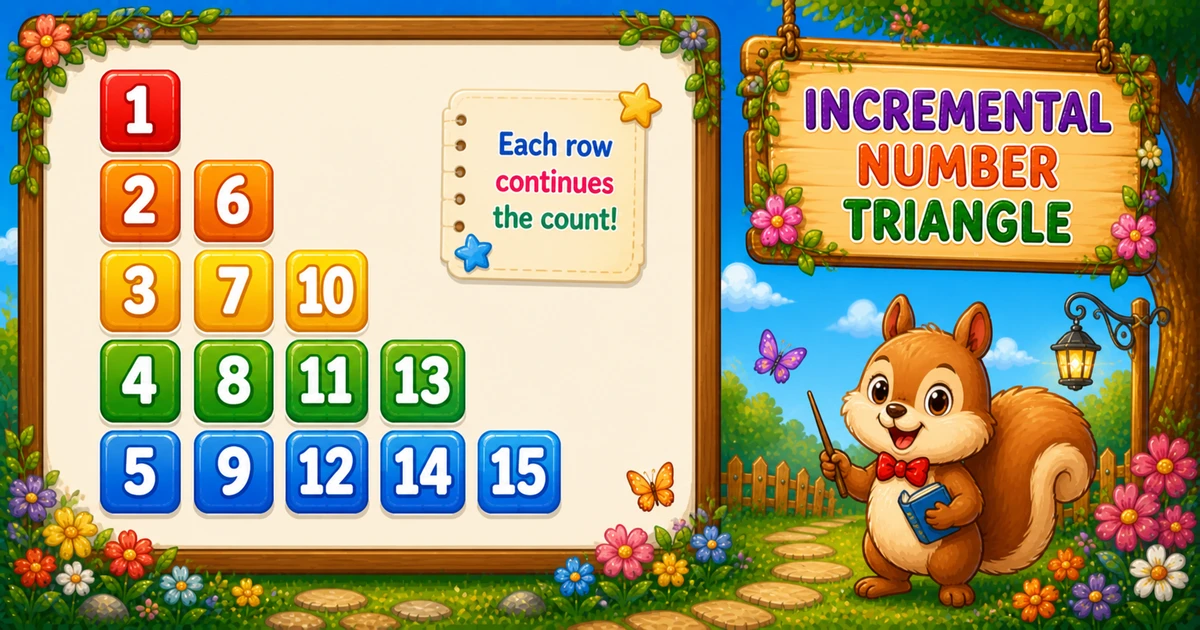
A column-wise number triangle fills a 2D array down each column with increasing numbers, then prints row by row. That fill order creates jumps like 2 6 and 3 7 10 instead of consecutive digits.
Follows the mirror diagonal diamond in Program 54; next is the centered palindromic pyramid in Program 56.
Approach
How to Solve It
Store values in a 2D array so fill order and print order can differ. Fill with col outer; print with row outer.
Method
Idea
Best for
2D array + column fill
Fill col outer, print row outer
Learning, interviews, exams
Row-wise fill
Swap loop order → consecutive 1, 2 3, 4 5 6…
Comparing fill strategies
Pseudocode
Pseudocode
create tri[rows+1][rows+1]
num = 1
for col from 1 to rows:
    for row from col to rows:
        tri[row][col] = num
        num = num + 1
for row from 1 to rows:
    for col from 1 to row:
        print tri[row][col] (space between values)
    print newline
Cheat sheet
Goal
Pattern
Store cells
int tri[rows + 1][rows + 1];
Fill column-wise
for (col = 1; col <= rows; col++) for (row = col; row <= rows; row++) tri[row][col] = num++;
Print row-wise
for (row = 1; row <= rows; row++) for (col = 1; col <= row; col++)
Space between
if (col < row) printf(" ");
Total cells
rows * (rows + 1) / 2
Printing Numbers vs Starting a New Line
API
Effect
Use for
printf("%d", val)
Stays on the same line
Each cell value
printf(" ")
Stays on the same line
Between cells on a row
printf("\n")
Ends the current line
After each printed row
Print values and spaces without a newline, then end the row once.
Try it
Live Preview
Change the row count and the column-wise triangle updates instantly — capped at 9 for readable demos.
Whole numbers from 1 to 9. Tap a chip or type a value — the preview redraws as you go.
Live resultrows = 5 · 15 cells
1
2 6
3 7 10
4 8 11 13
5 9 12 14 15
Trace
Worked Walkthrough — Fill for rows = 5
Trace how column-wise fill produces the jumps you see when printing row 2 and row 3.
2. Trace on paper. Confirm row 2 prints 2 4 — not consecutive — because of column-wise fill.
3. Scale up next. Once the small demo is clear, use Examples 1–2 for five rows or user input.
Edge Cases & Pitfalls
Check these before calling the solution done.
row outer fill
Consecutive instead of jumps
If you fill with row outer, you get 1, 2 3, 4 5 6… Keep col outer for the column-wise pattern.
0-based mix
Off-by-one indexing
These demos use 1-based tri[row][col]. Mixing 0-based loops with 1-based storage leaves holes or overwrites.
row = 1..rows fill
Upper triangle unused
During fill, start at row = col, not row = 1 — cells above the diagonal are never printed.
\n inside
Broken rows
If printf("\n") sits inside the print inner loop, each value lands on its own line. Call it only after the row finishes.
rows = 1
Single cell
Output is just 1 — a good sanity check for input validation.
scanf
Check before the VLA
Validate scanf before declaring int tri[rows + 1][rows + 1] — a failed read leaves rows uninitialized.
Analysis
Time and Space Complexity
Program
Time
Extra space
Fixed / input (Examples 1–2)
O(n²)
O(n²) array
Compact rows = 3 (Example 3)
O(n²)
O(n²) array
Fill and print each touch n(n+1)/2 cells. The 2D array uses O(n²) space (only the lower triangle is used).
Remember
Key Takeaways
Fill ≠ print: column-wise fill creates the jumps; row-wise print shows the triangle.
Fill bound: for each col, assign row = col..rows with num++.
Break the row: space between cells; printf("\n") only after the print inner loop.
Complexity:O(n²) time from n(n+1)/2 cells; O(n²) array space.
One line: fill tri[row][col] = num++ column-wise, then print tri[row][col] row-wise.
Frequently Asked Questions
Because the triangle is filled column-wise: after finishing column 1 (1..5), the next available number is 6 for column 2.
Column-wise filling creates the distinctive jumps (6, 10, 13). Row-wise printing displays the familiar triangle shape.
For rows=5: 1; 2 6; 3 7 10; 4 8 11 13; 5 9 12 14 15 — numbers increase within each column during fill.
Program 54 uses diagonal conditions with spaces. Program 55 uses a 2D array filled column-wise then printed row-wise.
Not strictly, but it keeps fill order and print order separate — much clearer for beginners.
Yes. Loop rows first and you get the standard 1, 2 3, 4 5 6 triangle — compare both approaches.
O(n²) for n rows because total filled/printed values equal n(n+1)/2.
For rows=n, the largest number is n(n+1)/2 — the triangular number of cells.
🤔
Did you know?
Numbers are filled column-wise into a 2D array — column 1 gets 1..n, column 2 gets the next block, and so on — then printed row-wise. Total values = n(n+1)/2, so O(n²).