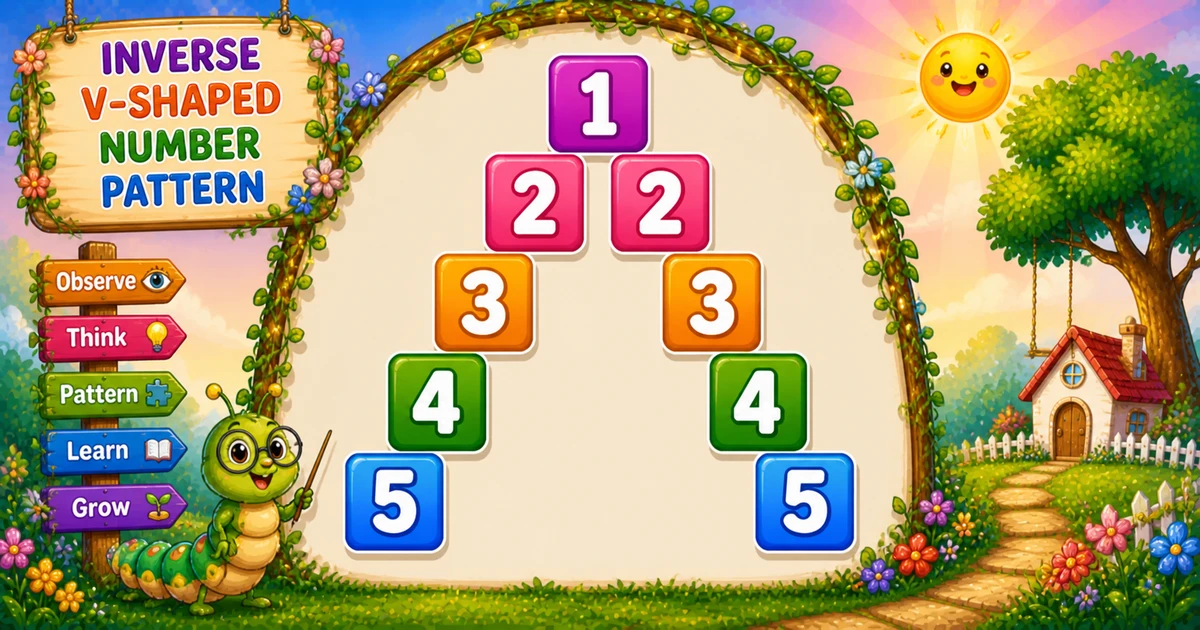
A diagonal mirror number pyramid prints the row digit only on the left and right diagonals — spaces fill the rest — forming an inverse-V (hollow) pyramid.
Remember
Rule: left j = rows..1 (print i if i==j), right k = 2..rows (print i if i==k)

    1
   2 2
  3   3
 4     4
5       5     ← rows = 5
In Python scan left with j = rows..1, then right with k = 2..rows, printing the digit only when i == j or i == k, then a bare print().
Approach
How to Solve It
Scan left columns downward from rows, then right columns from 2 — print the row digit only when the column index matches i.
Method
Idea
Best for
Two conditional loops
Left j = rows..1, right k = 2..rows
Learning, interviews, exams
Rows input
Same logic with a user-chosen height
Practice / demos
Pseudocode
Pseudocode
for i from 1 to rows:
    for j from rows down to 1:
        if i == j: print i
        else: print space
    for k from 2 to rows:
        if i == k: print i
        else: print space
    print newline
Cheat sheet
Goal
Pattern
Outer loop
for i in range(1, rows + 1):
Left diagonal
for j in range(rows, 0, -1): print(j if i == j else " ", end="")
Right diagonal
for k in range(2, rows + 1): print(k if i == k else " ", end="")
Width per row
2 * rows - 1 character positions
Digits per row
1 when i == 1; otherwise 2
Printing Numbers vs Starting a New Line
API
Effect
Use for
print(..., end="")
Stays on the same line
Each diagonal digit or filler space
print()
Ends the current line
After both left and right loops
Columns use end=""; a bare print() ends the row once.
Try it
Live Preview
Change the row count and the inverse-V pyramid updates instantly — capped at 9 for readable single-digit demos.
Whole numbers from 1 to 9. Tap a chip or type a value — the preview redraws as you go.
Live resultrows = 5 · width 9
    1
   2 2
  3   3
 4     4
5       5
Trace
Worked Walkthrough — Row i = 3 when rows = 5
Trace one middle row so both diagonal hits and the skip-center right loop are clear.
Loop
Values
Prints
Left j
5..1
3 (digit at j = 3)
Right k
2..5
3 (digit at k = 3)
Full row: 3 3. Starting the right loop at 2 avoids printing a third 3 at the center.
Code
Python Programs
Three complete programs: fixed rows = 5, user-input rows, and a compact rows = 3 demo. Use View Output for sample results.
Example 1 — Fixed rows = 5
Hard-coded height — left diagonal down from rows, right diagonal from 2.
Python
rows = 5

for i in range(1, rows + 1):
    for j in range(rows, 0, -1):
        print(j if i == j else " ", end="")

    for k in range(2, rows + 1):
        print(k if i == k else " ", end="")

    print()
Output
    1
   2 2
  3   3
 4     4
5       5
How It Works
1. Left half.j counts down from rows; print the digit when i == j, else a space.
2. Right half.k starts at 2 so the center column is not printed twice.
3. Newline. Call bare print() only after both loops finish the row.
Example 2 — User Input (rows)
Read the row count and draw the same inverse-V diagonal pyramid.
Python
try:
    rows = int(input("Enter the number of rows: "))
except ValueError:
    print("Please enter a positive whole number.")
    raise SystemExit

if rows < 1:
    print("Please enter a positive whole number.")
    raise SystemExit

for i in range(1, rows + 1):
    for j in range(rows, 0, -1):
        print(j if i == j else " ", end="")

    for k in range(2, rows + 1):
        print(k if i == k else " ", end="")

    print()
2. Same core. Left and right diagonal loops match Example 1 — only rows comes from the user.
3. Single-digit tip. Cap demos at rows ≤ 9 so every digit stays one character wide.
Example 3 — Compact rows = 3
Same structure with only three rows — easy to trace every i == j / i == k check.
Python
rows = 3

for i in range(1, rows + 1):
    for j in range(rows, 0, -1):
        print(j if i == j else " ", end="")

    for k in range(2, rows + 1):
        print(k if i == k else " ", end="")

    print()
Output
  1
 2 2
3   3
How It Works
1. Five positions. Each row spans 2×3−1 = 5 character slots.
2. Trace on paper. Row 2 hits at left j = 2 and right k = 2 → 2 2.
Edge Cases & Pitfalls
Check these before calling the solution done.
k = 1
Triple digit on a row
If the right loop starts at 1, the center column can print a third digit. Keep k = 2.
j = 1..rows
Mirrored the wrong way
The left loop must count j down from rows — ascending 1..rows flips the left diagonal.
bare print()
Broken rows
If bare print() sits inside an inner loop, each character lands on its own line. Call it only after both loops finish.
rows = 1
Single digit
Output is just 1 — the right loop (k = 2..1) does not run.
rows > 9
Multi-digit width
Digits 10+ break neat column alignment. Cap demos at 9 or use a fixed field width.
Bad input
int(input()) throws
Wrap with try/except ValueError so non-numeric input does not crash the script.
Analysis
Time and Space Complexity
Program
Time
Extra space
Fixed / compact (Examples 1, 3)
O(n²)
O(1)
User input (Example 2)
O(n²)
O(1)
Each of n rows scans about 2n−1 positions → O(n²) time. Only a few loop variables are needed.
Remember
Key Takeaways
Two diagonals: print digit i when i == j (left) or i == k (right).
Skip the center: right loop starts at k = 2 so the middle column is not duplicated.
print vs print(): digits and spaces use end=""; bare print() advances after both loops.
Next step: Program 58 mirrors this pyramid downward into a full hollow diamond.
One line: left j = rows..1 and right k = 2..rows, print i only on the diagonals.
Frequently Asked Questions
The left loop places the row number on the left diagonal; the right loop mirrors it on the right diagonal.
Starting at k = 2 avoids duplicating the center column — each row prints the digit at most twice.
Row i shows digit i on two diagonals with spaces between, e.g. for rows=5, row 3 is ' 3 3 '.
Program 56 prints a full palindromic row (1..i..1). Program 57 prints only the row number twice on mirror diagonals.
Each column prints either the row digit or a space — those conditions pick exactly the two diagonal positions.
Change rows or read it from user input with int(input()) inside try/except — see Example 2.
O(n²) for n rows because each row scans about 2n character positions.
Yes. Replace print(j, end="") / print(k, end="") with print("*", end="") in both diagonal print branches.
Use try/except ValueError around int(input()) so bad input does not crash the script.
One row prints a single 1 — the right loop (k = 2..1) does not run.
🤔
Did you know?
Each row prints the row number twice — once on the left diagonal and once on the right — with spaces everywhere else. Total positions per row = 2×rows-1.