Python Decreasing Number Triangle Pattern (Right-Aligned)
Beginner
5 min read
Updated: Sep 2026
3 programs
Live preview
Definition
What Is This Pattern?
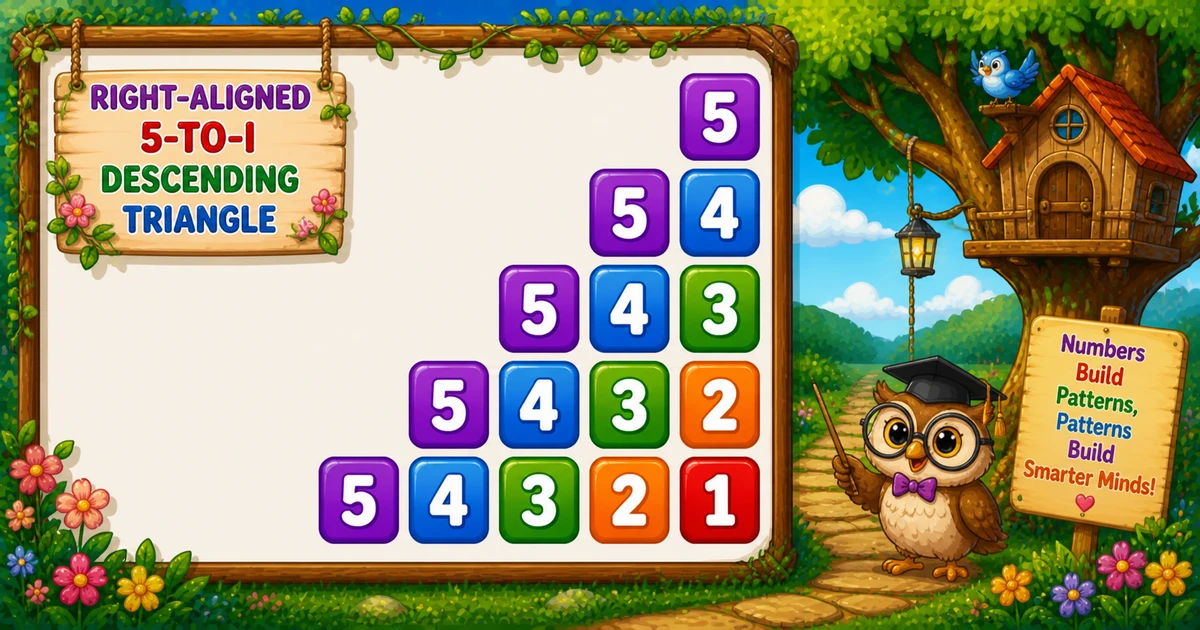
A right-aligned decreasing triangle indents each row, then prints values from rows down to the current i — so every row starts at the same high number.
Follows the continuous counter in Program 35; next is the palindrome number triangle in Program 37.
Approach
How to Solve It
One descending outer loop with a separate indent loop and number loop — pads with " ", values with f"{j:2d}".
Method
Idea
Best for
Indent + descending
Pad left; print rows..i with :2d
Learning, interviews, exams
User-input rows
Same logic with a variable height
Practice / demos
Pseudocode
Pseudocode
for i from rows down to 1:
    for j from 1 to i-1:
        print two spaces
    for j from rows down to i:
        print j (width 2)
    print newline
Cheat sheet
Goal
Pattern
Shrink the row limit
for i in range(rows, 0, -1):
Right-align
for j in range(1, i): print(" ", end="")
Descending values
for j in range(rows, i - 1, -1):
Fixed-width digit
print(f"{j:2d}", end="")
End the row
print()
Printing Numbers vs Starting a New Line
API
Effect
Use for
print(" ", end="") / print(f"{j:2d}", end="")
Stays on the same line
Each indent or number
print()
Ends the current line
After both inner loops
Print indents and numbers without a newline, then end the row once.
Try it
Live Preview
Change the row count and the right-aligned decreasing triangle updates instantly — capped at 9 for readable demos.
Whole numbers from 1 to 9 (keeps digits single-width). Tap a chip or type a value — the preview redraws as you go.
Live result5 rows · 15 values
         5
       5 4
     5 4 3
   5 4 3 2
 5 4 3 2 1
Trace
Worked Walkthrough — rows = 4
Trace indentation vs the decreasing sequence. Outer i starts at 4 and shrinks.
i
Indents / numbers
Printed row
4
3 pads / 4
4
3
2 pads / 4 3
4 3
2
1 pad / 4 3 2
4 3 2
1
none / 4..1
4 3 2 1
Larger i means more indentation and fewer numbers — that is what creates the right-aligned tip at the top.
Code
Python Programs
Three complete programs: fixed rows = 5, input() variant, and a compact rows = 3 demo. Use View Output to reveal sample results.
Example 1 — Fixed rows = 5
Descending outer loop: indent, then print rows..i with width-2 formatting.
Python
rows = 5

for i in range(rows, 0, -1):
    for j in range(1, i):
        print("  ", end="")

    for j in range(rows, i - 1, -1):
        print(f"{j:2d}", end="")

    print()
Output
         5
       5 4
     5 4 3
   5 4 3 2
 5 4 3 2 1
How It Works
1. Outer loop.i starts at 5 and shrinks to 1 — more numbers appear each row.
2. Indent. Print " " while j < i so shorter rows stay right-aligned.
3. Numbers. Print j from rows down to i with f"{j:2d}" for fixed columns.
Example 2 — User Input Rows
Read rows with input(), validate, then use the same indent and descend logic.
Python
try:
    rows = int(input("Enter rows: "))
except ValueError:
    print("Please enter a positive whole number.")
    raise SystemExit(1)

if rows < 1:
    print("Please enter a positive whole number.")
    raise SystemExit(1)

for i in range(rows, 0, -1):
    for j in range(1, i):
        print("  ", end="")

    for j in range(rows, i - 1, -1):
        print(f"{j:2d}", end="")

    print()
Output (when user enters 3)
Enter rows: 3
     3
   3 2
 3 2 1
How It Works
1. Prompt and validate. Catch ValueError; require rows >= 1 before printing.
2. Same core. Indent + f"{j:2d}" match Example 1 — only rows comes from the user.
3. Safer input tip. Cap demos for readable output:
Safer input tip
if rows < 1 or rows > 9:
    print("Enter a whole number from 1 to 9.")
    raise SystemExit(1)
Example 3 — Compact rows = 3
Same structure with only three rows — easy to confirm pads shrink and every row restarts at rows.
Python
rows = 3

for i in range(rows, 0, -1):
    for j in range(1, i):
        print("  ", end="")

    for j in range(rows, i - 1, -1):
        print(f"{j:2d}", end="")

    print()
Output
     3
   3 2
 3 2 1
How It Works
1. Same rules. Indent i - 1 times; print rows down to i.
2. Full width. The last row has no indentation — just 3 2 1.
3. Scale up next. Once the small demo is clear, use Examples 1–2 for five rows or user input.
Edge Cases & Pitfalls
Check these before calling the solution done.
skip indent
Omit the indentation loop
Without for j in range(1, i), every row starts at the left margin.
ascending i
Loop i from 1 up instead of down
The tip and base swap order. Keep for i in range(rows, 0, -1).
no :2d
Print j without width
Columns drift for multi-digit values. Prefer f"{j:2d}".
print() inside
Broken rows
If bare print() sits inside an inner loop, you get one cell per line. Call it only after both loops.
rows = 1
Single value
Output is just the formatted 1 — no indentation. A good sanity check.
input()
Catch ValueError
Bare int(input()) crashes on non-numeric text — wrap it in try/except ValueError.
Analysis
Time and Space Complexity
Program
Time
Extra space
Fixed / input (Examples 1–2)
O(n²)
O(1)
Compact rows = 3 (Example 3)
O(n²)
O(1)
Indent steps plus printed numbers across all rows sum to roughly n² work. Numbers printed = n(n+1)/2.
Remember
Key Takeaways
Rule: indent i - 1 times, then print rows..i with width 2.
Outer direction:i runs from rows down to 1 so the tip appears first.
end="" vs print(): indents and numbers stay on the line; bare print() advances after both loops.
Complexity:O(n²) time; O(1) extra space.
One line: for each i from rows down to 1, indent then print the decreasing sequence rows..i.
Frequently Asked Questions
A right-aligned decreasing triangle: for rows=5 you get indented 5 / 5 4 / 5 4 3 / 5 4 3 2 / 5 4 3 2 1 — every row starts at rows and counts down to i.
An indentation loop prints two spaces while j < i before the number loop runs, pushing shorter rows to the right.
The format specifier reserves 2 columns per number (right-aligned), keeping columns stable in the console output.
The number loop runs for j in range(rows, i - 1, -1), so every row begins at rows and counts down to the current i.
Program 35 uses a continuous counter k. Program 36 restarts from rows on each row with a separate indentation loop.
Replace 5 with rows in the outer loop bound — see Example 2.
Use try/except ValueError around int(input()) and require rows >= 1 — see Example 2.
O(n²) for n rows because total printed numbers are 1 + 2 + … + n = n(n+1)/2.
🤔
Did you know?
Each row starts from rows and counts down to i. An indentation loop prints two spaces per step (j = 1..i-1), then print(f"{j:2d}", end="") keeps number columns aligned.