Shape Rule
Right-aligned triangle
Row $i prints $rows down to $i, with indentation spaces before the numbers.

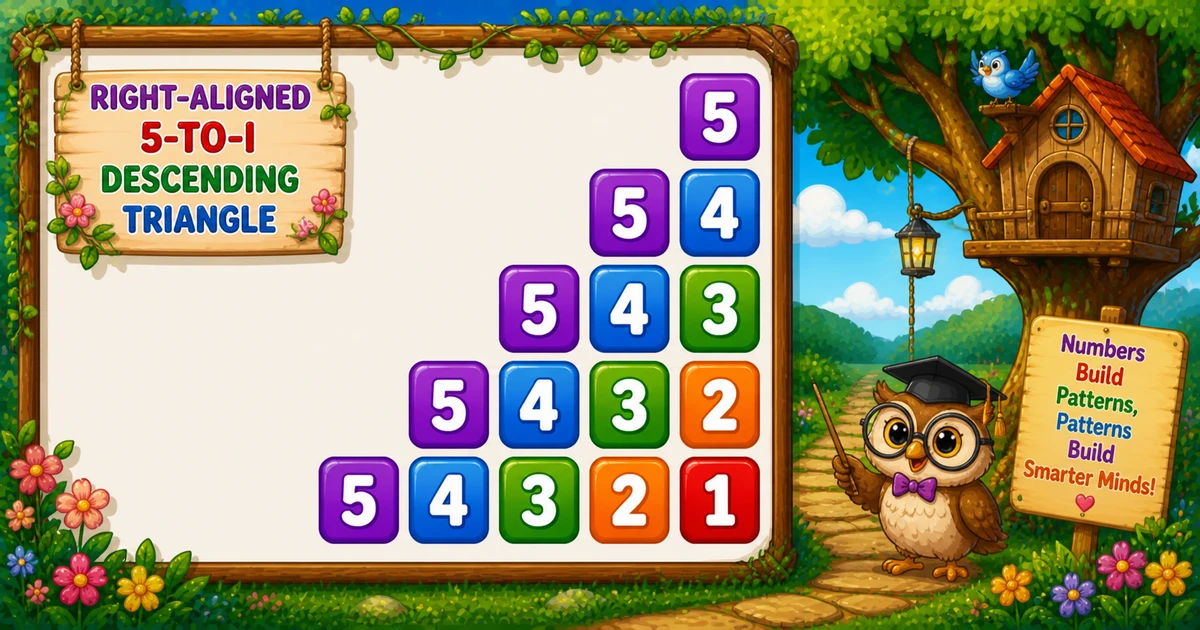
The right-aligned decreasing triangle prints 5, then 5 4, then 5 4 3, … — a natural follow-up after Program 35’s continuous counter triangle. This tutorial covers indentation loops, decreasing sequences, fixed-width formatting, nested loops, a live preview, worked PHP examples, edge cases, and complexity.
Right-aligned triangle
Row $i prints $rows down to $i, with indentation spaces before the numbers.
$i = $rows..1
for ($i = $rows; $i >= 1; $i--) — descending outer loop, one row per iteration.
1..$i-1
for ($j = 1; $j < $i; $j++) — prints " " for right alignment.
%2d format
for ($j = $rows; $j >= $i; $j--) then printf("%2d", $j).
3–7 rows
Pick a row count and draw the right-aligned decreasing triangle in the browser.
Complexity
Total prints = n(n+1)/2 — work scales as n².
A right-aligned decreasing number triangle prints a sequence that starts at $rows on every row and counts down to $i: 5, then 5 4, then 5 4 3, and so on. With $rows = 5, shorter rows shift right thanks to an indentation loop.
In PHP you use three nested loops: print " " while $j < $i, then print printf("%2d", $j) for $j = $rows..$i, then echo PHP_EOL.
It combines two inner loops — one for spaces, one for numbers — a step after Program 35’s continuous counter pattern.
Decreasing sequence.
$j < $i spaces.
Fixed-width columns.
Follow Program 35; continue to Program 37 next.
In short: outer $i = $rows..1, indent $j = 1..$i-1 with " ", numbers $j = $rows..$i with %2d, then echo PHP_EOL.
Given $rows = 5, print a right-aligned decreasing triangle: indentation spaces while $j < $i, then numbers from $rows down to $i with fixed-width formatting.
// $rows = 5
// 5
// 5 4
// 5 4 3
// 5 4 3 2
//5 4 3 2 1 | Item | Type | Description |
|---|---|---|
$rows | int | Triangle height and starting number for each row. |
$i | int | Outer loop — current row limit (rows down to 1). |
$j | int | Indent loop (1..$i-1) or number loop ($rows..$i). |
for i from rows down to 1:
for j from 1 to i-1: print 2 spaces
for j from rows down to i: print j in width 2
print newline | Approach | Idea | Best for |
|---|---|---|
| Fixed rows | 5, 5 4, … | Learning and interviews |
| User-input rows | (int) trim(fgets(STDIN)); | Configurable triangle size |
| Compact trace | $rows = 3 on paper first | Debugging loop bounds |
| Goal | Pattern |
|---|---|
| Outer loop | for ($i = $rows; $i >= 1; $i--) |
| Indent loop | for ($j = 1; $j < $i; $j++) echo " "; |
| Number loop | for ($j = $rows; $j >= $i; $j--) |
| Print number | printf("%2d", $j); |
| End the row | echo PHP_EOL; |
| User input | (int) trim(fgets(STDIN)) |
Same right-aligned decreasing triangle — different ways to control the row count.
$i = $rows..1Descending row limit
$j < $iTwo spaces per step
$j = $rows..$iDecreasing sequence
%2dFixed-width columns
Reach for this pattern when teaching dual inner loops, decreasing sequences, and right-aligned console output.
Natural follow-up — replaces the continuous counter with a per-row decreasing sequence and a separate indent loop.
Practice separating space printing from number printing before tackling more complex shapes.
Combine loops with fgets(STDIN) and is_numeric() checks for flexible row counts.
Compare Program 35 (incremental counter) and Program 37 (next in series) next.
This is a console teaching pattern — not how you build modern app screens.
Key benefit: one small program that locks in dual inner loops, formatted output, and O(n²) thinking.
Choose a row count between 3 and 7 and draw the right-aligned decreasing triangle in the browser.
Three complete PHP programs — fixed rows, user input, and a smaller trace demo. Click View Output to reveal sample console results.
Print five rows of the right-aligned decreasing triangle with indent and number loops.
$rows = 5Hard-coded row count — ideal for first demos and screenshots.
<?php
$rows = 5;
for ($i = $rows; $i >= 1; $i--) {
for ($j = 1; $j < $i; $j++) {
echo " ";
}
for ($j = $rows; $j >= $i; $j--) {
printf("%2d", $j);
}
echo PHP_EOL;
} When $i = 5, the indent loop prints four space pairs, then 5. When $i = 1, no indentation — output 5 4 3 2 1 with fixed-width columns.
Read the row count with fgets(STDIN) instead of hard-coding 5.
Read $rows with (int) trim(fgets(STDIN)) after checking is_numeric().
<?php
echo "Enter rows: ";
$input = trim(fgets(STDIN));
if (!is_numeric($input)) return;
$rows = (int) $input;
if ($rows < 1) return;
for ($i = $rows; $i >= 1; $i--) {
for ($j = 1; $j < $i; $j++) {
echo " ";
}
for ($j = $rows; $j >= $i; $j--) {
printf("%2d", $j);
}
echo PHP_EOL;
} Same dual inner-loop core as Example 1; only $rows comes from user input instead of being hard-coded as 5. Non-numeric input leaves $rows unset if you skip is_numeric() checks — always check it in safer labs.
Run with $rows = 3 to trace every row on paper before scaling up.
$rows = 3Same indent and number loops with a smaller row count for quick tracing.
<?php
$rows = 3;
for ($i = $rows; $i >= 1; $i--) {
for ($j = 1; $j < $i; $j++) {
echo " ";
}
for ($j = $rows; $j >= $i; $j--) {
printf("%2d", $j);
}
echo PHP_EOL;
} Only $rows changes from 5 to 3 — the indent and number loops stay identical. Trace $i = 3, 2, 1 on paper to see how indentation shrinks each row.
Set $rows = 5; and use fgets(STDIN) when reading input. Set loop variables $i, $j.
for ($i = $rows; $i >= 1; $i--) — descending outer loop; row limit shrinks each iteration.
for ($j = 1; $j < $i; $j++) — prints " " for right alignment.
for ($j = $rows; $j >= $i; $j--) then printf("%2d", $j) — decreasing sequence.
echo PHP_EOL ends the row after both inner loops finish.
Total numbers = n(n+1)/2 — O(n²) time, O(1) extra memory.
$rows = 5Trace each outer-loop value of $i, indentation steps, numbers printed, and full row output.
$i | Indent steps | Numbers printed | Row output |
|---|---|---|---|
5 | 4 | 5 | 5 |
4 | 3 | 5, 4 | 5 4 |
3 | 2 | 5, 4, 3 | 5 4 3 |
2 | 1 | 5, 4, 3, 2 | 5 4 3 2 |
1 | 0 | 5, 4, 3, 2, 1 | 5 4 3 2 1 |
Indent steps per row = $i - 1 — zero when $i = 1. Numbers per row = $rows - $i + 1.
Where this tiny pattern (and its loop structure) shows up beyond the homework prompt.
Clearest visual proof that outer and inner bounds interact.
Example: remove the indent loop and watch the triangle snap left.
Foundation for right-aligned variants with separate space and number loops.
Example: compare with Program 35 (incremental counter) and Program 37 next.
Practice %2d formatting and fixed-width columns.
Example: change %2d to {0,3} for wider spacing on large row counts.
Add two-space indent groups once the three-loop structure works.
Example: use a single space instead of " " and watch columns drift.
Triangular totals make O(n²) concrete for beginners.
Example: count printed numbers for $rows = 5 — total is 1+2+3+4+5 = 15.
Pair the pattern with is_numeric($input) checks and positive-row validation.
Example: reject $rows <= 0 and re-prompt.
Pro Tip: when an interviewer asks for patterns, explain the outer/inner roles first — then write the loops. The story matters as much as the code.
Why this pattern earns a permanent spot in beginner PHP courses.
Wrong bounds show up immediately as a broken staircase.
Only loops and console output — no arrays or math libraries.
Invert, center, hollow, or change the fill character with small edits.
Streaming output needs no storage beyond loop counters.
Pro Tip: trace $i and both $j loops on paper for $rows = 3 before coding — watch how indent steps shrink each row.
Small habits that keep number-pattern code clean.
Indent loop ($j < $i) and number loop ($j = $rows..$i) must run in order before echo PHP_EOL.
is_numeric($input)Avoid undefined behavior when the user types letters instead of a number.
Only call echo PHP_EOL after both inner loops finish the row.
Write the decreasing sequence for each $i before coding the number loop.
Trace $i = 3..1 on paper before coding the full $rows = 5 demo.
Pro Tip: if the output is a vertical list of single digits per line, you almost certainly put echo PHP_EOL inside an inner loop.
Mistakes that commonly break right-aligned decreasing triangles.
Each digit lands on its own line — you get a column, not a triangle.
→ Use printf("%2d", $j); echo PHP_EOL only after both inner loops.
Without for ($j = 1; $j < $i; $j++), every row starts at the left margin.
→ Run the indent loop before the number loop on every row.
Single spaces instead of " " break column alignment with %2d.
→ Print two spaces per indent step to match the fixed-width number columns.
Plain echo $j makes multi-digit values crowd earlier columns.
→ Use printf("%2d", $j) for consistent column width.
Letters or empty input leave $rows uninitialized or unchanged.
→ Call is_numeric($input) and re-prompt on failure.
Check these inputs before calling the solution done.
Output is just 1 with leading spaces — one value, one row.
Outer loop never runs when $rows < 1 — print nothing or show a message.
$rows < 1Treat as invalid; re-prompt instead of silent empty output.
Two rows: 1 and 2 3.
Unchecked CLI input leaves $rows unset — call is_numeric($input) first.
Total numbers = $rows($rows+1)/2 — grows quadratically with rows.
Try these variations to lock in the pattern.
k$i prints $rows down to $i$i - 1is_numeric($input) until $rows >= 1$i = $rows..1. Indent loop $j = 1..$i-1 prints " ". Number loop $j = $rows..$i prints %2d.printf("%2d", $j) stays on the line; echo PHP_EOL advances — mix them carefully.$rows >= 1 for interactive programs; $rows = 1 prints a single 1.$i - 1 — compare with Program 35 where a continuous counter replaces the per-row sequence.Quick Takeaway: outer $i = $rows..1, indent $j = 1..$i-1 with " ", numbers $j = $rows..$i with %2d, then echo PHP_EOL.
| Program | Time | Extra space |
|---|---|---|
| Nested loops (Examples 1–3) | O(n²) | O(1) |
| Smaller demo (Example 3) | O(n²) | O(1) |
The right-aligned decreasing number triangle is a compact lesson in dual inner loops and formatted output: indent with " ", print $rows down to $i with printf("%2d", $j), and end each row with echo PHP_EOL. Master the fixed-$rows version, then try user input and a smaller trace demo.
Practice the three examples above, then continue to Program 37 for the next pattern in the series.
Run the indent loop before the number loop — validate $rows when reading from the console.
for ($i = $rows; $i >= 1; $i--) in the outer loopfor ($j = 1; $j < $i; $j++) echo " ";printf("%2d", $j) for $j = $rows..$iis_numeric($input) instead of ignoring bad inputecho PHP_EOL inside an inner loop" " for indentation$rows = 1 edge casePrint the pattern the beginner-friendly way.
Decreasing seq
Definition$j < $i spaces
CodeFixed width
Codeecho PHP_EOL after both inner loops
ShapeO(n²) time
AnalysisEach row starts from $rows and counts down to $i. An indentation loop prints two spaces per step ($j = 1..$i-1), then printf("%2d", $j) keeps number columns aligned.
Move on to the next pattern in the PHP number-pattern series.
12 people found this page helpful

