Home JavaScript Number Patterns Program 49 JavaScript Multiplication Number Triangle Pattern Definition
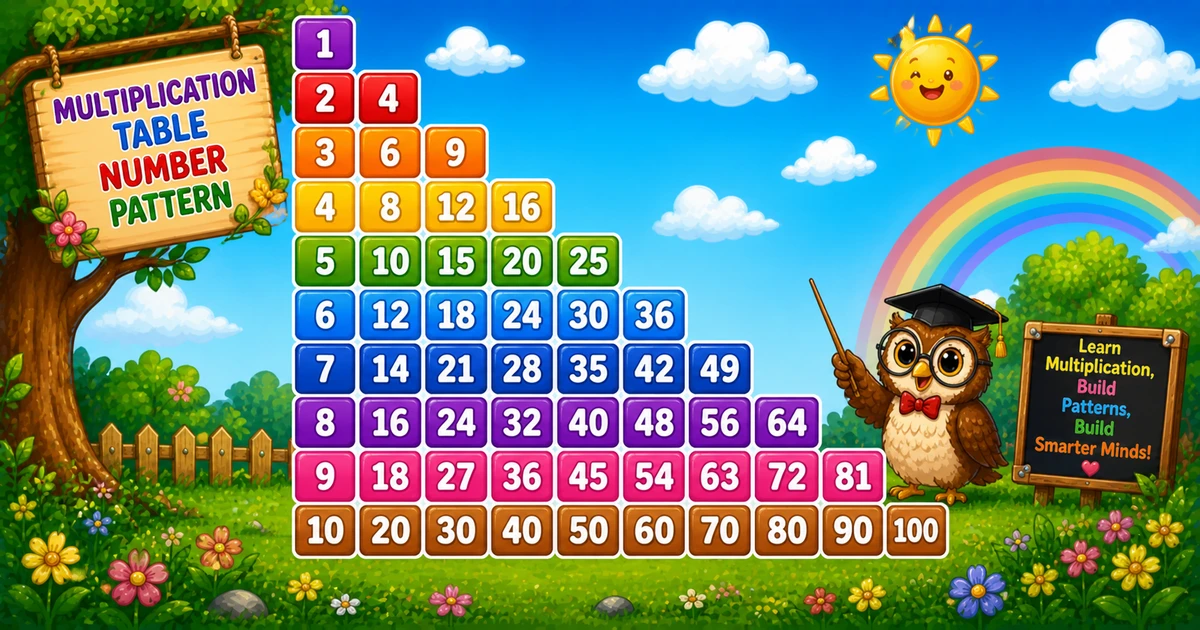
What Is This Pattern? A triangular multiplication pattern prints the products i × 1, i × 2, …, i × i on row i.
Rule: on row i, append i*j for j = 1..i

1
2 4
3 6 9
4 8 12 16
5 10 15 20 25   ← rows = 5
Unlike Program 48 (1D powers of 11), this uses nested loops — total products for n rows is n(n+1)/2.
Approach
How to Solve It One nested loop: row multiplier outside, column factors inside. End each row with console.log.
Method Idea Best for Basic triangle Append i * j for j = 1..i Classic demos Aligned columns Same products with padStart(3) Neater multi-digit output
Pseudocode for i from 1 to rows:
line = ""
for j from 1 to i:
append i * j and a space
print line Cheat sheet Goal Pattern Outer (rows) for (let i = 1; i <= rows; i++)Inner (cols) for (let j = 1; j <= i; j++)Product line += (i * j) + " ";Aligned line += String(i * j).padStart(3, " ");End the row console.log(line);Total products rows * (rows + 1) / 2
Printing Numbers vs Starting a New Line API Effect Use for line += …Stays on the same row Each product i * j console.log(line)Ends the current row After j = 1..i finish
Append without a newline, then end the row once.
Try it
Live Preview Change the row count and the multiplication triangle updates instantly.
Trace
Worked Walkthrough Trace three rows — watch how j runs to i and each cell is i * j.
Row i j valuesProducts Printed row 1 1 112 1, 2 2, 42 43 1, 2, 3 3, 6, 93 6 9
Last value on row i is always i * i. Total products for n rows = n(n+1)/2.
Code
JavaScript Programs Three complete programs: fixed rows = 5, prompt input, and padStart alignment. Use View Output for samples, or Try It Yourself to edit and run live.
1. Fixed rows 2. User input 3. Aligned columns Example 1 — Fixed rows = 5 Nested loops append i * j with a trailing space.
const rows = 5;

for (let i = 1; i <= rows; i++) {
  let line = "";
  for (let j = 1; j <= i; j++) {
    line += (i * j) + " ";
  }
  console.log(line);
} 1
2 4
3 6 9
4 8 12 16
5 10 15 20 25 How It Works 1. Outer loop sets the multiplier. i is both the row index and the left factor in each product.
2. Inner loop grows with the row. j runs from 1 to i; each cell appends i * j.
3. End the row. console.log(line) after the inner loop starts the next row.
Example 2 — User Input Rows Read the row count with prompt and validate before drawing.
const rows = parseInt(prompt("Enter number of rows:"), 10);

if (!Number.isFinite(rows) || rows < 1) {
  console.log("Please enter a positive integer.");
} else {
  for (let i = 1; i <= rows; i++) {
    let line = "";
    for (let j = 1; j <= i; j++) {
      line += (i * j) + " ";
    }
    console.log(line);
  }
} How It Works 1. Prompt and validate. Use parseInt and require rows >= 1.
2. Same triangle core. Only the source of rows changes — i * j matches Example 1.
3. Entering 4. Ten products total (4×5/2), ending at 16.
Example 3 — Aligned Columns Same products; padStart(3) keeps columns neat as values grow.
const rows = 5;

for (let i = 1; i <= rows; i++) {
  let line = "";
  for (let j = 1; j <= i; j++) {
    line += String(i * j).padStart(3, " ");
  }
  console.log(line);
} 1
2 4
3 6 9
4 8 12 16
5 10 15 20 25 How It Works 1. Same geometry. Still i * j for j = 1..i.
2. Fixed width. padStart(3, " ") reserves three columns per product (like C# {0,3}).
3. Cleaner for larger n. Two-digit values no longer shift the columns.
Edge Cases & Pitfalls Check these before calling the solution done.
log early Call console.log only after the row is built
Logging inside the inner loop prints one product per line.
j vs i j * i vs i * j
Same products — fine. Just stay consistent; both equal i * j.
rows = 1 Single-row case
Output is just 1 — one product on one line.
Bad input Validate parseInt
Check Number.isFinite(rows) and require rows >= 1 before the loops.
Analysis
Time and Space Complexity Program Time Extra space Fixed / aligned (Examples 1, 3) O(n²)O(n) per row stringUser input (Example 2) O(n²)O(n) per row string
Products appended are 1 + 2 + … + n = n(n+1)/2 — quadratic in n.
Remember
Key Takeaways Rule: on row i, append i * j for j = 1..i.
Last cell: always i * i (e.g. 25 on row 5).
Break the row: call console.log(line) only after the column loop.
Complexity: O(n²) — total products = n(n+1)/2.
One line: nest two loops, append i * j for each column up to i, then log the row.
Frequently Asked Questions What does this pattern print? A triangle where row i contains i values: i*1, i*2, … up to i*i. Row 4 prints 4 8 12 16.
Which loop controls rows and columns? Outer loop sets row i. Inner loop runs j = 1..i and appends i*j for each column.
Why does row 5 end with 25? The last value on row i is i*i. For i = 5, that is 25.
What is the difference between line += and console.log? line += appends products on the same row. console.log(line) ends the row after j = 1..i finish.
How is this different from Program 48? Program 48 is a 1D powers-of-11 sequence with one loop. Program 49 uses nested loops for a multiplication triangle.
How can I align output nicely? Use String(i*j).padStart(3, " ") so columns line up — see Example 3.
What is the time complexity? O(n²) for n rows because total appends are 1+2+…+n = n(n+1)/2.
How do I make a full multiplication table? Change the inner loop to j = 1..rows on every row: for (let j = 1; j <= rows; j++).
🤔
Did you know? On row i, append i*1, i*2, … up to i*i. Total appends = n(n+1)/2 — a triangular number, so time is O(n²).
Next: Rotating Number Pattern Continue with the next pattern in the JavaScript number-pattern series.
Program 50 tutorial → About the author Developer, cloud engineer, and technical writer
I write practical tutorials so students and working developers can learn by doing—from databases and APIs to deployment on AWS.
12 people found this page helpful