Right-Aligned Decreasing Number Triangle in JavaScript

Beginner
⏱️ 9 min read
📚 Updated: Sep 2026
🎯 3 Code Examples
🚀 Live Preview
Nested Loops + Alignment

What You’ll Learn

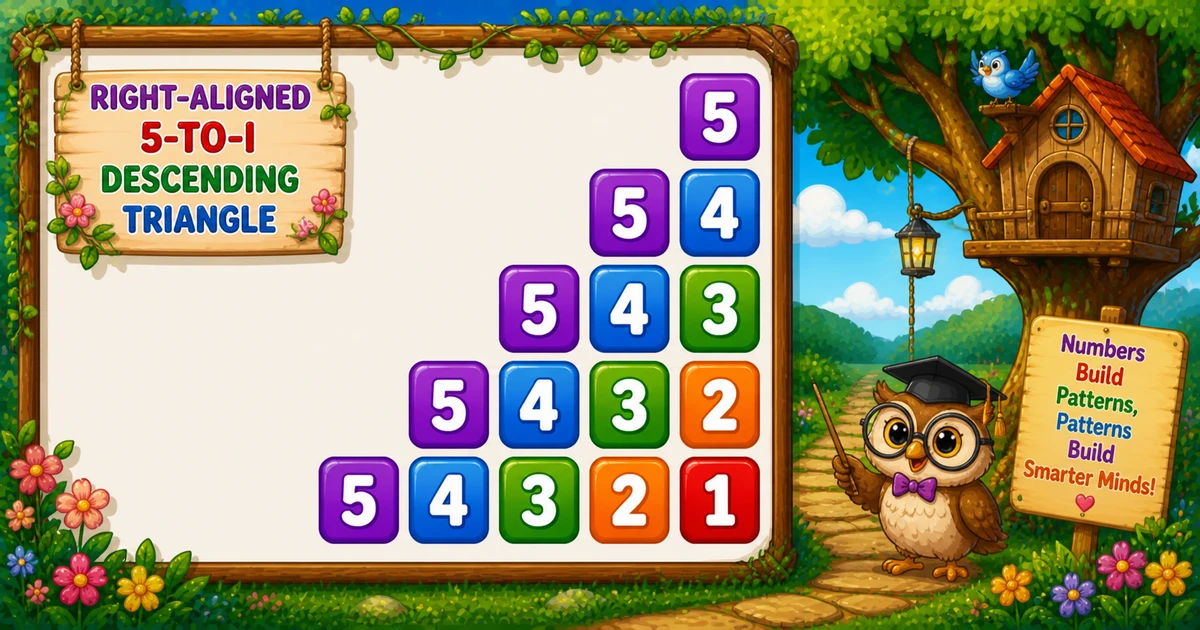
The right-aligned decreasing triangle prints 5, then 5 4, then 5 4 3, … — a natural follow-up after Program 35’s continuous counter triangle. This tutorial covers indentation loops, decreasing sequences, fixed-width formatting, nested loops, a live preview, worked JavaScript examples, edge cases, and complexity.

Shape Rule

Right-aligned triangle

Row i prints rows down to i, with indentation spaces before the numbers.

Outer Loop

i = rows..1

for (let i = rows; i >= 1; i--) — descending outer loop, one row per iteration.

Indent Loop

1..i-1

for (let j = 1; j < i; j++) — appends " " for right alignment.

Number Loop

:2d format

for (let j = rows; j >= i; j--) then line += String(j).padStart(2, " ").

Live Preview

3–7 rows

Pick a row count and draw the right-aligned decreasing triangle in the browser.

O(n²)

Complexity

Total prints = n(n+1)/2 — work scales as .

Introduction

A right-aligned decreasing number triangle prints a sequence that starts at rows on every row and counts down to i: 5, then 5 4, then 5 4 3, and so on. With rows = 5, shorter rows shift right thanks to an indentation loop.

In JavaScript you use three nested loops: append " " while j < i, then line += String(j).padStart(2, " ") for j = rows..i, then console.log(line).

Why it matters?

It combines two inner loops — one for spaces, one for numbers — a step after Program 35’s continuous counter pattern.

Key Highlights

rows..i

Decreasing sequence.

Indent loop

j < i spaces.

:2d

Fixed-width columns.

Series Foundation

Follow Program 35; continue to Program 37 next.

In short: outer i = rows..1, indent j = 1..i-1 with " ", numbers j = rows..i with padStart(2), then console.log(line).

📝 Problem & Approach

Given rows = 5, print a right-aligned decreasing triangle: indentation spaces while j < i, then numbers from rows down to i with fixed-width formatting.

JavaScript
# rows = 5
#         5
#       5 4
#     5 4 3
#   5 4 3 2
# 5 4 3 2 1

Inputs & Outputs

ItemTypeDescription
rowsintTriangle height and starting number for each row.
iintOuter loop — current row limit (rows down to 1).
jintIndent loop (1..i-1) or number loop (rows..i).

Minimal workflow

Pseudocode
for i from rows down to 1:
    for j from 1 to i-1: append 2 spaces
    for j from rows down to i: append j with padStart(2)
    console.log(line)

Approach comparison

ApproachIdeaBest for
Fixed rows5, 5 4, …Learning and interviews
User-input rowsparseInt(prompt(...), 10)Configurable triangle size
Compact tracerows = 3 on paper firstDebugging loop bounds

⚡ Quick Reference

GoalPattern
Outer loopfor (let i = rows; i >= 1; i--)
Indent loopfor (let j = 1; j < i; j++) line += " "
Number loopfor (let j = rows; j >= i; j--)
Print numberline += String(j).padStart(2, " ")
End the rowconsole.log(line)
User inputparseInt(prompt(...), 10)

📋 Fixed vs User Input vs Compact Demo

Same right-aligned decreasing triangle — different ways to control the row count.

Outer loop
i = rows..1

Descending row limit

Indent
j < i

Two spaces per step

Numbers
j = rows..i

Decreasing sequence

Learning tip
padStart(2)

Fixed-width columns

Context

When This Pattern Shows Up

Reach for this pattern when teaching dual inner loops, decreasing sequences, and right-aligned console output.

  1. After Program 35

    Natural follow-up — replaces the continuous counter with a per-row decreasing sequence and a separate indent loop.

  2. Dual inner-loop drills

    Practice separating space printing from number printing before tackling more complex shapes.

  3. Console I/O practice

    Combine loops with prompt() and Number.isFinite for flexible row counts.

  4. Gateway to variants

    Compare Program 35 (incremental counter) and Program 37 (next in series) next.

  5. Not a UI layout tool

    This is a console teaching pattern — not how you build modern app screens.

Key benefit: one small program that locks in dual inner loops, formatted output, and O(n²) thinking.

🔮 Live Preview

Choose a row count between 3 and 7 and draw the right-aligned decreasing triangle in the browser.

Try 3, 5, or 7. Rows between 3 and 9 in this preview.

Live result
Press "Draw pattern".

Examples Gallery

Three complete JavaScript programs — fixed rows, user input, and a smaller trace demo. Click View Output to reveal sample console results, or Try it Yourself to run the code live.

📚 Getting Started

Print five rows of the right-aligned decreasing triangle with indent and number loops.

Example 1 — Fixed rows = 5

Hard-coded row count — ideal for first demos and screenshots.

JavaScript
const rows = 5;

for (let i = rows; i >= 1; i--) {
  let line = "";
  for (let j = 1; j < i; j++) {
    line += "  ";
  }
  for (let j = rows; j >= i; j--) {
    line += String(j).padStart(2, " ");
  }
  console.log(line);
}
Try it Yourself

How It Works

When i = 5, the indent loop appends four space pairs, then 5. When i = 1, no indentation — output 5 4 3 2 1 with fixed-width columns.

📈 User Input

Read the row count with prompt() and parseInt() instead of hard-coding 5.

Example 2 — User input rows

Read rows with prompt() and parseInt() instead of hard-coding 5.

JavaScript
const rowsInput = prompt("Enter rows:");
const rows = parseInt(rowsInput, 10);

if (!Number.isFinite(rows) || rows < 1) {
  console.log("Please enter a positive integer.");
} else {
  for (let i = rows; i >= 1; i--) {
    let line = "";
    for (let j = 1; j < i; j++) {
      line += "  ";
    }
    for (let j = rows; j >= i; j--) {
      line += String(j).padStart(2, " ");
    }
    console.log(line);
  }
}
Try it Yourself

How It Works

Same dual inner-loop core as Example 1; only rows comes from user input instead of being hard-coded as 5. Non-numeric input yields NaN with bare parseInt(prompt(), 10) — validate with Number.isFinite for safer labs.

⚡ Smaller Demo

Run with rows = 3 to trace every row on paper before scaling up.

Example 3 — Compact rows = 3

Same indent and number loops with a smaller row count for quick tracing.

JavaScript
const rows = 3;

for (let i = rows; i >= 1; i--) {
  let line = "";
  for (let j = 1; j < i; j++) {
    line += "  ";
  }
  for (let j = rows; j >= i; j--) {
    line += String(j).padStart(2, " ");
  }
  console.log(line);
}
Try it Yourself

How It Works

Only rows changes from 5 to 3 — the indent and number loops stay identical. Trace i = 3, 2, 1 on paper to see how indentation shrinks each row.

🧠 How the Algorithm Prints Rows

1

Set up

No imports needed for fixed rows; use prompt() when reading. Set loop variables i, j with rows = 5.

Setup
2

Outer loop walks rows

for (let i = rows; i >= 1; i--) — descending outer loop; row limit shrinks each iteration.

Row
3

Indent loop

for (let j = 1; j < i; j++) — appends " " for right alignment.

Align
4

Number loop

for (let j = rows; j >= i; j--) then line += String(j).padStart(2, " ") — decreasing sequence.

Print
5

New line

console.log(line) ends the row after both inner loops finish.

Break
=

Right-aligned triangle complete

Total numbers = n(n+1)/2O(n²) time, O(1) extra memory.

🔎 Worked Walkthrough — rows = 5

Trace each outer-loop value of i, indentation steps, numbers printed, and full row output.

iIndent stepsNumbers printedRow output
5455
435, 45 4
325, 4, 35 4 3
215, 4, 3, 25 4 3 2
105, 4, 3, 2, 15 4 3 2 1

Indent steps per row = i - 1 — zero when i = 1. Numbers per row = rows - i + 1.

Use Cases

Where this tiny pattern (and its loop structure) shows up beyond the homework prompt.

1. Teaching Nested Loops

Clearest visual proof that outer and inner bounds interact.

Example: remove the indent loop and watch the triangle snap left.

2. Pattern Series Base

Foundation for right-aligned variants with separate space and number loops.

Example: compare with Program 35 (incremental counter) and Program 37 next.

3. Console Formatting Drills

Practice padStart(2) formatting and fixed-width columns.

Example: change padStart(2) to {0,3} for wider spacing on large row counts.

4. Padding character

Add two-space indent groups once the three-loop structure works.

Example: use a single space instead of " " and watch columns drift.

5. Complexity Intuition

Triangular totals make O(n²) concrete for beginners.

Example: count printed numbers for rows = 5 — total is 1+2+3+4+5 = 15.

6. Input Validation Labs

Pair the pattern with Number.isFinite and positive-row validation.

Example: reject rows <= 0 and re-prompt.

Pro Tip: when an interviewer asks for patterns, explain the outer/inner roles first — then write the loops. The story matters as much as the code.

Advantages

Why this pattern earns a permanent spot in beginner JavaScript courses.

  1. 1. Instant Visual Feedback

    Wrong bounds show up immediately as a broken staircase.

  2. 2. Minimal Concepts

    Only loops and console output — no arrays or math libraries.

  3. 3. Easy to Extend

    Invert, center, hollow, or change the fill character with small edits.

  4. 4. O(1) Extra Memory

    Streaming output needs no storage beyond loop counters.

Pro Tip: trace i and both j loops on paper for rows = 3 before coding — watch how indent steps shrink each row.

Usage Tips

Small habits that keep number-pattern code clean.

  1. 1. Two Inner Loops

    Indent loop (j < i) and number loop (j = rows..i) must run in order before console.log(line).

  2. 2. Call Number.isFinite

    Avoid undefined behavior when the user types letters instead of a number.

  3. 3. Keep newline outside inner loops

    Only call console.log(line) after both inner loops finish the row.

  4. 4. Trace rows..i on Paper

    Write the decreasing sequence for each i before coding the number loop.

  5. 5. Dry-Run rows = 3

    Trace i = 1..3 on paper before coding the full rows = 5 demo.

Pro Tip: if the output is a vertical list of single digits per line, you almost certainly put console.log(line) inside an inner loop.

Common Pitfalls

Mistakes that commonly break right-aligned decreasing triangles.

  1. 1. Newline Inside an Inner Loop

    Each digit lands on its own line — you get a column, not a triangle.

    → Use line += String(j).padStart(2, " "); console.log(line) only after both inner loops.

  2. 2. Skipping the Indent Loop

    Without for (let j = 1; j < i; j++), every row starts at the left margin.

    → Run the indent loop before the number loop on every row.

  3. 3. Wrong Space Width

    Single spaces instead of " " break column alignment with padStart(2).

    → Print two spaces per indent step to match the fixed-width number columns.

  4. 4. Skipping :2d

    Plain line += j makes multi-digit values crowd earlier columns.

    → Use line += String(j).padStart(2, " ") for consistent column width.

  5. 5. Bare parseInt(prompt())

    Letters or empty input yield NaN with bare parseInt(prompt(), 10).

    → Validate with Number.isFinite and re-prompt on failure.

Edge Cases

Check these inputs before calling the solution done.

rows = 1

Single row

Output is just 1 with leading spaces — one value, one row.

rows = 0

Empty pattern

Outer loop never runs when rows < 1 — print nothing or show a message.

Negative

rows < 1

Treat as invalid; re-prompt instead of silent empty output.

rows = 2

Smallest triangle

Two rows: 1 and 2 3.

Bad input

Non-numeric input

Bare parseInt(prompt(), 10) yields NaN on bad input — validate with Number.isFinite first.

Large rows

Large row count

Total numbers = rows(rows+1)/2 — grows quadratically with rows.

🎯 Practice Problems

Try these variations to lock in the pattern.

1. Incremental counter

  • Review Program 35
  • Right-aligned triangle with continuous counter k

2. Next in series

  • Continue with Program 37
  • Next pattern in the number-pattern series

3. Sequence trace

  • Prove on paper: row i prints rows down to i
  • Indent steps = i - 1

4. Safe input loop

  • Validate rows >= 1 after reading input
  • Then draw the triangle

Notes

  • Loop rule. Outer i = rows..1. Indent loop j = 1..i-1 appends " ". Number loop j = rows..i prints padStart(2).
  • line += String(j).padStart(2, " ") stays on the line; console.log(line) advances — mix them carefully.
  • Validate rows >= 1 for interactive programs; rows = 1 prints a single 1.
  • Indent steps = i - 1 — compare with Program 35 where a continuous counter replaces the per-row sequence.

Quick Takeaway: outer i = rows..1, indent j = 1..i-1 with " ", numbers j = rows..i with padStart(2), then console.log(line).

⏱️ Time and Space Complexity

ProgramTimeExtra space
Nested loops (Examples 1–3)O(n²)O(1)
Smaller demo (Example 3)O(n²)O(1)
Wrap Up

🎉 Conclusion

The right-aligned decreasing number triangle is a compact lesson in dual inner loops and formatted output: indent with " ", print rows down to i with line += String(j).padStart(2, " "), and end each row with console.log(line). Master the fixed-rows version, then try user input and a smaller trace demo.

Practice the three examples above, then continue to Program 37 for the next pattern in the series.

Run the indent loop before the number loop — validate rows when reading from the console.

💡 Best Practices

✅ Do

  • Use for (let i = rows; i >= 1; i--) in the outer loop
  • Indent: for (let j = 1; j < i; j++) line += " "
  • Numbers: line += String(j).padStart(2, " ") for j = rows..i
  • Validate parseInt(prompt(), 10) with Number.isFinite
  • State O(n²) time when asked about complexity

❌ Don’t

  • Call console.log(line) inside an inner loop
  • Skip the indent loop (breaks right alignment)
  • Use single spaces instead of " " for indentation
  • Ignore bad console input in user-facing demos
  • Skip the rows = 1 edge case

Key Takeaways

Knowledge Unlocked

Five things to remember about this decreasing triangle

Print the pattern the beginner-friendly way.

5
Core concepts
02

Indent loop

j < i spaces

Code
0 03

:2d

Fixed width

Code
04

Row break

console.log(line) after both inner loops

Shape
O 05

Complexity

O(n²) time

Analysis

❓ Frequently Asked Questions

A right-aligned decreasing triangle: the first row prints 5, the next prints 5 4, then 5 4 3, and so on until 5 4 3 2 1.
An indentation loop appends two spaces while j < i before the number loop runs, pushing shorter rows to the right.
padStart(2, " ") reserves 2 columns per number (right-aligned), keeping columns stable in the console output.
The number loop runs for j from rows down to i, so every row begins at rows and counts down to the current i.
Program 35 uses a continuous counter k. Program 36 restarts from rows on each row with a separate indentation loop.
Replace 5 with rows in the outer loop bound — see Example 2.
O(n²) for n rows because total appends are 1 + 2 + ... + n = n(n+1)/2.
Use parseInt with Number.isFinite or validate the raw string before converting so bad input does not produce NaN.
Only one row prints — a single number with no leading spaces.

Did you Know? 🔊

Each row starts from rows and counts down to i. An indentation loop appends two spaces per step (j = 1..i-1), then String(j).padStart(2, " ") keeps number columns aligned.

Continue to Program 37

Move on to the palindrome number triangle in the JavaScript number-pattern series.

Program 37 tutorial →

About the author

Mari Selvan M P
Mari Selvan M P 🔗

Developer, cloud engineer, and technical writer

  • Experience 12 years building web and cloud systems
  • Focus Full Stack Development, AWS, and Developer Education

I write practical tutorials so students and working developers can learn by doing—from databases and APIs to deployment on AWS.

12 people found this page helpful
