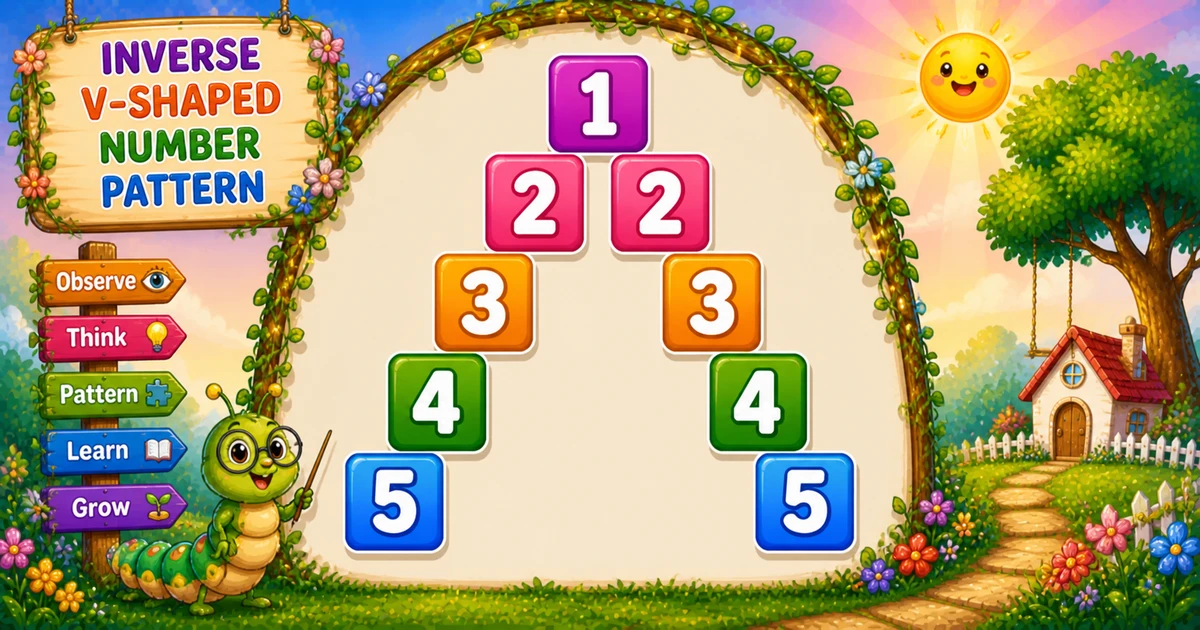
A hollow number pyramid prints the row number only at the left and right edges — spaces fill everything between, forming an expanding V of digits.
Remember
Rule: for i = 1..n
        left  j = n..1: print j if i==j else space
        right k = 2..n: print k if i==k else space

    1
   2 2
  3   3
 4     4
5       5     ← n = 5
Unlike Program 56 (filled palindromic pyramid), here the interior stays empty — only the edges light up.
Approach
How to Solve It
For each row, walk the left half with i==j, then the right half with i==k starting at 2.
Method
Idea
Best for
Fixed n
Hard-code size; two edge loops
Labs and demos
Scanner input
Same logic; read n at runtime
Interactive practice
Compact rows
StringBuilder for one print per row
Fewer System.out calls
Pseudocode
Pseudocode
for i from 1 to n:
    for j from n down to 1:
        if i == j: print j
        else: print space
    for k from 2 to n:
        if i == k: print k
        else: print space
    new line
Cheat sheet
Goal
Pattern
Set size
int n = 5;
Left half
for (int j = n; j >= 1; j--)
Left edge
if (i == j) print(j); else print(" ");
Right half
for (int k = 2; k <= n; k++)
Right edge
if (i == k) print(k); else print(" ");
Printing Numbers vs Starting a New Line
API
Effect
Use for
System.out.print
Stays on the same line
Each digit or space in both halves
System.out.println
Ends the line
After both edge loops finish
Build the full row with print, then break once.
Try it
Live Preview
Change n and the hollow number pyramid updates instantly.
Whole numbers from 3 to 9. Tap a chip or type a value — the preview redraws as you go.
Live resultn = 5 · width = 9
    1
   2 2
  3   3
 4     4
5       5
Trace
Worked Walkthrough — n = 5, row i = 3
Trace where the two edge digits land for row 3.
Half
Loop
Hit
Printed so far
Left
j = 5..1
j = 3 → 3
3
Right
k = 2..5
k = 3 → 3
3 3
Full row: 3 3 — two edge digits with spaces between and around them.
Code
Java Programs
Three complete programs: fixed n = 5, Scanner input, and compact StringBuilder rows. Use View Output to reveal sample results.
Example 1 — Fixed n = 5
Hard-coded size — left loop j = n..1, right loop k = 2..n.
Java
public class HollowNumberPyramid {
    public static void main(String[] args) {
        int n = 5;

        for (int i = 1; i <= n; i++) {
            for (int j = n; j >= 1; j--) {
                if (i == j) System.out.print(j);
                else System.out.print(" ");
            }
            for (int k = 2; k <= n; k++) {
                if (i == k) System.out.print(k);
                else System.out.print(" ");
            }
            System.out.println();
        }
    }
}
Output
    1
   2 2
  3   3
 4     4
5       5
How It Works
1. Left half. Walk j from n down to 1 — print j only when i == j.
2. Right half. Walk k from 2 to n — print k only when i == k.
3. Hollow middle. Every other cell is a space, so only the edges show digits.
Example 2 — Scanner Input
Read n at runtime. Same two-edge logic.
Java
import java.util.Scanner;

public class HollowNumberPyramidInput {
    public static void main(String[] args) {
        Scanner sc = new Scanner(System.in);
        System.out.print("Enter n: ");
        int n = sc.nextInt();
        if (n < 1) return;

        for (int i = 1; i <= n; i++) {
            for (int j = n; j >= 1; j--) {
                if (i == j) System.out.print(j);
                else System.out.print(" ");
            }
            for (int k = 2; k <= n; k++) {
                if (i == k) System.out.print(k);
                else System.out.print(" ");
            }
            System.out.println();
        }
        sc.close();
    }
}
Output (when user enters 5)
Enter n: 5
    1
   2 2
  3   3
 4     4
5       5
How It Works
1. Prompt and guard. Read n; exit early if it is less than 1.
2. Same edges. Only the source of n changes — left and right loops stay identical.
3. Safer input tip. Prefer:
Safer input
if (!sc.hasNextInt()) {
    System.out.println("Enter a positive integer.");
    return;
}
int n = sc.nextInt();
if (n < 1) {
    System.out.println("Enter a positive integer.");
    return;
}
Example 3 — Compact Rows
Same edge logic — build each row in a StringBuilder, then print once.
Java
public class HollowNumberPyramidCompact {
    public static void main(String[] args) {
        int n = 5;

        for (int i = 1; i <= n; i++) {
            StringBuilder row = new StringBuilder();
            for (int j = n; j >= 1; j--) row.append(i == j ? j : " ");
            for (int k = 2; k <= n; k++) row.append(i == k ? k : " ");
            System.out.println(row);
        }
    }
}
Output
    1
   2 2
  3   3
 4     4
5       5
How It Works
1. Same conditions. Still use i == j and i == k to choose digits vs spaces.
2. One println. Characters accumulate in the builder — fewer console calls per row.
3. Same shape. Output matches Examples 1 and 2 character for character.
Edge Cases & Pitfalls
Check these before calling the solution done.
k from 1
Doubled center
Starting the right loop at k = 1 can duplicate the middle column. Keep k = 2.
Missing spaces
Solid row
Skipping the else print(" ") branch packs digits together and destroys the hollow shape.
print(i)
Same result here
When i == j, printing i or j is the same. Prefer j/k to match the column index.
n = 1
Single digit
Output is 1 — the right loop does not run.
n = 0
Empty output
The outer loop never runs. Guard interactive input with n >= 1.
Bad input
Use hasNextInt
nextInt() throws on letters — prefer hasNextInt() and require a positive integer.
Analysis
Time and Space Complexity
Program
Time
Extra space
Examples 1–2
O(n²)
O(1)
StringBuilder (Example 3)
O(n²)
O(n) per row
Each of n rows prints 2n − 1 characters → about 2n² prints.
Remember
Key Takeaways
Rule: print on i==j (left) and i==k (right); spaces everywhere else.
Right start:k = 2 avoids duplicating the center on row 1.
Width: each row is 2n − 1 characters.
Complexity:O(n²) for size n.
One line: light up both edges with i; leave the middle hollow.
Frequently Asked Questions
Row 2 places 2 at the left edge (when i==j) and again at the right edge (when i==k), with spaces between.
On row 1, the left edge prints 1 and the right loop starts at k=2, so only one digit appears (centered in the left half).
Left loop j=n..1 prints j when i==j (right-aligned in the left half). Right loop k=2..n prints k when i==k (expanding outward).
Starting at 1 would duplicate the center column on row 1. k=2 skips the overlap.
Yes. Use a variable n in all loop bounds — the pyramid scales to n rows.
After rows 1..n, mirror rows n-1..1 with the same edge logic — see Program 58.
O(n²) because each row scans about 2n-1 positions to decide number or space.
Use sc.hasNextInt() before sc.nextInt() so bad input does not throw InputMismatchException.
🤔
Did you know?
Each row prints the row number at the left and right edges only — everything between is spaces. Row 1 overlaps at one position; row 5 reads 5 5.