Java Sequential Number Triangle Pattern (Narrowing)
Beginner
7 min read
Updated: Sep 2026
3 programs
Live preview
Definition
What Is This Pattern?
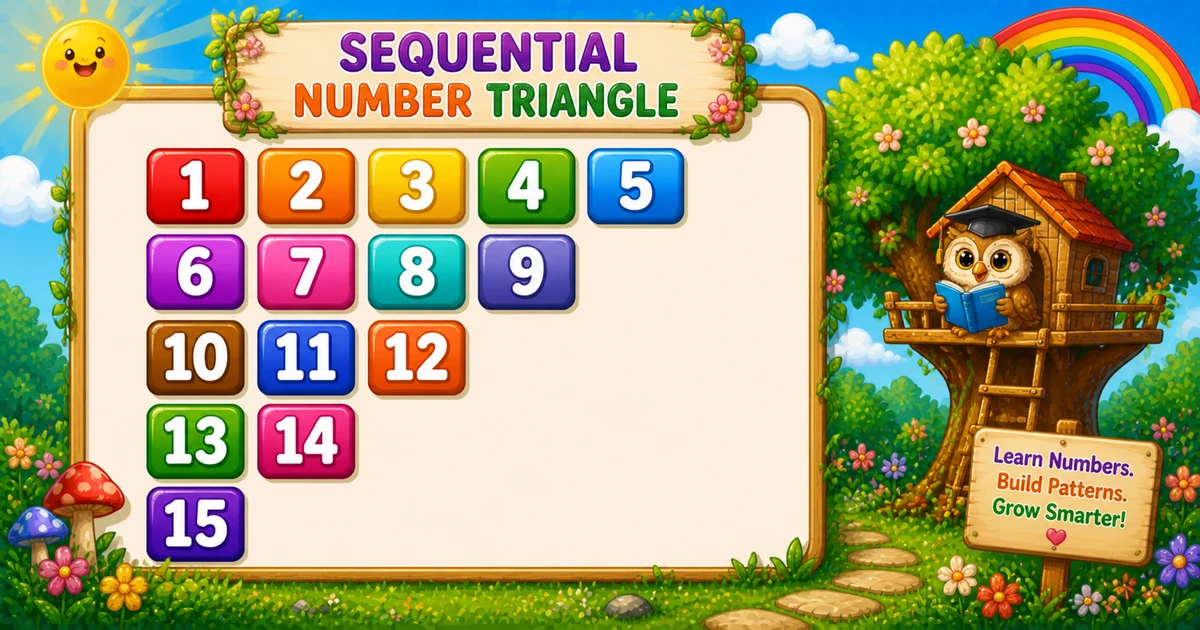
A sequential decreasing-width triangle prints consecutive integers while each row gets one value shorter — from rows numbers on the first line down to a single value.
Remember
Rule: k = 1; for i from 1 to rows,
      print (rows - i + 1) values with format("%3d", k++)

  1  2  3  4  5
  6  7  8  9
 10 11 12
 13 14
 15     ← rows = 5
Unlike Program 37 (palindrome per row), here one shared counter k continues across the whole triangle.
Approach
How to Solve It
Walk i from 1 to rows; on each row print rows − i + 1 consecutive values via k++.
Method
Idea
Best for
Shared counter + format
k++ with %3d; inner loop shrinks each row
Learning, interviews, exams
Custom start
Same loops; initialize k to any start value
When the sequence should not begin at 1
Pseudocode
Pseudocode
k = 1
for i from 1 to rows:
    for j from rows down to i:
        print k (width 3); k = k + 1
    print newline
Cheat sheet
Goal
Pattern
Walk rows
for (int i = 1; i <= rows; i++)
Shrinking width
for (int j = rows; j >= i; j--)
Print next value
System.out.format("%3d", k++);
End the row
System.out.println();
Values per row
rows - i + 1
Printing Numbers vs Starting a New Line
API
Effect
Use for
System.out.format / printf
Stays on the same line
Each formatted number
System.out.println
Ends the current line
After the inner loop finishes
Print values without a newline, then end the row once.
Try it
Live Preview
Change the row count and the sequential triangle updates instantly.
Whole numbers from 3 to 9. Tap a chip or type a value — the preview redraws as you go.
Live resultrows = 5 · 15 values
  1  2  3  4  5
  6  7  8  9
 10 11 12
 13 14
 15
Trace
Worked Walkthrough — rows = 5
Trace the count per row (rows − i + 1) and the values taken from k.
i
Count
Values from k
Printed row
1
5
1 … 5
1 2 3 4 5
2
4
6 … 9
6 7 8 9
3
3
10 … 12
10 11 12
4
2
13, 14
13 14
5
1
15
15
Total values = 5 + 4 + 3 + 2 + 1 = 15 — the triangular number n(n+1)/2.
Code
Java Programs
Three complete programs: fixed rows = 5, Scanner input, and a custom start for k. Use View Output to reveal sample results.
Example 1 — Fixed rows = 5
Hard-coded size — shared k with %3d formatting.
Java
public class SequentialNumberTriangle {
    public static void main(String[] args) {
        int rows = 5;
        int k = 1;

        for (int i = 1; i <= rows; i++) {
            for (int j = rows; j >= i; j--)
                System.out.format("%3d", k++);
            System.out.println();
        }
    }
}
Output
  1  2  3  4  5
  6  7  8  9
 10 11 12
 13 14
 15
How It Works
1. Counter outside.k starts at 1 before the outer loop and never resets.
2. Inner loop shrinks.j runs from rows down to i — fewer prints each row.
3. Formatted print.format("%3d", k++) prints the next value in a 3-column field.
When i = 1: five values 1…5. When i = 5: a single 15.
Example 2 — Rows Input
Read rows at runtime. Same counter and shrinking inner loop.
Java
import java.util.Scanner;

public class SequentialNumberTriangleInput {
    public static void main(String[] args) {
        Scanner sc = new Scanner(System.in);
        System.out.print("Enter the number of rows: ");
        int rows = sc.nextInt();
        if (rows < 1) return;

        int k = 1;
        for (int i = 1; i <= rows; i++) {
            for (int j = rows; j >= i; j--)
                System.out.format("%3d", k++);
            System.out.println();
        }
        sc.close();
    }
}
Output (when user enters 5)
Enter the number of rows: 5
  1  2  3  4  5
  6  7  8  9
 10 11 12
 13 14
 15
How It Works
1. Prompt and guard. Read rows; exit early if it is less than 1.
2. Same core. Only the source of rows changes from a literal to user input.
3. Safer input tip. Prefer:
Safer input
if (!sc.hasNextInt()) {
    System.out.println("Enter a positive integer.");
    return;
}
int rows = sc.nextInt();
if (rows < 1) {
    System.out.println("Enter a positive integer.");
    return;
}
Example 3 — Custom Start k = 10
Same shrinking loops — only the initial counter value changes.
Java
public class SequentialCustomStart {
    public static void main(String[] args) {
        int rows = 5;
        int k = 10;

        for (int i = 1; i <= rows; i++) {
            for (int j = rows; j >= i; j--)
                System.out.format("%3d", k++);
            System.out.println();
        }
    }
}
Output
 10 11 12 13 14
 15 16 17 18
 19 20 21
 22 23
 24
How It Works
1. Same structure. Shrinking inner loop and %3d — only k starts at 10.
2. Fifteen values still. Sequence runs from 10 through 24.
3. Wider fields tip. Use %4d when totals grow past two digits.
Edge Cases & Pitfalls
Check these before calling the solution done.
println inside
Column of numbers
If println is inside the inner loop, each value lands on its own line. Use format for values; println only after the inner loop.
Reset k
Restarted sequence
Declaring k = 1 inside the outer loop restarts the count every row instead of continuing.
Wrong inner bound
Rectangle
Using j <= rows on every row prints a rectangle instead of a shrinking triangle.
No %3d
Crowded digits
Plain print(k++) makes two-digit values crowd earlier columns.
rows = 1
Single value
Output is just 1 on one line.
Bad input
Use hasNextInt
nextInt() throws on letters — prefer hasNextInt() and require a positive integer.
Analysis
Time and Space Complexity
Program
Time
Extra space
Sequential shrinking (Examples 1–3)
O(n²)
O(1)
Total values = n(n+1)/2 — still quadratic. Only loop counters are stored.
Remember
Key Takeaways
Rule: row i prints rows − i + 1 consecutive values via k++.
Keep k outside: one shared counter continues the sequence across rows.
Break the row: call println only after the inner loop.
Complexity:O(n²) time; O(1) extra space.
One line: for each row, print rows − i + 1 values with format("%3d", k++), then println().
Frequently Asked Questions
Because the row lengths are 5, 4, 3, 2, and 1. Their sum is 5+4+3+2+1 = 15, which equals n(n+1)/2.
%3d prints an integer right-aligned in a field width of 3 characters, which keeps columns aligned when numbers reach two digits.
Each row prints a different count of numbers, but the sequence must continue globally (1, 2, 3, …). k stores the next value and increments after every print.
Yes. Initialize k with your starting value instead of 1 — see Example 3.
Program 37 builds a palindrome on each row. Program 38 prints one continuous ascending sequence with shrinking row widths.
O(n²) where n is the number of rows. Total printed values equal 1+2+…+n = n(n+1)/2.
Use sc.hasNextInt() before sc.nextInt() so bad input does not throw InputMismatchException.
The outer loop never runs, so nothing is printed. Validate and prompt again if you want a clear user message.
🤔
Did you know?
Row i prints rows - i + 1 consecutive numbers via a shared k counter. Total values for n rows is the triangular number n(n+1)/2 — 15 when rows = 5.