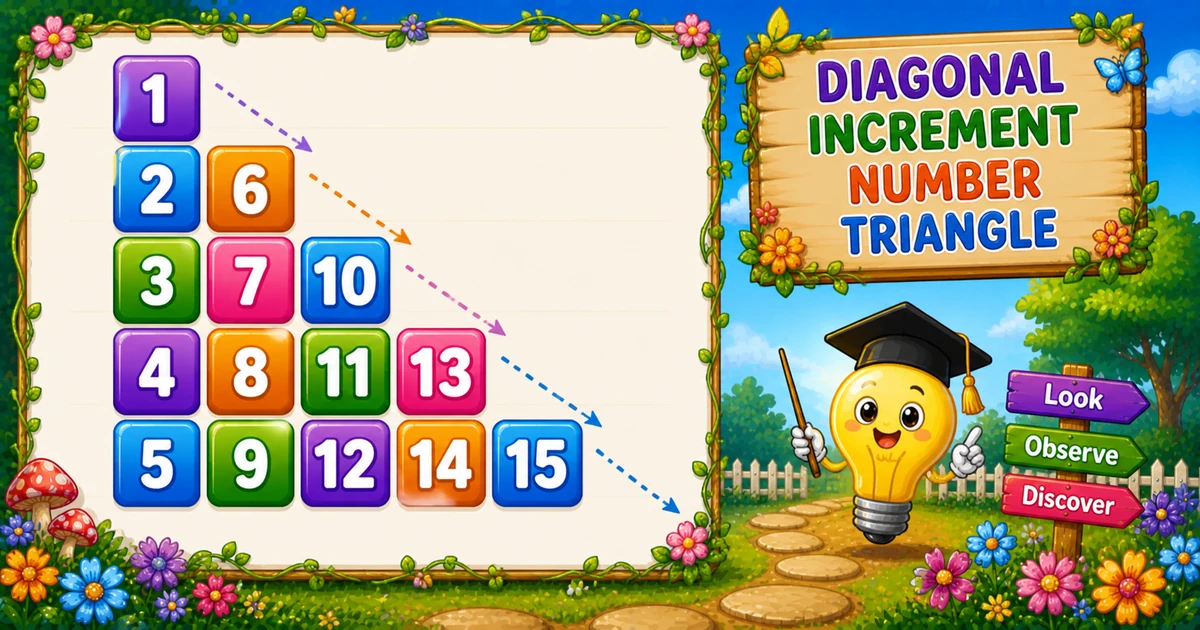
An increasing jump number triangle starts each row at the row index i, then jumps forward with a step m that shrinks after every print.
Remember
Rule: print i, then for the rest of the row
      add a decreasing step m (start m = rows - 1)

1
2 6
3 7 10
4 8 11 13
5 9 12 14 15     ← rows = 5
Unlike Program 20 (one continuous k++), this pattern resets a local step m on every row and shrinks it after each jump.
Approach
How to Solve It
Print i first, then walk the rest of the row with m-- and k = k + m.
Method
Idea
Best for
Decreasing step
m = rows - 1; print k, then m--, k += m
Learning, interviews, exams
Custom step
Same loops; set initial m yourself
Tighter or wider jumps
Pseudocode
Pseudocode
for i from 1 to rows:
    print i
    m = rows - 1
    k = i + m
    for j from 1 to i - 1:
        print k
        m = m - 1
        k = k + m
    print newline
Cheat sheet
Goal
Pattern
Walk each row
for (int i = 1; i <= rows; i++)
Print row start
System.out.print(i + " ");
Initial step
int m = rows - 1;
First jump value
int k = i + m;
Next jump
m--; k = k + m; after each k print
End the row
System.out.println();
Printing Numbers vs Starting a New Line
API
Effect
Use for
System.out.print
Stays on the same line
Each i and each k with a trailing space
System.out.println
Ends the current line
After the inner loop
Print numbers without a newline, then end the row once.
Try it
Live Preview
Change the row count and the jump number triangle updates instantly.
Whole numbers from 1 to 12. Tap a chip or type a value — the preview redraws as you go.
Live resultrows = 5 · 15 numbers
1
2 6
3 7 10
4 8 11 13
5 9 12 14 15
Trace
Worked Walkthrough — rows = 4
Trace each row’s start, initial m, and the jumped values.
i
Start + jumps
Printed row
1
1 (no jumps)
1
2
2, then m=3 → 5
2 5
3
3, 6 (m=3), 8 (m=2)
3 6 8
4
4, 7, 9, 10
4 7 9 10
Total numbers: 1 + 2 + 3 + 4 = 10 = n(n + 1) / 2 — that is why time is O(n²).
Code
Java Programs
Three complete programs: fixed rows = 5, Scanner input, and a custom initial step. Use View Output to reveal sample results.
Example 1 — Fixed rows = 5
Hard-coded height — print i, then jump with m = 4.
Java
public class JumpNumberTriangle {
    public static void main(String[] args) {
        for (int i = 1; i <= 5; i++) {
            System.out.print(i + " ");

            int m = 4;
            int k = i + m;

            for (int j = 1; j < i; j++) {
                System.out.print(k + " ");
                m--;
                k = k + m;
            }

            System.out.println();
        }
    }
}
Output
1
2 6
3 7 10
4 8 11 13
5 9 12 14 15
How It Works
1. Print the row start. Each row begins with i.
2. Set the first jump.m = 4 (rows - 1) and k = i + m.
3. Shrink the step. After printing k, do m-- then k = k + m for the next value.
When i = 3: print 3, then k = 7, m-- to 3, k = 10 → 3 7 10.
Example 2 — Rows Input
Read rows at runtime. Prefer hasNextInt() before nextInt() in real apps.
Java
import java.util.Scanner;

public class JumpNumberTriangleInput {
    public static void main(String[] args) {
        Scanner sc = new Scanner(System.in);
        System.out.print("Enter the number of rows: ");
        int rows = sc.nextInt();

        for (int i = 1; i <= rows; i++) {
            System.out.print(i + " ");

            int m = rows - 1;
            int k = i + m;

            for (int j = 1; j < i; j++) {
                System.out.print(k + " ");
                m--;
                k = k + m;
            }

            System.out.println();
        }
        sc.close();
    }
}
Output (when user enters 4)
Enter the number of rows: 4
1
2 5
3 6 8
4 7 9 10
How It Works
1. Prompt and read. Ask for a height, then store it with sc.nextInt().
2. Scale the step.m = rows - 1 each row so the initial jump matches triangle height.
3. Safer input tip. Prefer:
Safer input
if (!sc.hasNextInt()) {
    System.out.println("Enter a positive whole number.");
    return;
}
int rows = sc.nextInt();
if (rows < 1) {
    System.out.println("Enter a positive whole number.");
    return;
}
Example 3 — Custom Initial Step m = 3
Keep rows = 4 but start each row with m = 3 (here equal to rows - 1, shown as an override).
Java
public class JumpNumberCustomStep {
    public static void main(String[] args) {
        int rows = 4;

        for (int i = 1; i <= rows; i++) {
            System.out.print(i + " ");

            int m = 3;
            int k = i + m;

            for (int j = 1; j < i; j++) {
                System.out.print(k + " ");
                m--;
                k = k + m;
            }

            System.out.println();
        }
    }
}
Output
1
2 5
3 6 8
4 7 9 10
How It Works
1. Same loops. Print i, then jump with m-- and k = k + m.
2. Override the start. Only the initial m changes — try other values to tighten or widen jumps.
3. Same shape. Row lengths stay 1, 2, 3, 4; only the jump sizes change when m differs from rows - 1.
Edge Cases & Pitfalls
Check these before calling the solution done.
Wrong m
Step not reset
Reset m = rows - 1 at the start of every row. Reusing a leftover m breaks later rows.
Order
m-- before add
After printing k, decrease m first, then do k = k + m. Reversing the order uses the wrong step.
println inside
Column of numbers
If println is inside the inner loop, each number lands on its own line. Use print for numbers; println only after the inner loop.
rows = 1
Single 1
Output is just 1 — the inner loop never runs. A good sanity check.
rows ≤ 0
Empty output
The outer loop never runs. Validate and require rows ≥ 1.
Bad input
Use hasNextInt
nextInt() throws on letters — prefer hasNextInt() and require a positive whole number.
Analysis
Time and Space Complexity
Program
Time
Extra space
Decreasing step (Examples 1–3)
O(n²)
O(1)
Total prints: 1 + 2 + … + n = n(n + 1) / 2 — still quadratic in n. Only a few scalars (i, m, k) are stored.
Remember
Key Takeaways
Rule: print i, then jump with a decreasing step m.
Reset m: set m = rows - 1 at the start of every row.
Update order: after printing k, do m-- then k = k + m.
Complexity:O(n²) time; O(1) extra space.
One line: print i, then add a shrinking step m for the rest of the row, then println().
Frequently Asked Questions
Because the step variable m starts at rows − 1 and decreases after each printed number. Each next value is computed by adding the current m, so the jumps shrink across the row.
m is the step size used to compute the next printed number in the row. It decreases each time, changing the increment between consecutive outputs.
For rows = 5, row 2 prints i = 2 first. Then m = 4 and k = i + m = 6 — the inner loop prints k once, giving 2 6.
System.out.print stays on the same line with a trailing space. System.out.println ends the current line. Numbers use print; the row break uses println after the inner loop.
Total prints are 1+2+…+n = n(n+1)/2 — row i prints exactly i values.
Yes. Set m to a custom value instead of rows − 1 — see Example 3. Smaller steps produce tighter jumps.
O(n²) for n rows because total digit prints equal n(n+1)/2.
Use sc.hasNextInt() before sc.nextInt(), require rows ≥ 1, and reject non-numeric input — see Example 2 notes.
🤔
Did you know?
Each row starts at i, then adds a decreasing step m to compute the next value. As m shrinks after each print, the jumps get smaller toward the end of the row — total prints still equal n(n+1)/2 for n rows.