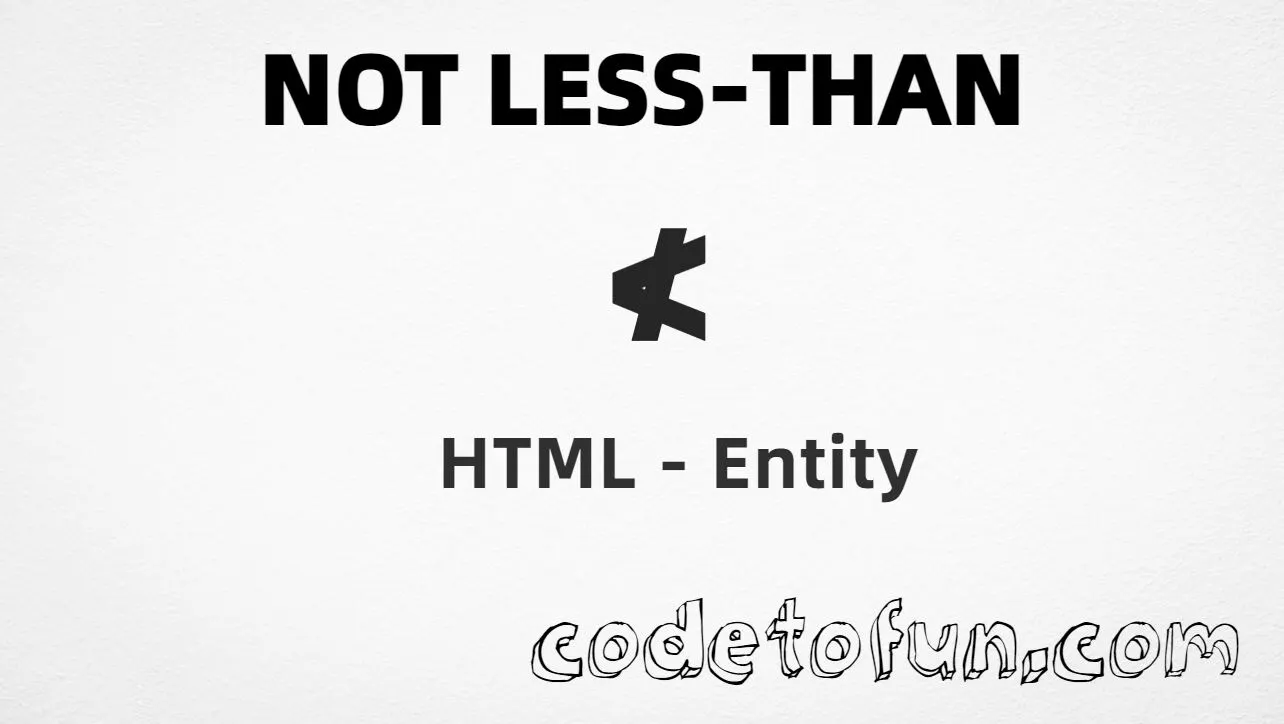
Not less than (≮) is the Mathematical Operators character at Unicode U+226E (NOT LESS-THAN). It states that a value is not less than another — for example x ≮ y.
Using Named Entity: ≮
Using Hex Code: ≮
Using HTML Code: ≮
Using CSS Entity: ≮
Example: 5 ≮ 3
How It Works
1. Named:≮ (or ≮) is the clearest HTML form and renders ≮.
2. Hex:U+226E → ≮ in HTML. Same result as the named entity.
3. Decimal: same code point as 8814 → ≮. Same result as hex.
4. CSS: use \226E in content (not an HTML entity). #point::after appends that ≮ after the paragraph text.
Pitfalls & Tips
Common mistakes when working with the not-less-than entity.
Pair
≮ ≠ <
≮ is the negation. < is the affirmative less than (<).
Look-alikes
Not ≥ or ≯
≥ is ≥ (greater than or equal). ≯ is ≯ (not greater than). “Not less” is not always interchangeable with ≥.
Aliases
≮ = ≮
Both (and ≮) map to U+226E. Pick one and stay consistent.
CSS vs HTML
Do not mix escapes
\226E belongs in CSS. ≮ / ≮ / ≮ belong in HTML.
Encoding
Declare UTF-8
If you paste ≮ directly, keep <meta charset="UTF-8"> so the file is not misread.
Semicolon
End references
Always finish with ; — write ≮, not &nlt.
Compatibility
Browser Support
Not less than (U+226E) and its entity forms (≮, ≮, ≮, CSS \\226E) are supported in all modern browsers. Glyph availability depends on the font.
✓ Universal encoding
Not Less Than (≮)
Encode with named, hex, decimal, or CSS escape — or paste ≮ directly in UTF-8 HTML.
100%Browser coverage
Google ChromeSupported
Yes
Microsoft EdgeSupported
Yes
Mozilla FirefoxSupported
Yes
Apple SafariSupported
Yes
OperaSupported
Yes
Internet ExplorerAll versions
Yes
U+226EFull support
Bottom line: Prefer ≮ (or ≮) for readable HTML. Use \\226E only inside CSS content.
Remember
Key Takeaways
Unicode: this character is U+226E (decimal 8814).
HTML: prefer ≮ (alias ≮) — or use ≮ / ≮.
Use ≮ or ≮ (named), ≮ (hex), ≮ (decimal), type ≮ in UTF-8, or the CSS escape \226E in content. All render ≮. Prefer ≮ in HTML source.
U+226E (NOT LESS-THAN). Hex 226E, decimal 8814. It belongs to the Mathematical Operators block (U+2200–U+22FF).
Yes. HTML5 defines ≮, ≮, and ≮ (aliases for the same character). Related: < for < (U+003C).
Use it when a value is not less than another (e.g. x ≮ y). Prefer ≮ for readable source. Note that x ≮ y means “not less,” which is not always the same as writing ≥ in every context — pick the symbol your notation requires.
HTML entities (≮, ≮, or ≮) go in markup. The CSS escape \226E is used in stylesheets (usually in the content property of ::before/::after). Both render ≮.
≥ (U+2265, ≥) means greater than or equal. ≯ (U+226F, ≯) means not greater than. ≮ (≮) specifically means not less than — do not substitute one for another.
🤔
Did you know?
Not less than (≮) is Unicode U+226E (decimal 8814) — NOT LESS-THAN in Mathematical Operators. HTML5 provides ≮, ≮, and ≮ (same glyph). It negates less than (<, <, U+003C). Related: ≯ (≯, not greater than) and ≥ (≥, greater than or equal).