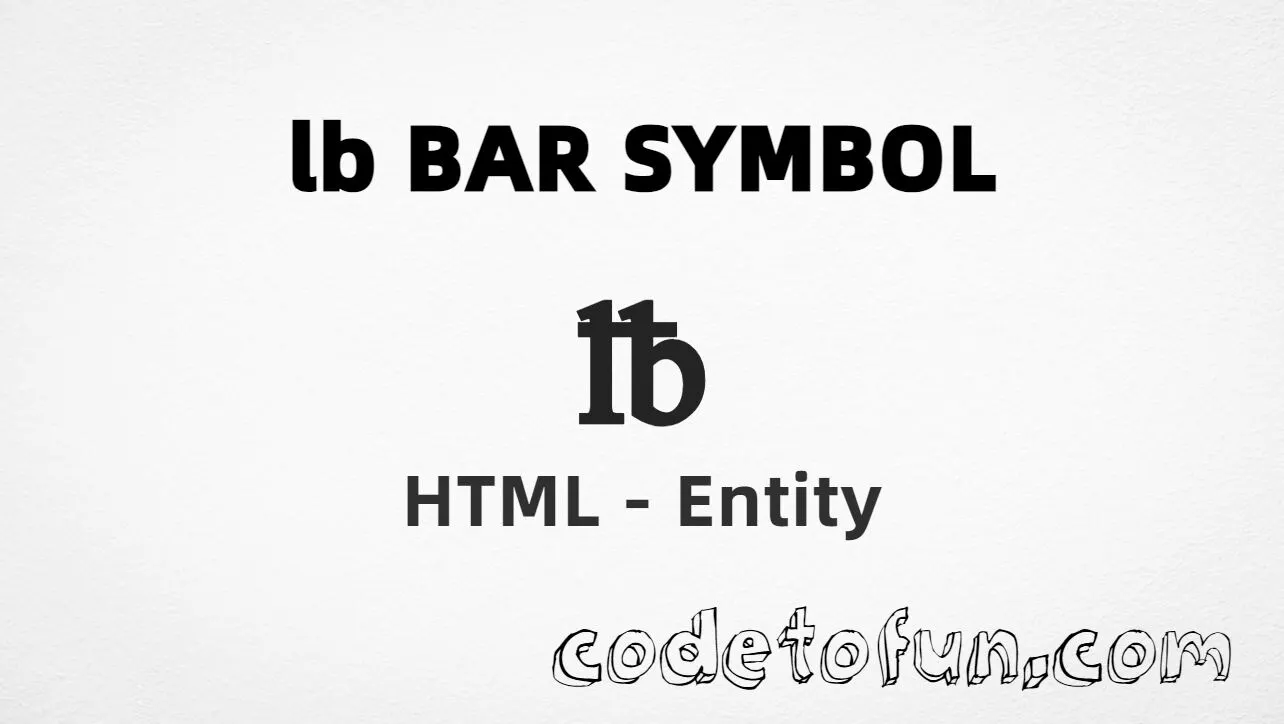
Lb Bar Symbol (℔) is the Letterlike Symbols character at Unicode U+2114 (L B BAR SYMBOL). It is a traditional glyph for weight in pounds (libra), used in recipes, labels, and measurement text.
Remember
Character     ℔
Unicode       U+2114
Hex entity    ℔
Decimal       ℔
CSS escape    \2114
Named entity  (none)
Not the same  lb / £ (sterling)
All of these produce the same glyph: ℔ (when the font supports U+2114). Prefer numeric entities in HTML; use CSS \2114 only in content.
Reference
Quick Reference
One table for every form you will actually use.
Form
Code
Where it goes
Hex entity
℔
HTML markup
Decimal entity
℔
HTML markup
CSS escape
\2114
Stylesheet content
Direct character
℔
UTF-8 HTML text
Named entity
—
Not defined in HTML5
When to Use Which
Situation
Use
Need the dedicated lb-bar weight symbol
℔ or ℔
Everyday weight text
Plain lb (clearer for most readers)
Generated text via ::before / ::after
content: "\2114"
Currency pound sterling
Use £ (£ / U+00A3) — not U+2114
Accessibility
Add nearby text or aria-label (e.g. “pounds”)
See it
Live Preview
Lb Bar Symbol in weight and label contexts.
Labeled℔ pounds (weight)
Large glyph℔
RecipeFlour: 2 ℔
vs text / £℔ (weight) | lb | £ (currency)
With entitiesHex: ℔ | Decimal: ℔
Code
Complete HTML Example
One page that shows Lb Bar Symbol with hex, decimal, CSS, and a typed character. Use View Output or open the live editor.
Using Hex Code: ℔
Using HTML Code: ℔
Using CSS Entity: ℔
Typed directly: ℔
Flour: 2 ℔
How It Works
1. Hex:U+2114 → ℔ in HTML. The browser turns it into ℔.
2. Decimal: same code point as 8468 → ℔. Same result as hex.
3. CSS: use \2114 in content (not an HTML entity). #point::after appends that ℔ after the paragraph text.
4. Typed: in UTF-8 you can type ℔ directly — same visual result when the font supports it.
Pitfalls & Tips
Common mistakes when working with Lb Bar Symbol.
Named?
No named entity
HTML5 does not define a named entity for U+2114. Use numeric forms.
Look-alikes
Not £ or “lb”
£ is currency (U+00A3). Plain lb is two letters. Use U+2114 only when you want the bar glyph.
A11y
Say “pounds”
Add “pounds” nearby or use aria-label so assistive tech does not skip a silent symbol.
CSS vs HTML
Do not mix escapes
\2114 belongs in CSS. ℔ / ℔ belong in HTML.
Fonts
Letterlike coverage
Some fonts omit U+2114. Prefer Segoe UI, Noto Sans, or another Letterlike-capable face.
Semicolon
End references
Always finish with ; — write ℔, not ℔.
Compatibility
Browser Support
Lb Bar Symbol (U+2114) and its numeric entity forms (℔, ℔, CSS \\2114) are supported in all mainstream browsers when the font includes Letterlike Symbols.
✓ Universal support
Lb Bar Symbol (℔)
Encode with hex, decimal, or CSS escape — same character when the font supports U+2114.
100%Browser coverage
Google ChromeSupported
Yes
Microsoft EdgeSupported
Yes
Mozilla FirefoxSupported
Yes
Apple SafariSupported
Yes
OperaSupported
Yes
Internet ExplorerAll versions
Yes
U+2114 / entitiesFull support
Bottom line: Prefer ℔ or ℔ in HTML. Use \\2114 only inside CSS content. For everyday copy, plain lb is often clearer.
Remember
Key Takeaways
Unicode: lb bar symbol is U+2114 (decimal 8468).
HTML: use ℔ or ℔ — no named entity.
CSS: use \2114 inside content for generated text.
Watch out: ℔ ≠ £ and ≠ the letters lb.
One line:U+2114 → ℔ / ℔ / CSS \2114.
Frequently Asked Questions
Use ℔ (hex), ℔ (decimal), or the CSS escape \2114 in the content property. All render ℔ when the font supports Letterlike Symbols. There is no named HTML entity.
U+2114 (L B BAR SYMBOL). Hex 2114, decimal 8468. It belongs to the Letterlike Symbols block and traditionally marks weight in pounds (libra).
No. HTML5 does not define a named entity for U+2114. Use numeric references like ℔ or ℔ when you need an entity form.
Use it in recipes, nutrition labels, shipping weights, and scientific content that need the traditional pound-weight glyph. For many sites, plain text lb is clearer and more compatible.
HTML entities (℔ or ℔) go in markup. The CSS escape \2114 is used in stylesheets (usually in the content property of ::before/::after). Both render ℔.
U+2114 (℔) is the lb bar / libra weight symbol. £ (U+00A3) is pound sterling (currency). The ASCII letters lb are two characters, not a single weight symbol.
🤔
Did you know?
Lb Bar Symbol is Unicode U+2114 (decimal 8468) — L B BAR SYMBOL in the Letterlike Symbols block. HTML5 has no named entity — use ℔ or ℔. It marks weight in pounds (libra). Do not confuse it with pound sterling (£, U+00A3) or the letters lb.