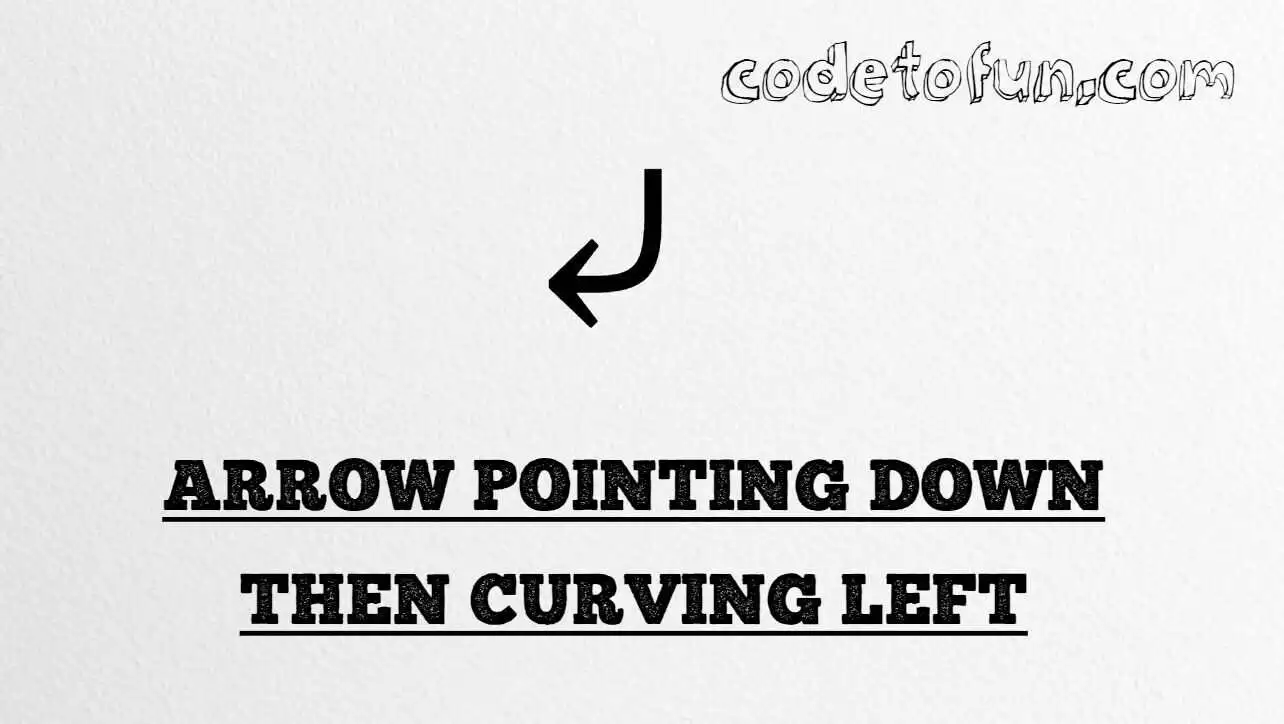
HTML Entity for Arrow Pointing Downwards Then Curving Leftward (⤶)
Beginner
6 min read
Updated: Sep 2026
1 example
Unicode U+2936
Definition
What Is Arrow Pointing Downwards Then Curving Leftward?
Arrow pointing downwards then curving leftward (⤶) is Unicode U+2936 in the Supplemental Arrows-B block. It is a down-then-left bend used in compact UI cues, flow sketches, and “return”-style diagrams. HTML provides the named entity ⤶.
Remember
Character     ⤶
Unicode       U+2936
Hex entity    ⤶
Decimal       ⤶
Named entity  ⤶
CSS escape    \2936
Not the same  ↓ U+2193 · ⤷ U+2937
All of these produce the same glyph: ⤶. Prefer ⤶ in hand-written HTML; type ⤶ in UTF-8 when you can; use numeric or CSS forms for generated content.
vs. related arrows⤶ left bend · ⤷ right bend · ↓ down
Monospacereturn ⤶
With entitiesNamed: ⤶ | Hex: ⤶ | Decimal: ⤶
Code
Complete HTML Example
One page that shows ⤶ with hex, decimal, named entity, CSS escape, and a typed character. Use View Output or open the live editor.
Hex + Decimal + Named + CSS + Typed
Five ways to produce ⤶ in a single document.
html
<!DOCTYPE html>
<html lang="en">
<head>
<meta charset="UTF-8">
<title>Arrow Down Then Curving Left (⤶) in HTML</title>
<style>
#point::after {
content: "\2936";
}
</style>
</head>
<body>
<p>Curved left using Hex Code: ⤶</p>
<p>Curved left using HTML Code: ⤶</p>
<p>Curved left using Named Entity: ⤶</p>
<p id="point">Curved left using CSS Entity: </p>
<p>Typed directly: ⤶</p>
</body>
</html>
Curved left using Hex Code: ⤶
Curved left using HTML Code: ⤶
Curved left using Named Entity: ⤶
Curved left using CSS Entity: ⤶
Typed directly: ⤶
How It Works
1. Hex:U+2936 → ⤶ in HTML. The browser turns it into ⤶.
2. Decimal: same code point as 10550 → ⤶. Same result as hex.
3. Named:⤶ is the standard HTML name for U+2936 — clear in source.
4. CSS: use \2936 in content (not an HTML entity). #point::after appends that ⤶ after the paragraph text.
5. Typed ⤶: fine in UTF-8 source. All five lines show the same glyph.
Pitfalls & Tips
Common mistakes when working with arrow down then curving left (⤶).
⤷
Not the rightward bend
⤷ (U+2937) mirrors this glyph — do not swap them in diagrams.
↓
Not a plain down arrow
For a straight down arrow use ↓ from the arrow entities hub.
CSS vs HTML
Do not mix escapes
\2936 belongs in CSS. ⤶ / ⤶ belong in HTML.
a11y
Label decorative arrows
Pair icon-only cues with visible text or ARIA so the action is clear.
Fonts
Need Supplemental Arrows-B
Some UI fonts omit U+2936. Prefer fonts with solid arrow coverage.
Semicolon
End references
Always finish with ; — write ⤶, not &ldca.
Compatibility
Browser Support
Arrow pointing downwards then curving leftward (U+2936) and its entity forms (⤶, ⤶, ⤶, CSS \\2936) are supported in all mainstream browsers. Glyph availability depends on font support for Supplemental Arrows-B.
✓ Universal support
Arrow Down Then Curving Left (⤶)
Type ⤶, or encode with named, hex, decimal, or CSS escape — same glyph everywhere encoding is supported.
100%Browser coverage
Google ChromeSupported
Yes
Microsoft EdgeSupported
Yes
Mozilla FirefoxSupported
Yes
Apple SafariSupported
Yes
OperaSupported
Yes
Internet ExplorerAll versions
Yes
U+2936 / entitiesFull support
Bottom line: Prefer ⤶ or a typed ⤶ for normal text. Use numeric forms when generating markup, and \\2936 only inside CSS content.
Remember
Key Takeaways
Unicode: down then curving left is U+2936 (decimal 10550).
Use ⤶ (hex), ⤶ (decimal), ⤶ (named), or the CSS escape \2936 in the content property. All render ⤶. You can also paste ⤶ directly if your file is UTF-8.
U+2936 (hex 2936, decimal 10550). Unicode names it ARROW POINTING DOWNWARDS THEN CURVING LEFTWARD. It belongs to the Supplemental Arrows-B block.
Yes. ⤶ maps to U+2936. Prefer it in hand-written HTML; numeric forms are useful in generated markup.
U+2937 is ARROW POINTING DOWNWARDS THEN CURVING RIGHTWARD (⤷). It mirrors the bend of U+2936 — pick the code point that matches your diagram.
HTML entities (⤶, ⤶, or ⤶) go in markup. The CSS escape \2936 is used in stylesheets (usually in the content property of ::before/::after). Both render ⤶.
Use it for compact “return,” “back to section,” or flow bends when a font supports Supplemental Arrows-B. Pair decorative arrows with visible text or accessible names.
🤔
Did you know?
Arrow pointing downwards then curving leftward is Unicode U+2936 (decimal 10550) in the Supplemental Arrows-B block. HTML provides ⤶ for ⤶. It is the left-bend twin of U+2937 (⤷) — not a plain down arrow.