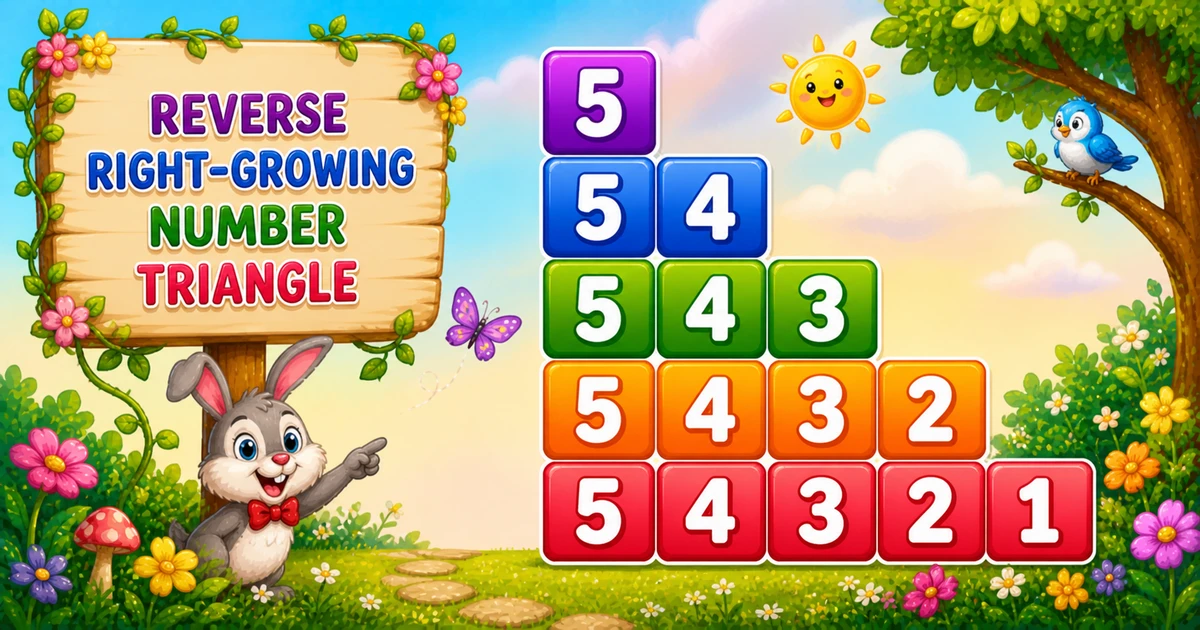
A reverse left-growing number triangle always starts each row at the peak digit rows, then counts down farther each time — so you see 5, 54, 543, and so on.
Unlike Program 7 (i..1 starting at the row index) or Program 6 (i..rows ascending), this pattern keeps the start fixed at rows and only moves the stop point left.
Approach
How to Solve It
Outer loop from rows down to 1. Inner loop from rows down to current i. Print each digit, then end the line.
Method
Idea
Best for
Nested loops
Outer down, inner rows..i
Learning, interviews, demos
Compact trace
Same logic with rows = 3
Quick dry-runs on paper
Pseudocode
Pseudocode
for i from rows down to 1:
    for j from rows down to i:
        print j
    print newline
Cheat sheet
Goal
Pattern
Outer (stop moves left)
for (i = rows; i >= 1; i--)
Inner (start fixed)
for (j = rows; j >= i; j--)
Print digit
cout << j;
End the row
cout << "\n";
Digits on outer i
rows - i + 1
Printing Numbers vs Starting a New Line
API
Effect
Use for
cout << j
Stays on the same line
Each digit
cout << "\n"
Ends the line
After the inner loop
Print digits without a newline, then end the row once.
Try it
Live Preview
Change the row count and the reverse left-growing triangle updates instantly.
Use rows from 1 to 9. Tap a chip or type a value — the preview redraws as you go.
Live result5 rows · 15 digits
5
54
543
5432
54321
Trace
Worked Walkthrough
Trace three outer values when rows = 5 — watch the stop digit move left while the start stays at 5.
Outer i
Inner j
Prints
5
5..5
5
3
5..3
543
1
5..1
54321
The inner start stays fixed at rows; only the stop value moves left as i decreases.
Code
C++ Programs
Three complete programs: fixed rows = 5, cin input, and a compact rows = 3 demo. Use View Output to reveal sample results.
Example 1 — Fixed rows = 5
Hard-coded height — outer down from 5, inner from 5 down to i.
C++
#include <iostream>
using namespace std;

int main()
{
    int rows = 5;
    int i, j;

    for (i = rows; i >= 1; i--)
    {
        for (j = rows; j >= i; j--)
            cout << j;

        cout << "\n";
    }

    return 0;
}
Output
5
54
543
5432
54321
How It Works
1. Outer moves the stop.i starts at rows and moves toward 1 — that is where the inner loop ends.
2. Inner always starts at the peak.j runs from rows down to i, so every row begins with the same digit.
3. End the row. Call cout << "\n" only after the inner loop finishes.
Example 2 — User Input Rows
Read the row count at runtime with a simple validation tip.
C++
#include <iostream>
using namespace std;

int main()
{
    int rows, i, j;

    cout << "Enter the number of rows: ";
    cin >> rows;

    for (i = rows; i >= 1; i--)
    {
        for (j = rows; j >= i; j--)
            cout << j;

        cout << "\n";
    }

    return 0;
}
Output (when user enters 4)
Enter the number of rows: 4
4
43
432
4321
How It Works
1. Same loop core. Only the source of rows changes from a literal to cin.
2. Entering 4 stops early. You get four rows ending at 4321.
3. Validate in real apps. Prefer checking cin failure and requiring a positive height (tip below).
Safer input tip
if (!(cin >> rows) || rows < 1)
{
    cout << "Please enter a positive integer.\n";
    return 1;
}
Example 3 — Compact rows = 3
Smaller height for a quick paper trace of both loop bounds.
C++
#include <iostream>
using namespace std;

int main()
{
    int rows = 3;
    int i, j;

    for (i = rows; i >= 1; i--)
    {
        for (j = rows; j >= i; j--)
            cout << j;

        cout << "\n";
    }

    return 0;
}
Output
3
32
321
How It Works
1. Only three rows. Easy to dry-run every i and j value on paper.
2. Same formula. Nothing changes except rows — proving the pattern scales.
3. Peak still first. Row 2 prints 32 — start at 3, stop at 2.
Edge Cases & Pitfalls
Check these before calling the solution done.
Inner start
Always start the inner loop at rows
Starting at i instead reprints Program 7 (1, 21, 321), not this shape.
Inner direction
Count down with j--
Counting up from i to rows reprints Program 6 (5, 45, 345).
Newlines
Do not put "\n" inside the inner loop
That prints one digit per line and destroys the triangle.
Bad cin
Validate input
Check cin >> rows and require rows >= 1 before the loops.
Analysis
Time and Space Complexity
Program
Time
Extra space
Triangle (Examples 1–3)
O(n²)
O(1)
Digits printed are 1 + 2 + … + n = n(n + 1) / 2 — quadratic in n. Extra memory is only the loop variables.
Remember
Key Takeaways
Rule: outer i = rows..1, inner j = rows..i.
Growth: each row adds one digit on the right while still starting at rows.
Break the row: call cout << "\n" only after the inner loop finishes.
Complexity:O(n²) time, O(1) extra space.
One line: always start at rows, and count down one digit farther each row.
Frequently Asked Questions
A reverse left-growing number triangle: for rows=5 you get 5, 54, 543, 5432, 54321.
The inner loop always starts at j = rows. Only the stopping value i changes, so each row begins with the peak digit.
When i = 1, the inner loop prints j from rows down to 1 — giving 54321 on the last line.
Program 7 outer counts up and prints i down to 1 (1, 21, 321). Program 8 outer counts down and inner always starts at rows (5, 54, 543).
Program 6 inner prints i..rows ascending (5, 45, 345). Program 8 inner prints rows..i descending (5, 54, 543).
Printing a digit stays on the same line. Printing a newline ends the current row. Digits use cout without a newline; the row break uses cout << "\n" after the inner loop.
O(n²) for n rows because total prints are 1 + 2 + ... + n = n(n+1)/2.
One row prints a single digit 1.
🤔
Did you know?
Each row starts at rows and counts down to i — outer i runs rows..1, inner j prints rows..i — producing 5, 54, 543, and so on. Total prints grow as O(n²).