C++ Increasing Number Triangle Pattern (Right-Aligned)
Beginner
6 min read
Updated: Sep 2026
3 programs
Live preview
Definition
What Is This Pattern?
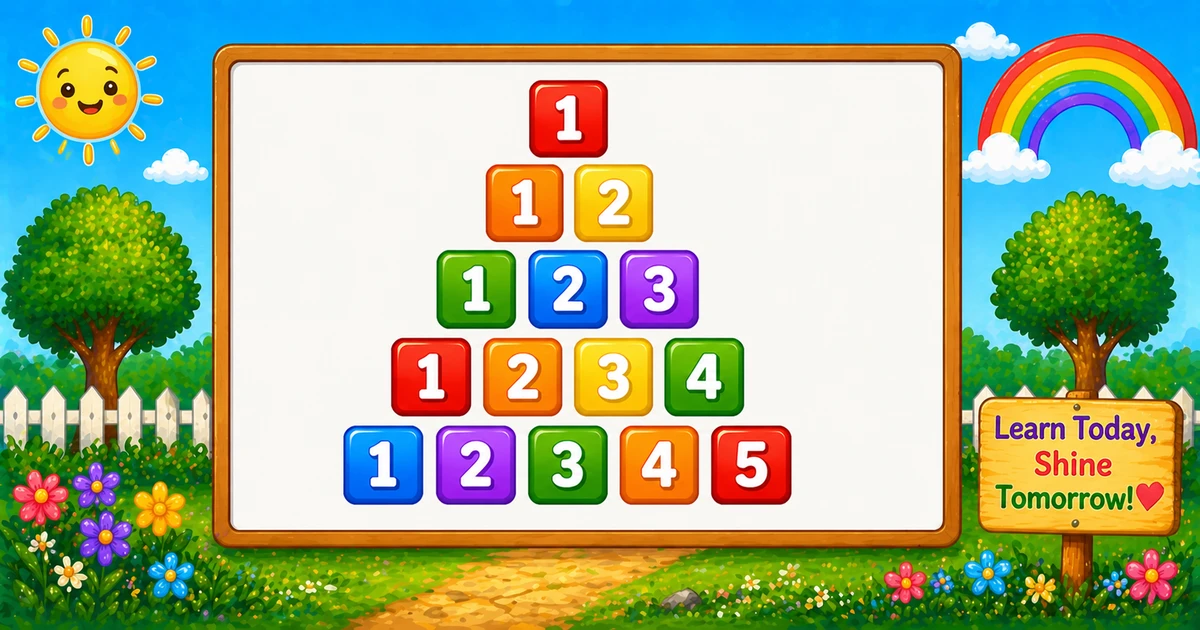
A right-aligned ascending number triangle prints 1..i on row i, with leading spaces so shorter rows sit flush against the right edge of the widest row.
Remember
Rule: spaces while j > i, then print 1..i with setw(2)

     1
    1 2
   1 2 3
  1 2 3 4
 1 2 3 4 5     ← 5 rows
Unlike Program 42 (hollow square grid), this shape grows one more number per row and uses an indent loop for right alignment.
Approach
How to Solve It
Print leading spaces first, then ascending numbers with fixed width — or skip spaces for a left-aligned twin.
Method
Idea
Best for
Spaces + numbers
Indent while j > i, then setw(2) for 1..i
Learning, interviews, right-aligned demos
Left-aligned
Same number loop; skip the space loop
Tracing values on paper
Pseudocode
Pseudocode
for i from 1 to rows:
    for j from rows down to i + 1:
        print space (no newline)
    for k from 1 to i:
        print k in width 2 (no newline)
    print newline
Cheat sheet
Goal
Pattern
Walk each row
for (i = 1; i <= rows; i++)
Leading spaces
for (j = rows; j > i; j--) cout << " ";
Print 1..i
for (k = 1; k <= i; k++) cout << setw(2) << k;
End the row
cout << "\n";
Need setw
#include <iomanip>
Left-aligned twin
Remove the space loop only
Printing Numbers vs Starting a New Line
API
Effect
Use for
cout << " " / cout << setw(2) << k
Stays on the same line
Each space or number
cout << "\n"
Ends the current line
After both inner loops
Print spaces and numbers without a newline, then end the row once. cout << endl also ends the line and flushes; "\n" is enough for these demos.
Try it
Live Preview
Change the row count and the right-aligned triangle updates instantly — including the triangular digit total.
Whole numbers from 1 to 9 (fits setw(2)). Tap a chip or type a value — the preview redraws as you go.
Live result5 rows · 15 numbers
     1
    1 2
   1 2 3
  1 2 3 4
 1 2 3 4 5
Trace
Worked Walkthrough — rows = 4
Trace each outer-loop value of i, how many leading spaces print, and the numbers on that row.
i
Spaces
Numbers
Printed row
1
3
1
1
2
2
1 2
1 2
3
1
1 2 3
1 2 3
4
0
1 2 3 4
1 2 3 4
Total numbers: 1 + 2 + 3 + 4 = 10 = 4×5/2. Space count is always rows - i.
Code
C++ Programs
Three complete programs: fixed rows, cin input, and a left-aligned contrast. Use View Output to reveal sample results.
Example 1 — Fixed rows = 5
Hard-coded row count — ideal for first demos and screenshots.
C++
#include <iostream>
#include <iomanip>
using namespace std;

int main()
{
    int rows = 5;
    int i, j, k;

    for (i = 1; i <= rows; i++)
    {
        for (j = rows; j > i; j--)
            cout << " ";

        for (k = 1; k <= i; k++)
            cout << setw(2) << k;

        cout << "\n";
    }

    return 0;
}
Output
     1
    1 2
   1 2 3
  1 2 3 4
 1 2 3 4 5
How It Works
1. Outer loop grows the row.i runs from 1 to rows — one more number each line.
2. Space loop right-aligns. While j > i, print a single space so shorter rows shift right.
3. Number loop prints 1..i.setw(2) keeps each digit in a two-column field; then end the row with "\n".
When i = 1 you get four spaces then 1; when i = 5 there are no leading spaces.
Example 2 — User Input Version
Read the row count at runtime. Prefer validating cin (shown in the tip below).
C++
#include <iostream>
#include <iomanip>
using namespace std;

int main()
{
    int rows;
    int i, j, k;

    cout << "Enter number of rows: ";
    cin >> rows;

    for (i = 1; i <= rows; i++)
    {
        for (j = rows; j > i; j--)
            cout << " ";

        for (k = 1; k <= i; k++)
            cout << setw(2) << k;

        cout << "\n";
    }

    return 0;
}
Output (when user enters 3)
Enter number of rows: 3
   1
  1 2
 1 2 3
How It Works
1. Prompt and read. Ask for a row count, then store it in rows.
2. Same space + number core. Only the source of rows changes — the print logic matches Example 1.
3. Safer input tip. Prefer:
Safer input
if (!(cin >> rows) || rows < 1)
{
    cout << "Enter a whole number of rows (1 or more).\n";
    return 1;
}
Example 3 — Left-Aligned Triangle
Same ascending sequence without leading spaces — numbers start flush left.
C++
#include <iostream>
#include <iomanip>
using namespace std;

int main()
{
    int rows = 5;
    int i, k;

    for (i = 1; i <= rows; i++)
    {
        for (k = 1; k <= i; k++)
            cout << setw(2) << k;

        cout << "\n";
    }

    return 0;
}
Output
 1
 1 2
 1 2 3
 1 2 3 4
 1 2 3 4 5
How It Works
1. Only the space loop is removed. The number loop and setw(2) stay the same as Example 1.
2. Flush left. Every row starts at the left margin — easy to compare with the right-aligned version.
3. Alignment is layout only. The ascending 1..i rule does not change.
Edge Cases & Pitfalls
Check these before calling the solution done.
no spaces
Left by accident
Without for (j = rows; j > i; j--), every row starts at the left margin. Keep the space loop for right alignment.
\n early
Column of digits
If cout << "\n" is inside either inner loop, each space or number lands on its own line. End the row only after both loops.
No setw
Uneven columns
Without setw(2), single-digit and two-digit values drift. Include <iomanip> and keep a fixed width.
rows > 9
Widen the field
setw(2) is tight past 9. Bump to setw(3) and print two spaces in the indent loop if you want the same look.
rows = 1
Single number
Output is just 1 (padded to width 2) with no leading spaces. A good sanity check.
Bad cin
Validate rows
Check cin >> rows and require rows >= 1 before the outer loop.
Analysis
Time and Space Complexity
Program
Time
Extra space
Spaces + numbers (Examples 1–2)
O(rows²)
O(1)
Left-aligned (Example 3)
O(rows²)
O(1)
Total numbers = 1 + 2 + … + n = n(n + 1)/2. Leading spaces add the same order of work. Only a few integers of extra memory.
Remember
Key Takeaways
Rule: spaces while j > i, then print 1..i with setw(2).
Alignment: the space loop is what makes it right-aligned — remove it for a left twin.
Break the row: call cout << "\n" only after both inner loops.
Complexity:O(n²) time from the triangular print count; O(1) extra space.
One line: for i = 1..rows, print rows - i spaces, then setw(2) << 1..i, then end the line.
Frequently Asked Questions
A right-aligned ascending triangle: row 1 prints 1, row 2 prints 1 2, row 3 prints 1 2 3, and so on until 1 2 3 4 5.
Before printing numbers, the program prints spaces while j > i. Smaller rows get more spaces, pushing digits to the right edge.
setw(2) reserves 2 columns per number (right-aligned), keeping columns stable when values become two digits.
Remove the space loop that prints leading spaces. Then print numbers 1 to i directly — see Example 3.
Program 42 prints a hollow square grid with border conditions. Program 43 prints an ascending number triangle with indentation spaces.
Printing with setw stays on the same line for each number. Printing a newline ends the current line. Numbers use cout without a newline; the row break uses cout << "\n" after both inner loops.
O(n²) for n rows because total prints are 1 + 2 + ... + n = n(n+1)/2.
After cin >> rows, check failure and require rows ≥ 1 before the outer loop.
🤔
Did you know?
Each row prints numbers 1 to i. A space loop runs while j > i before the number loop; setw(2) keeps columns aligned in the output.