Repeating Number Triangle in C

Beginner
⏱️ 8 min read
📚 Updated: Aug 2026
🎯 3 Code Examples
🚀 Live Preview
Nested Loops

What You’ll Learn

Program 9 prints a repeating number triangle: each row repeats the row digit i exactly i times — 1, 22, 333, and so on. This tutorial covers the shape rule, outer loop for the digit, inner loop for repetition, a live preview, worked C examples, edge cases, and complexity.

Shape Rule

Repeat i, i times

Row with outer i = 3 prints 333 — the digit equals the row number, repeated that many times.

Outer Loop

i = 1..rows

for (i = 1; i <= rows; i++) — chooses which digit to repeat on each row.

Inner Loop

j = 1..i

for (j = 1; j <= i; j++) printf("%d", i) — repeats the digit i times.

printf vs newline

Same line / next line

Digits use printf("%d", i); end each row with printf("\n").

Live Preview

rows = 3..9

Pick row count and draw the repeating triangle in the browser.

O(n²)

Complexity

Total prints = 1+2+…+n = n(n+1)/2 — a triangular number.

Introduction

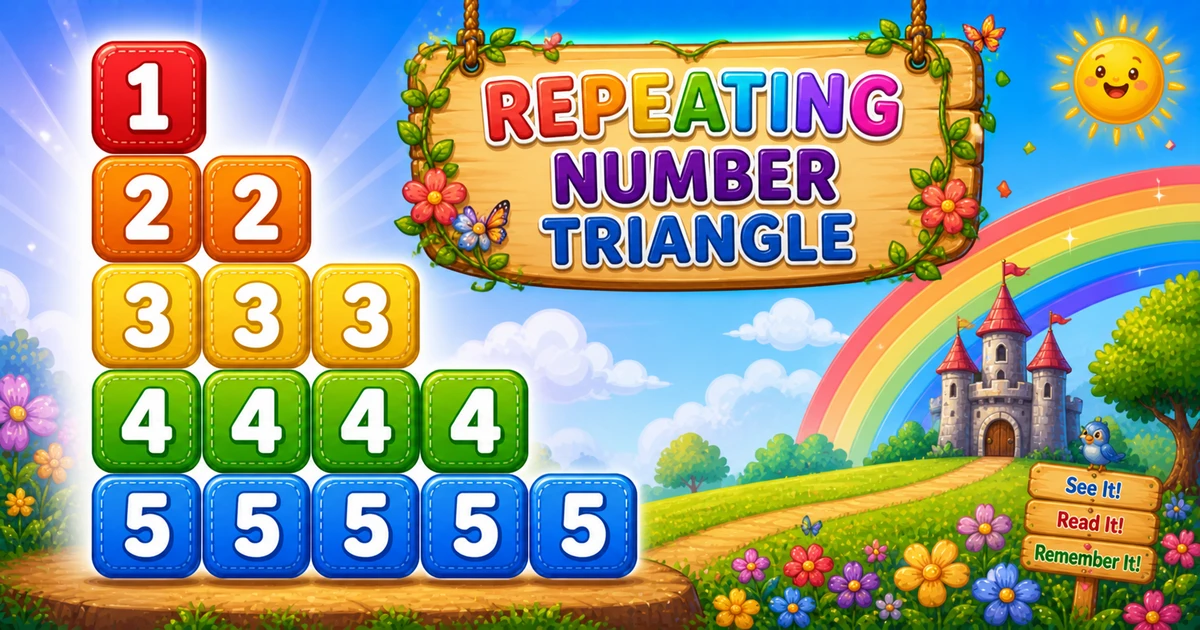
A repeating number triangle prints the row digit multiple times: row 1 prints 1 once, row 2 prints 2 twice, row 3 prints 3 three times, and so on. With rows = 5, you get 1, 22, 333, 4444, 55555.

In C use an outer loop from 1 to rows, an inner loop that runs i times printing i each time, then printf("\n") after each row.

Why it matters?

It teaches that the inner loop controls repetition count while the outer loop picks the value — a stepping stone to repeating stars and alphabets.

Key Highlights

Outer picks digit

i is both row number and print value.

Inner repeats

Inner runs i times, prints i.

vs Program 8

Program 8 prints descending sequences; Program 9 repeats one digit.

Series Step

Follow Program 8; continue to Program 10 next.

In short: outer i = 1..rows, inner j = 1..i, printf("%d", i) each time, then printf("\n").

📝 Problem & Approach

Given row count rows = 5, print a repeating number triangle — row i shows digit i repeated i times.

c
// rows = 5
//1
//22
//333
//4444
//55555

Inputs & Outputs

ItemTypeDescription
rowsintTriangle height — also the widest row digit count.
i (outer)intCurrent row digit — runs 1 up to rows.
j (inner)intRepetition counter — runs 1..i, prints i each time.
Row widthintRow with outer i prints exactly i copies of digit i.
First rowintSingle digit 1 when i = 1.
Last rowstringDigit rows repeated rows times.

Minimal workflow

Pseudocode
for i from 1 to rows:
    repeat i times:
        print i
    print newline

Approach comparison

ApproachIdeaBest for
Nested loopsfor j = 1..i print iStandard teaching approach
Descending outerfor (i = rows; i >= 1; i--)Mirror triangle variant
User-input rowsscanfFlexible height
Compact tracerows = 3 on paper firstQuick dry-runs
Spaced outputprintf("%d ", i)Readable columns

⚡ Quick Reference

GoalPattern
Outer loopfor (i = 1; i <= rows; i++)
Inner loopfor (j = 1; j <= i; j++) printf("%d", i);
End rowprintf("\n");
Program 5 contrastProgram 5: print j (1..i); Program 9: print i (repeat i times)

📋 Fixed Rows vs User Input vs Compact Trace

Same repeating triangle — three ways to set row count and trace the logic.

Fixed rows
rows = 5

Hard-coded height for demos

User input
scanf

Read row count from console

Compact trace
rows = 3

Quick dry-run on paper

Outer
i = 1..rows

Chooses digit to repeat

Inner
j = 1..i

Repetition count

Context

When This Pattern Shows Up

Reach for this pattern when teaching inner-loop repetition and comparing print value vs loop counter.

  1. Post Program 8 exercise

    Simpler than descending sequences — one digit repeated per row builds repetition intuition.

  2. Gateway to star patterns

    Same inner-loop repetition idea extends to repeating * or letters.

  3. Interview warm-ups

    Classic nested-loop question — explain outer picks value, inner controls count.

  4. Gateway to Program 10

    Compare this ascending repeat with the descending repeat in Program 10.

  5. Not a UI layout tool

    This is a console teaching pattern — not how you build modern app screens.

Key benefit: one small program that locks in value-vs-counter thinking and O(n²) repetition.

🔮 Live Preview

Choose a row count between 3 and 9 and draw the repeating number triangle in the browser.

Try 4, 5, or 7. Max up to 9 in this preview.

Live result
Press "Draw pattern".

Examples Gallery

Three complete C programs — fixed rows, user input, and a compact trace with rows = 3. Click View Output to reveal sample console results.

📚 Getting Started

Print five rows of the repeating number triangle with nested loops.

Example 1 — Fixed rows = 5

Hard-coded height — outer picks digit, inner repeats it i times.

c
#include <stdio.h>

int main() {
    int rows = 5;
    int i, j;

    for (i = 1; i <= rows; i++) {
        for (j = 1; j <= i; j++)
            printf("%d", i);

        printf("\n");
    }

    return 0;
}

How It Works

Outer i runs 1 to 5 — inner j runs 1 to i, printing i each time.

📈 Practical Variant

Read row count from the user with validation.

Example 2 — User Input Rows

Configurable height with scanf and a positive-rows check.

c
#include <stdio.h>

int main() {
    int rows;
    int i, j;

    printf("Enter the number of rows: ");
    if (scanf("%d", &rows) != 1 || rows <= 0) {
        printf("Please enter a positive integer.\n");
        return 1;
    }

    for (i = 1; i <= rows; i++) {
        for (j = 1; j <= i; j++)
            printf("%d", i);

        printf("\n");
    }

    return 0;
}

How It Works

Same nested loops — only the row count comes from console input with safe parsing.

⚡ Compact Trace

Use rows = 3 for a quick paper trace before larger triangles.

Example 3 — Compact rows = 3 Trace

Small triangle — easy to dry-run on paper before scaling up.

c
#include <stdio.h>

int main() {
    int rows = 3;
    int i, j;

    for (i = 1; i <= rows; i++) {
        for (j = 1; j <= i; j++)
            printf("%d", i);

        printf("\n");
    }

    return 0;
}

How It Works

Three rows, six total digits — trace i and inner count on paper before coding rows = 5.

🧠 How the Nested Loops Build Each Row

1

Choose the row count

int rows = 5; sets how many rows to print.

Setup
2

Outer loop (choose digit)

for (i = 1; i <= rows; i++) picks which digit to repeat on each row.

Row control
3

Inner loop (repeat i times)

for (j = 1; j <= i; j++) prints i exactly i times per row.

Repeat digit
4

New line

printf("\n") moves to the next row after each line is printed.

Line break
=

Repeating triangle complete

Total printed digits follow triangular numbers: n(n+1)/2, so time complexity is O(n²).

🔎 Worked Walkthrough — rows = 5

Trace each row — outer i is the digit, inner j counts repetitions from 1 to i.

Row (i)Inner runsOutput line
11 time1
22 times22
33 times333
44 times4444
55 times55555

Total digits printed: 1+2+3+4+5 = 15 = 5×6/2 — the fifth triangular number.

Use Cases

Where this repetition pattern shows up beyond the homework prompt.

1. Teaching Repetition

Inner loop count equals print value — clearest introduction to repeat-N-times logic.

Example: trace row 3 and watch i print three times.

2. Pair with Program 8

Program 8 prints descending sequences; Program 9 repeats one digit — same O(n²) total.

Example: compare output side by side for rows = 5.

3. Gateway to Star Patterns

Same inner-loop repetition extends to printing * or letters per row.

Example: replace printf("%d", i) with printf("*").

4. Compare with Program 5

Same inner bound 1..i — Program 5 prints j, Program 9 prints i.

Example: swap print value and see 123 vs 111 on row 3.

5. Complexity Intuition

Triangular totals make O(n²) concrete for beginners.

Example: count printed digits for n = 10 → 55.

6. Input Validation Labs

Pair the pattern with scanf and positive-row checks.

Example: reject rows <= 0 and re-prompt.

Pro Tip: when an interviewer asks for patterns, explain outer picks value and inner controls count first — then write the loops.

Advantages

Why this pattern earns a permanent spot in beginner C courses.

  1. 1. Simplest Repetition Pattern

    One digit repeated — wrong print value shows up immediately.

  2. 2. Minimal Concepts

    Only loops and console output — no arrays or math libraries.

  3. 3. Easy to Extend

    Swap digits for stars, letters, or spaced output with one-line edits.

  4. 4. O(1) Extra Memory

    Streaming output needs no storage beyond loop counters.

Pro Tip: trace rows = 3 on paper — row 2 should print exactly two twos.

Usage Tips

Small habits that keep repeating-triangle code clean.

  1. 1. Print i, Not j

    printf("%d", i) repeats the row digit — printing j gives 123 instead of 333.

  2. 2. Check scanf return value

    Avoid crashes when the user types letters instead of a number.

  3. 3. Keep Newline Outside

    Only call printf("\n") after the inner loop finishes the row.

  4. 4. Inner Bound Is 1..i

    for (j = 1; j <= i; j++) — row i gets exactly i prints.

  5. 5. Dry-Run One Small n

    Trace rows = 3 on paper before coding larger demos.

Pro Tip: if row 3 shows 123 instead of 333, you are printing j instead of i.

Common Pitfalls

Mistakes that commonly break repeating number triangles.

  1. 1. Printing j Instead of i

    Row 3 prints 123 instead of 333 — classic value-vs-counter mix-up.

    → Use printf("%d", i) inside the inner loop.

  2. 2. Forgetting Newline After Each Row

    All digits print on one long line.

    → Call printf("\n") after the inner loop.

  3. 3. Wrong Inner Bound

    Inner running to rows instead of i over-prints each row.

    → Inner loop must be j = 1..i, not 1..rows.

  4. 4. Blind scanf

    Letters or empty input leave rows unread when scanf is unchecked.

    → Check scanf return value and re-prompt on failure.

  5. 5. Newline Inside Inner Loop

    Each digit prints on its own line — vertical output instead of a triangle.

    → Use printf("%d", i) inside, printf("\n") outside only.

Edge Cases

Check these inputs before calling the solution done.

rows = 1

Single row

Prints only 1 — inner loop runs once.

rows = 0

Zero rows

Outer loop never runs — print nothing or show a message.

rows = 2

Minimal triangle

Output 1 then 22 — good quick test.

Negative

Negative rows

Reject with validation before the loops.

Bad input

Non-numeric scanf

Unchecked scanf leaves rows uninitialized — check the return value.

Large n

Many rows

Still O(n²) prints — cap rows for console demos.

🎯 Practice Problems

Try these variations to lock in the pattern.

1. Compare with Program 5

  • Program 5: print j (1..i)
  • Program 9: print i (repeat i times)

2. Repeat stars instead

  • Replace printf("%d", i) with "*"
  • Same loops, star triangle

3. Next in series

  • Continue with Program 10
  • Descending repeating triangle

4. Paper trace

  • Dry-run rows = 3 before coding
  • Fill the walkthrough table by hand

Notes

  • Row width. Row i prints digit i exactly i times.
  • Total digits = n(n+1)/2 — triangular number. For rows = 5, that is 15 digits.
  • Program 5 and Program 9 share inner bound 1..i — only the print value differs.
  • This pattern extends directly to repeating stars and alphabets in star-pattern programs.

Quick Takeaway: outer i = 1..rows, inner j = 1..i, printf("%d", i), then printf("\n").

⏱️ Time and Space Complexity

ProgramTimeExtra space
Nested loops (Examples 1–2)O(rows²)O(1)
Compact trace (Example 3)O(rows²)O(1)
Wrap Up

🎉 Conclusion

The repeating number triangle is one of the simplest nested-loop exercises: outer picks the digit, inner controls how many times it prints. Master the fixed rows = 5 version, then try user input and the compact rows = 3 trace.

Practice the three examples above, then continue to Program 10 for the descending repeating variant.

Print i not j, keep printf("\n") outside the inner loop, and validate row count when reading from the console.

💡 Best Practices

✅ Do

  • Explain print-i-not-j before coding
  • Use for (j = 1; j <= i; j++) printf("%d", i)
  • Call printf("\n") after each inner loop
  • Validate rows > 0 for user input
  • Dry-run rows = 3 on paper first
  • State O(n²) time when asked about complexity

❌ Don’t

  • Print j when the pattern needs i
  • Set inner bound to rows instead of i
  • Put printf("\n") inside the inner loop
  • Skip input validation on console reads
  • Confuse this with Program 8’s descending sequence

Key Takeaways

Knowledge Unlocked

Five things to remember about this repeating pattern

Print the repeating number triangle the beginner-friendly way.

5
Core concepts
02

Outer

i = 1..rows

Loop
i03

Print

printf("%d", i) not j

Value
#04

Inner

j = 1..i count

Repeat
O05

Complexity

O(n²) time

Analysis

❓ Frequently Asked Questions

It prints a repeating number triangle: row 1 shows 1, row 2 shows 22, row 3 shows 333, and so on until row n shows the digit n repeated n times.
The inner loop prints the current row number i each time it runs. The inner loop runs i times, so i is repeated i times on that row.
When i = 4, the inner loop runs 4 times and prints 4 each time — giving 4444 on that line.
Program 8 prints descending digits rows..i (5, 54, 543). Program 9 repeats the row digit i times (1, 22, 333).
Program 5 prints 1..i ascending per row. Program 9 prints i repeated i times — same inner bound, different print value.
printf("%d", i) stays on the same line for each digit. printf("\n") ends the row after the inner loop finishes.
Change rows or read it from user input with scanf — see Example 2.
Yes — make the outer loop count down from rows to 1 while keeping inner 1..i to reduce repeats each row.
O(n²) for n rows because total prints are 1 + 2 + ... + n = n(n+1)/2.
Check scanf return value: if (scanf("%d", &rows) != 1) handle bad input. Unchecked scanf leaves rows uninitialized on failure.

Did you Know? 🔊

Each row repeats the row number i exactly i times — outer i runs 1..rows, inner j prints i on every iteration — producing 1, 22, 333, and so on. Total prints grow as O(n²).

Continue to Program 10

Move on to the descending repeating triangle in the C number-pattern series.

Program 10 tutorial →

About the author

Mari Selvan M P
Mari Selvan M P 🔗

Developer, cloud engineer, and technical writer

  • Experience 12 years building web and cloud systems
  • Focus Full Stack Development, AWS, and Developer Education

I write practical tutorials so students and working developers can learn by doing—from databases and APIs to deployment on AWS.

11 people found this page helpful
