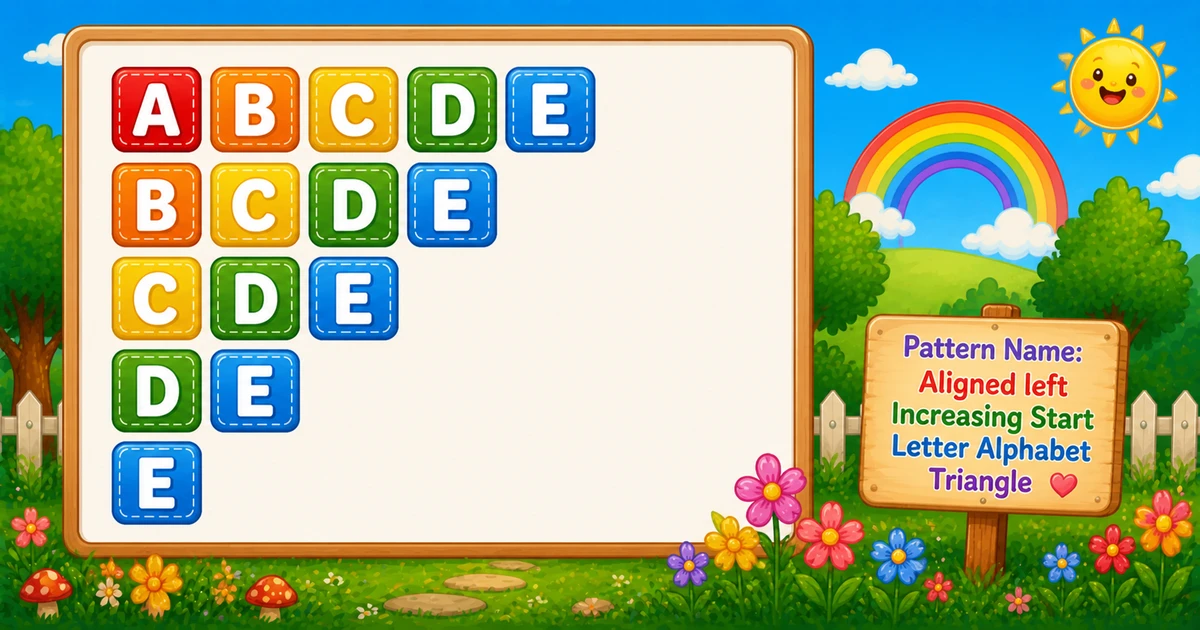
An increasing-start alphabet triangle keeps a fixed end letter on the right and moves the start letter one step later each row — so the left edge slides inward.
Remember
Rule: for start letter i from A to last,
      print i through last

ABCDE
BCDE
CDE
DE
E         ← 5 rows (right edge fixed at E)
Same widths as Program 5 (5, 4, 3, 2, 1), but Program 5 shortens the end while restarting at A. Here the start advances and the end stays put. Compare also with Program 3, which grows into the same right edge.
Approach
How to Solve It
Two ways to emit the same shape — nested char loops, or the same loops with spaced letters for readability.
Method
Idea
Best for
Nested char loops
Outer = advancing start; inner = start..end
Learning, interviews, exams
Spaced letters
Same loops; print "%c " per letter
Easier column scanning once loops click
Pseudocode
Pseudocode
end = lastLetter
for start from 'A' to end:
    for ch from start to end:
        print ch (no newline)
    print newline
Change the row count and the increasing-start triangle updates instantly — right edge stays fixed.
Whole number from 1 to 10. Tap a chip or type a count — the preview redraws as you go.
Live result5 rows · end E · 15 letters
ABCDE
BCDE
CDE
DE
E
Trace
Worked Walkthrough — rows = 4
Trace each outer-loop start letter as i advances from 'A' to 'D' with end fixed at 'D'.
Start i
Inner j
Printed row
Letters
'A'
A..D
ABCD
4
'B'
B..D
BCD
3
'C'
C..D
CD
2
'D'
D..D
D
1
Total letter prints: 4 + 3 + 2 + 1 = 10 = 4×5/2 — same triangular count as Programs 1 and 5.
Code
C Programs
Three complete programs: fixed end E, row-count input with scanf, and spaced letters. Use View Output to reveal sample results.
Example 1 — Fixed end at 'E'
Hard-coded end letter — outer loop advances the start; inner loop prints i..E.
c
#include <stdio.h>

int main(void) {
    char i, j;

    for (i = 'A'; i <= 'E'; i++) {
        for (j = i; j <= 'E'; j++) {
            printf("%c", j);
        }
        printf("\n");
    }

    return 0;
}
Output
ABCDE
BCDE
CDE
DE
E
How It Works
1. Outer loop picks the start letter.i runs from 'A' to 'E' — longest row first.
2. Inner loop starts at i. For each start, j runs from i to 'E', so the row is i..E.
3. Print letters, then break the line.printf("%c", j) stays on the row; printf("\n") after the inner loop starts the next (shorter) row.
When i = 'A' you get ABCDE; when i = 'E' you get E.
Example 2 — Row Count Input
Read the row count, map it to an end letter, then advance the start. Check scanf in real apps.
c
#include <stdio.h>

int main(void) {
    int rows;
    char i, j, end;

    printf("Enter the number of rows: ");
    scanf("%d", &rows);
    end = 'A' + rows - 1;

    for (i = 'A'; i <= end; i++) {
        for (j = i; j <= end; j++) {
            printf("%c", j);
        }
        printf("\n");
    }

    return 0;
}
Output (when user enters 4)
Enter the number of rows: 4
ABCD
BCD
CD
D
How It Works
1. Map rows to an end letter.end = 'A' + rows - 1 — for rows = 4, end is 'D'.
2. Same advance core. Only the source of end changes — the print logic matches Example 1.
3. Safer input tip. Prefer:
Safer input
if (scanf("%d", &rows) != 1 || rows < 1 || rows > 26) {
    printf("Enter a whole number from 1 to 26.\n");
    return 1;
}
Example 3 — Spaced Letters
Print a trailing space after each letter so columns are easier to scan.
c
#include <stdio.h>

int main(void) {
    char i, j;

    for (i = 'A'; i <= 'E'; i++) {
        for (j = i; j <= 'E'; j++) {
            printf("%c ", j);
        }
        printf("\n");
    }

    return 0;
}
Output
A B C D E
B C D E
C D E
D E
E
How It Works
1. Same bounds. Loop limits are unchanged — only the printed unit becomes "%c ".
2. Optional trim. Trim trailing spaces later if you need a compact line for grading scripts.
Edge Cases & Pitfalls
Check these before calling the solution done.
j = 'A'
Program 5 by mistake
If the inner loop starts at 'A' instead of i, you print ABCDE, ABCD, … Use for (j = i; …).
printf("\n") inside
Column of letters
If printf("\n") is inside the inner loop, each letter lands on its own line. Print letters with %c; break the line only after the row.
Wrong end
Off-by-one end letter
Use 'A' + rows - 1. Forgetting - 1 pushes the end past the intended letter.
rows > 26
Past Z
'A' + rows - 1 leaves A–Z when rows > 26. Clamp or reject in interactive programs.
rows = 1
Single A
Output is just A — start and end coincide. A good sanity check.
scanf
Check return value
scanf("%d", &rows) can fail on empty or non-numeric text. Check == 1 and validate the range.
Analysis
Time and Space Complexity
Program
Time
Extra space
Nested loops (Examples 1–2)
O(n²)
O(1)
Spaced letters (Example 3)
O(n²)
O(1)
Total letters = n + (n - 1) + … + 1 = n(n + 1)/2 — quadratic in n. Same totals as Programs 1 and 5.
Remember
Key Takeaways
Rule: advance start letter i; print i through a fixed end each row.
vs Program 5: same widths — here the left edge moves; there the right edge moves.
Break the row: call printf("\n") only after the inner loop.
Complexity:O(n²) time; O(1) extra space.
One line: for i from 'A' to the end letter, print i through that end, then printf("\n").
Frequently Asked Questions
The outer loop picks the starting letter (A, then B, then C…). The inner loop prints from that start up to a fixed end letter. Each row drops the leftmost character and becomes shorter.
Because the inner loop always stops at the same end letter ('E'), so the last printed character is fixed on the right.
Program 5 restarts each row at A and shortens the end letter (ABCDE, ABCD, …). Program 6 shifts the start letter forward each row while keeping the same end letter (ABCDE, BCDE, …).
Program 3 grows while starting earlier (E, DE, CDE). This pattern shrinks while starting later (ABCDE, BCDE, CDE). Both keep a fixed right edge at the top letter.
printf("%c", j) stays on the same line. printf("\n") ends the current line. Letters use %c; the row break uses \n after the inner loop.
O(n²) for n rows, because total printed characters are n(n+1)/2.
Yes. Read rows with scanf, set end = (char)('A' + rows - 1), then loop i from 'A' to end and print j from i up to end.
Check scanf("%d", &rows) == 1, require n ≥ 1, and cap at 26 so the end letter stays within A–Z.
🤔
Did you know?
Each row starts one letter later but always ends at the same letter. For 5 rows: ABCDE, BCDE, CDE, DE, E. Same widths as Program 5, but the left edge moves instead of the right.