C# Star Pattern Programs
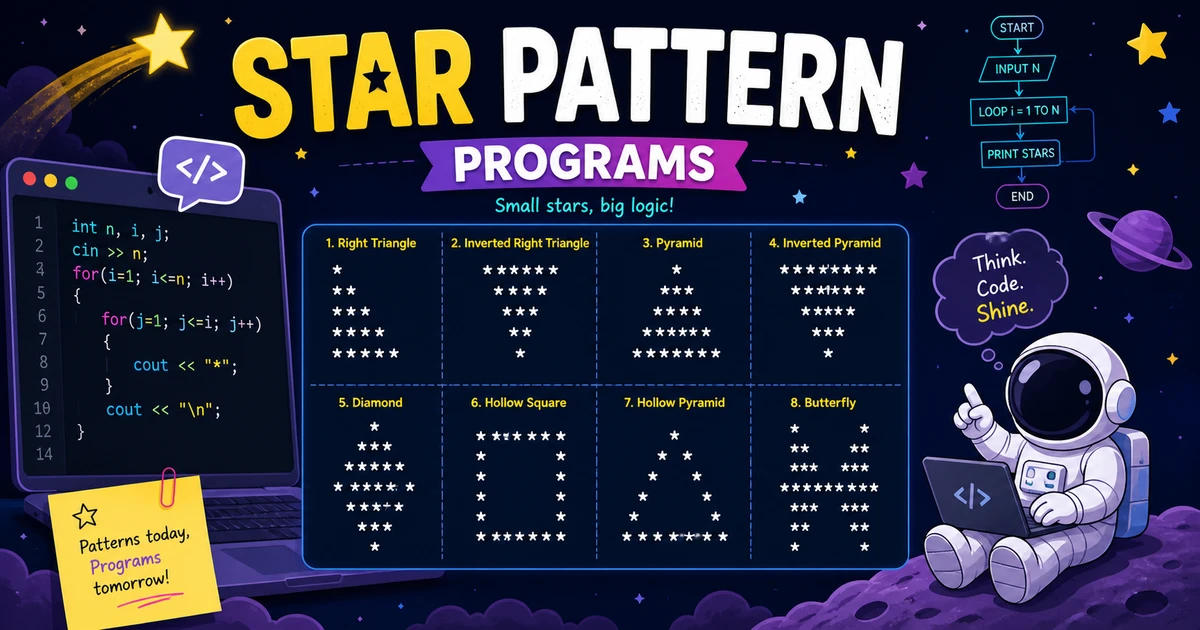
Understanding star patterns
Star pattern programs print asterisks (*) and spaces in rows and columns to build triangles, pyramids, diamonds, and hollow shapes. They are the classic first step into nested for loops in C#.
Because every cell is either a star or whitespace, you get immediate feedback when row counts, space loops, or symmetry rules are slightly off. Try changing the height or swapping characters once the basic shape works—that is how you turn a template into your own variation.
Why explore star patterns?
A small grid of * characters is enough to practice the same loop skills you will reuse for digits, letters, and formatted tables.
Clear visual feedback
Misaligned columns or missing hollow gaps show up right away. You learn to separate “how many spaces” from “how many stars” on each row.
Algorithmic thinking
Centered pyramids and diamonds force you to express symmetry with indices. That translates directly to matrix walks, parsing layouts, and UI grids later on.
Versatile building blocks
The same outer-row / inner-column structure scales from a five-line triangle to wider banners. Master a few shapes and you can recombine them quickly.
How to use this collection
Use the previews below to pick a silhouette, then open the matching tutorial for runnable code and a step-by-step breakdown.
Start with the triangle
New to patterns? Open Star Pattern 1 first, then move through the list as shapes get wider or symmetric.
Adjust height and spacing
Change the row count or the character you print. Re-run and compare output so you see which loop controls leading spaces versus stars.
Continue with numbers or letters
The same loop skeletons power number patterns and alphabet patterns—only the symbol you print changes.
Complete list of C# star pattern programs
Below are 11 star pattern programs in C#. Each card shows sample output; open it for the full program, logic breakdown, variations, and FAQs.
Printing a star with Console.Write("*") is simple; most of the program is usually deciding when to print a space instead. Naming variables like spaces and stars makes hollow and centered patterns much easier to read back later.
Ready to code?
Open Star Pattern 1 for a full walkthrough, runnable C# source, and common interview questions.
About the author


28 people found this page helpful