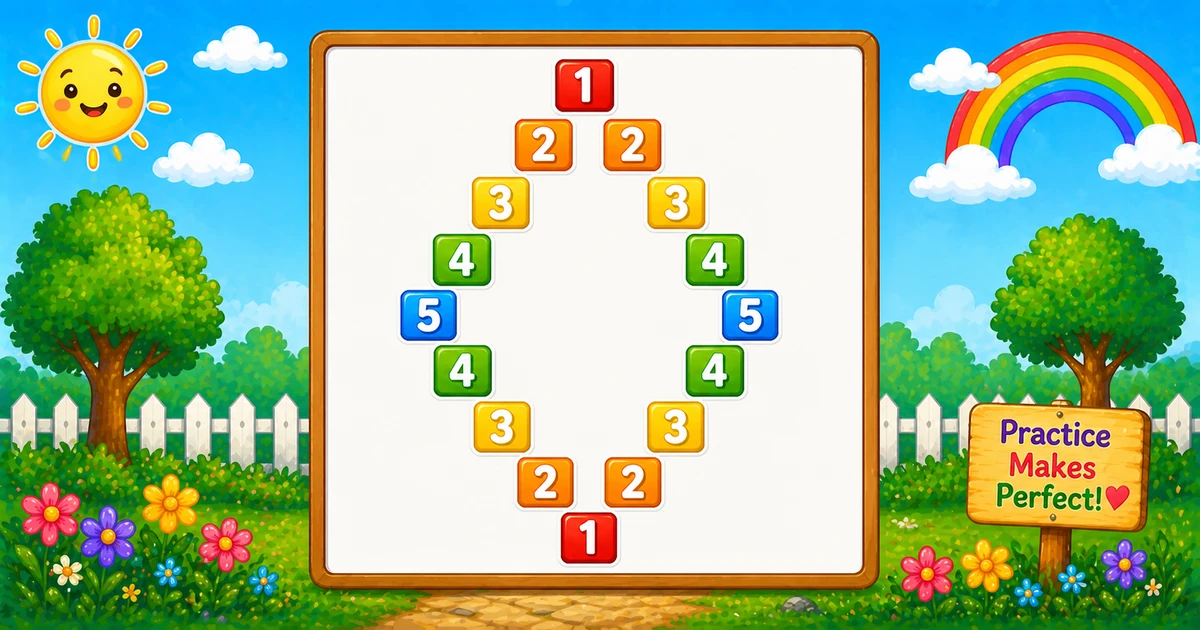
A diagonal mirror number diamond is Program 57’s inverse-V pyramid plus a mirrored bottom half — digit i only on the left and right diagonals, spaces everywhere else.
Remember
Rule: top i = 1..rows, bottom i = rows−1..1
      same left/right diagonal print as Program 57

    1
   2 2
  3   3
 4     4
5       5
 4     4
  3   3
   2 2
    1     ← rows = 5 (9 lines)
In C# reuse the same diagonal row logic twice: climb 1..rows, then descend rows-1..1, then WriteLine() after each row.
Approach
How to Solve It
Reuse Program 57’s diagonal row logic twice: climb 1..rows, then descend rows-1..1 so the peak line appears once.
Method
Idea
Best for
Two outer loops
Top 1..rows, bottom rows-1..1
Learning, interviews, exams
Rows input
Same logic with a user-chosen half-height
Practice / demos
Pseudocode
Pseudocode
function print_row(i, rows):
    for j from rows down to 1:
        if i == j: print i else print space
    for k from 2 to rows:
        if i == k: print i else print space
    print newline

for i from 1 to rows:
    print_row(i, rows)
for i from rows - 1 down to 1:
    print_row(i, rows)
2. Same core. Top and bottom loops match Example 1 — only rows comes from the user.
3. Single-digit tip. Cap demos at rows ≤ 9 so every digit stays one character wide.
Example 3 — Compact rows = 3
Five-line diamond — easy to confirm the bottom starts at 2, not 3.
C#
using System;

namespace MyApp
{
    class Program
    {
        static void Main(string[] args)
        {
            int rows = 3;
            int i, j, k;

            for (i = 1; i <= rows; i++)
            {
                for (j = rows; j >= 1; j--)
                    Console.Write(i == j ? j.ToString() : " ");

                for (k = 2; k <= rows; k++)
                    Console.Write(i == k ? k.ToString() : " ");

                Console.WriteLine();
            }

            for (i = rows - 1; i >= 1; i--)
            {
                for (j = rows; j >= 1; j--)
                    Console.Write(i == j ? j.ToString() : " ");

                for (k = 2; k <= rows; k++)
                    Console.Write(i == k ? k.ToString() : " ");

                Console.WriteLine();
            }
        }
    }
}
Output
  1
 2 2
3   3
 2 2
  1
How It Works
1. Five lines. Top prints 1, 2 2, 3 3; bottom reprints 2 2 and 1.
2. Trace on paper. Confirm the peak 3 3 appears once — bottom starts at rows - 1.
Edge Cases & Pitfalls
Check these before calling the solution done.
i = rows..1
Double peak
If the bottom loop starts at rows, the widest line prints twice. Always start at rows - 1.
k = 1
Triple digit on a row
If the right loop starts at 1, the center column can print a third digit. Keep k = 2.
WriteLine
Broken rows
If WriteLine sits inside an inner loop, each character lands on its own line. Call it only after both diagonal loops finish.
rows = 1
Single line
Output is just 1 — the bottom loop (rows-1..1) does not run.
rows > 9
Multi-digit width
Digits 10+ break neat column alignment. Cap demos at 9 or use a fixed field width.
Bad input
Convert.ToInt32 throws
Prefer int.TryParse so non-numeric input does not crash the program.
Analysis
Time and Space Complexity
Program
Time
Extra space
Fixed / compact (Examples 1, 3)
O(n²)
O(1)
User input (Example 2)
O(n²)
O(1)
You print 2n−1 lines, each scanning about 2n−1 positions → O(n²) time. Only a few loop variables are needed.
Remember
Key Takeaways
Pyramid + mirror: top 1..rows, bottom rows-1..1, same diagonal row body.
Skip the peak twice: bottom starts at rows - 1.
Write vs WriteLine: digits and spaces stay on the line; WriteLine advances after both loops.
Next step: Program 59 prints consecutive numbers around a hollow square border.
One line: Program 57 once upward, then again from rows-1 down to 1.
Frequently Asked Questions
Each row prints the same digit on the left diagonal and the right diagonal; spaces fill the remaining positions.
The top half already printed the peak row — starting at rows-1 avoids duplicating the middle line.
An inverse-V pyramid from 1 to rows, then mirrored back down to 1 — 2*rows-1 lines total.
Program 57 prints only the top pyramid half. Program 58 adds a second outer loop from rows-1 down to 1 for the bottom half.
Each column prints either the row digit or a space — those conditions pick exactly the two diagonal positions.
Change rows or read it from user input with TryParse — see Example 2.
O(n²) for n rows because you print 2n-1 lines, each scanning about 2n positions.
Yes. Replace Console.Write(j) / Console.Write(k) with Console.Write('*') in both diagonal print branches.
Prefer int.TryParse(Console.ReadLine(), out rows) so bad input does not throw FormatException.
Only one line prints — the bottom loop (rows-1..1) does not run.
🤔
Did you know?
Print the Program 57 pyramid for the top half, then mirror with for (i = rows-1; i >= 1; i--). Total lines = 2×rows-1 — each row scans about 2×rows-1 positions.