Shape Rule
Layers to center
Each row i prints numbers that peel from k down to i, then mirror back out.

Program 46 prints a concentric number square: outer values stay at k while inner layers step down to 1 at the center — a natural step after Program 45’s star-and-zero X grid. This tutorial covers nested loops with j > i logic, left/right mirroring, a live preview, worked C# examples, edge cases, and complexity.
Layers to center
Each row i prints numbers that peel from k down to i, then mirror back out.
i = k..1
for (i = k; i >= 1; i--) walks each concentric layer from outside in.
Left + right
j = k..1 builds the left half; j = 2..k mirrors the right half.
j > i
if (j > i) print j; else print i — picks outer or current layer value.
k = 3..7
Pick outer value k and draw the concentric square in the browser.
Complexity
k rows × 2k - 1 columns — total prints grow as k²; extra memory stays O(1).
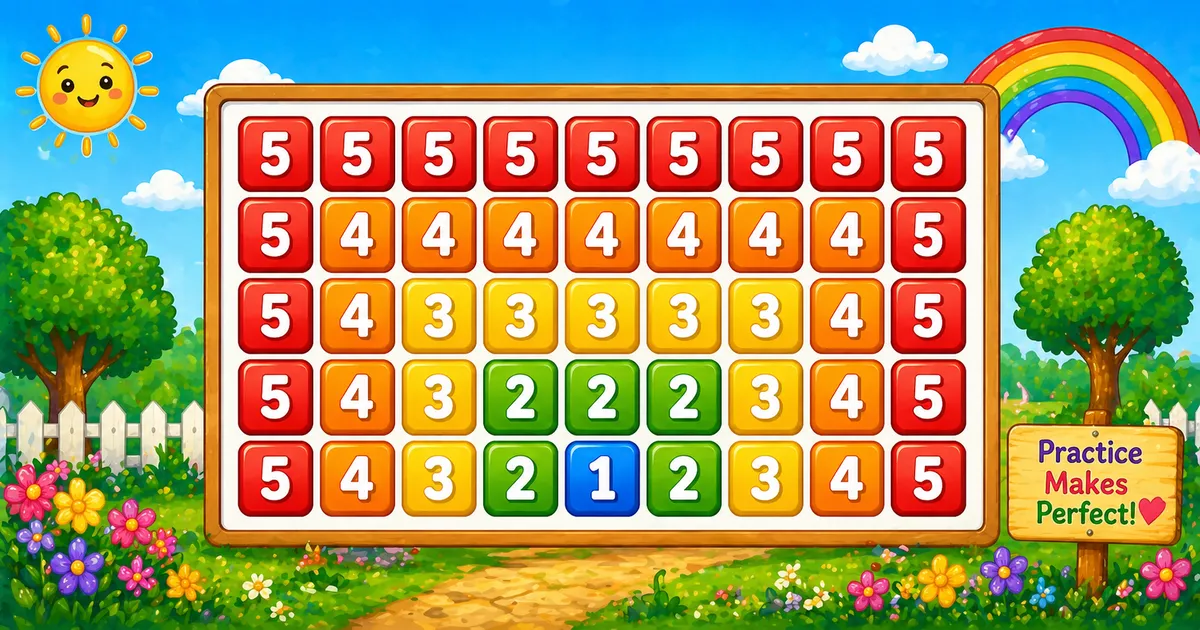
A concentric number square prints layers of numbers that decrease toward the center and mirror back out symmetrically. With k = 5, the outer row is all 5s and the bottom row ends at 1 in the middle.
In C# the outer loop runs i = k..1, two inner loops print left and right halves, and j > i picks the outer column value or the current row value.
It teaches symmetric row building and layer logic — a key step after Program 45’s star-and-zero X grid.
Sets max number and width.
Two inner loops mirror halves.
Program 45 prints * and 0; Program 46 prints concentric numbers.
Follow Program 45; continue to Program 47 next.
In short: outer loop i = k..1, two inner loops, print j if j > i else i, then WriteLine().
Given outer value k = 5, print a concentric number square — layers decrease to 1 at the center and mirror back out.
// k = 5
//5 5 5 5 5 5 5 5 5
//5 4 4 4 4 4 4 4 5
//5 4 3 3 3 3 3 4 5
//5 4 3 2 2 2 3 4 5
//5 4 3 2 1 2 3 4 5 | Item | Type | Description |
|---|---|---|
k | int | Outer (maximum) number — also sets row count and half-width. |
i | int | Outer loop — current row/layer value (k down to 1). |
j | int | Inner loop — column index for left (k..1) or right (2..k) half. |
| Width | int | 2 × k - 1 numbers per row (9 when k = 5). |
for i from k down to 1:
for j from k down to 1: // left half
print j if j > i else i
for j from 2 to k: // right half
print j if j > i else i
print newline | Approach | Idea | Best for |
|---|---|---|
| Two inner loops + if | 5 4 3 2 1 2 3 4 5 bottom row | Learning and interviews |
| User-input k | int.TryParse(...) | Flexible outer value |
| Ternary operator | j > i ? j : i | Compact one-liner per cell |
| Goal | Pattern |
|---|---|
| Walk layers | for (i = k; i >= 1; i--) |
| Left half | for (j = k; j >= 1; j--) |
| Right half | for (j = 2; j <= k; j++) |
| Cell rule | if (j > i) Console.Write(j + " "); else Console.Write(i + " "); |
| Ternary form | Console.Write((j > i ? j : i) + " "); |
| Row width | 2 × k - 1 numbers per row |
| Program 45 contrast | Star-and-zero X on a fixed grid — not concentric numbers |
Same concentric square — different ways to set k and write the cell rule.
i = k..1Layers from outside in
j = k..1Descending columns
j = 2..kMirror without center dup
j > i ? j : iOuter or layer value
Reach for this pattern when teaching symmetric output, layer logic, and dual inner loops.
Natural follow-up after Program 45 — same nested loops but adds symmetric row building.
Left and right inner loops teach symmetry without string reversal.
j > i selects which concentric ring each cell belongs to.
Compare Program 45 (star/zero X) and Program 47 (next in series) next.
This is a console teaching pattern — not how you build modern app screens.
Key benefit: one small program that locks in nested loops, symmetry, and O(k²) thinking.
Choose outer value k between 3 and 7 and draw the concentric number square in the browser.
Three complete C# programs — fixed rows, user input, and a smaller trace demo. Click View Output to reveal sample console results.
Print a concentric number square with k = 5 using two inner loops and the j > i rule.
k = 5Hard-coded outer value — ideal for first demos and screenshots.
using System;
namespace MyApp
{
class Program
{
static void Main(string[] args)
{
int k = 5;
int i, j;
for (i = k; i >= 1; i--)
{
for (j = k; j >= 1; j--)
{
if (j > i)
Console.Write(j + " ");
else
Console.Write(i + " ");
}
for (j = 2; j <= k; j++)
{
if (j > i)
Console.Write(j + " ");
else
Console.Write(i + " ");
}
Console.WriteLine();
}
}
}
} When i = 5 (first row), every j satisfies j > i is false for the inner range — all cells print 5. When i = 1 (last row), the center prints 1 and outer columns print ascending/descending values.
Read outer value k from the console instead of hard-coding 5.
Read k from the console with safe parsing.
using System;
namespace MyApp
{
class Program
{
static void Main(string[] args)
{
int k;
Console.Write("Enter k: ");
if (!int.TryParse(Console.ReadLine(), out k) || k <= 0)
{
Console.WriteLine("Please enter a positive integer.");
return;
}
for (int i = k; i >= 1; i--)
{
for (int j = k; j >= 1; j--)
Console.Write((j > i ? j : i) + " ");
for (int j = 2; j <= k; j++)
Console.Write((j > i ? j : i) + " ");
Console.WriteLine();
}
}
}
} Same inner-loop core as Example 1; only the source of k changes from a literal to user input. Width becomes 2k - 1 automatically.
Smaller outer value for quick tracing — same logic, fewer rows.
k = 3Use k = 3 to trace the pattern quickly on paper or in interviews.
using System;
namespace MyApp
{
class Program
{
static void Main(string[] args)
{
int k = 3;
for (int i = k; i >= 1; i--)
{
for (int j = k; j >= 1; j--)
Console.Write((j > i ? j : i) + " ");
for (int j = 2; j <= k; j++)
Console.Write((j > i ? j : i) + " ");
Console.WriteLine();
}
}
}
} Only three rows — easy to dry-run each j value. The ternary j > i ? j : i replaces the if-else from Example 1.
using System; brings in Console. Set k = 5 as the outer value and row/layer count.
for (i = k; i >= 1; i--) walks concentric layers from k down to 1.
If j > i print j; else print i — builds descending left side.
Same rule for j = 2..k — mirrors the left half without duplicating the center.
Console.WriteLine() ends each row after the inner loop finishes.
k rows × 2k - 1 columns — O(k²) time, O(1) extra memory.
i = 3, k = 5Trace left-half columns j on row 3 — which value prints for each cell.
j | j > i? | Prints |
|---|---|---|
5 | Yes | 5 |
4 | Yes | 4 |
3 | No | 3 (i) |
2 | No | 3 (i) |
1 | No | 3 (i) |
Left half of row 3: 5 4 3 3 3. Right half (j = 2..5) mirrors to 3 3 4 5 — full row: 5 4 3 3 3 3 3 4 5. Total cells per row = 2k - 1 = 9.
Where this tiny pattern (and its loop structure) shows up beyond the homework prompt.
Clearest visual proof that outer and inner bounds interact.
Example: change k to 3 for a quick trace — see Example 3.
Foundation for concentric layers, symmetric grids, and peel-down patterns.
Example: continue to Program 47 for the next pattern in the series.
Practice Write vs WriteLine without complex math.
Example: put WriteLine inside the inner loop by mistake.
Two inner loops teach left-right mirroring without string reversal.
Example: trace row i = 3 in the walkthrough table.
k rows × 2k - 1 columns makes O(k²) concrete.
Example: count cells for k = 5 — 5 rows × 9 cols = 45 prints.
Pair the pattern with TryParse and positive-row checks.
Example: reject rows <= 0 and re-prompt.
Pro Tip: when an interviewer asks for patterns, explain the outer/inner roles first — then write the loops. The story matters as much as the code.
Why this pattern earns a permanent spot in beginner C# courses.
Wrong bounds show up immediately as a broken staircase.
Only loops and console output — no arrays or math libraries.
Change k, use ternary form, or trace with k = 3 for quick dry-runs.
Streaming output needs no storage beyond loop counters.
Pro Tip: trace row i = 3 on paper — watch how j > i switches from outer values to the current layer.
Small habits that keep number-pattern code clean.
Never hard-code 5 in loop bounds — use k everywhere.
TryParseAvoid crashes when the user types letters instead of a number.
Only call WriteLine() after the inner loop finishes the row.
Left half uses j = k..1; right half uses j = 2..k — do not repeat j = 1 on the right.
Trace all three rows on paper before coding the full k = 5 demo.
Pro Tip: if the output is a vertical list of single squares per line, you almost certainly put WriteLine inside the print loop.
Mistakes that commonly break concentric number square patterns.
Each cell lands on its own line — you get a column, not a square.
→ Use Write((j > i ? j : i) + " ") per cell; WriteLine only after both inner loops.
Starting the right half at j = 1 duplicates the center digit on every row.
→ Use for (j = 2; j <= k; j++) for the mirror half.
Using i = 1..k prints the pattern upside-down — center row appears first.
→ Use for (i = k; i >= 1; i--) to start from the outer layer.
k = 1 prints a single 1; k = 2 gives a minimal 3-column square.
→ Validate k >= 2 for interactive programs expecting a visible pattern.
Letters or empty input throw FormatException.
→ Prefer int.TryParse and re-prompt on failure.
Check these inputs before calling the solution done.
Output is just 1 on one line — no layers to peel.
Outer loop never runs — print nothing or show a message.
k < 0Treat as invalid; re-prompt instead of silent empty output.
Three columns wide — 2 2 2, 2 1 2.
Convert.ToInt32 throws — use TryParse.
Each row prints 2k - 1 cells — total work grows as k².
Try these variations to lock in the pattern.
j > i ? j : i instead of if-elsej when j > i; otherwise print i. Apply in both left and right inner loops.Console.Write stays on the line; WriteLine advances — call it only after both inner loops finish.k > 0 for interactive programs; k = 1 prints a single 1.k rows × 2k - 1 columns per row — total prints ≈ k × (2k - 1).Quick Takeaway: outer loop i = k..1, two inner loops, print j if j > i else i, then WriteLine().
| Program | Time | Extra space |
|---|---|---|
| Nested loops (Examples 1–3) | O(k²) | O(1) |
| Smaller demo (Example 3) | O(k²) | O(1) |
The concentric number square is a compact nested-loop lesson: peel layers from k down to 1 using the j > i rule on left and right halves. Master the fixed-k version, then try user input and the compact k = 3 trace.
Practice the three examples above, then continue to Program 47 for the next pattern in the series.
Left half j = k..1, right half j = 2..k — same cell rule in both loops and validate k when reading input.
for (i = k; i >= 1; i--)for (j = k; j >= 1; j--), Right: for (j = 2; j <= k; j++)j if j > i, else ik ≥ 2 for interactive programsint.TryParse over bare Convert.ToInt32WriteLine inside the inner cell loopj = 1 — duplicates centeri = 1..k — prints pattern upside-downk = 3 dry-run before coding k = 5Print the pattern the beginner-friendly way.
j > i ? j : i
DefinitionLayers i = k..1
CodeLeft k..1, right 2..k
CodeMirror halves
LogicO(k²) time
AnalysisEach cell prints j when j > i, else i. Row i runs from k down to 1; grid width = 2k - 1 columns per row.
Move on to the next pattern in the C# number-pattern series.
12 people found this page helpful

