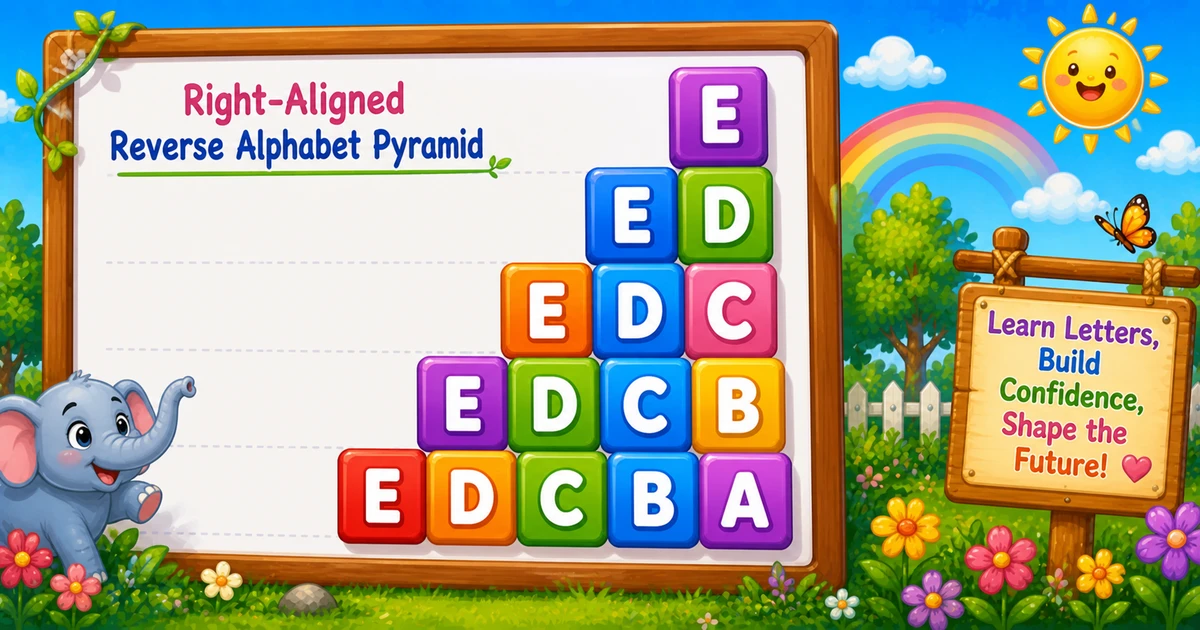
C# Reverse Alphabet Pyramid Pattern (Slice from E)
Beginner
7 min read
Updated: Sep 2026
3 programs
Live preview
Definition
What Is This Pattern?
A right-aligned reverse alphabet pyramid prints a growing reverse slice each row — from a single top letter down to a full E D C B A base — with padding so the block stays right-aligned.
Remember
Rule: for i from top down to 'A',
      print pads for A..(i-1), then letters top..i (width 2)

        E
      E D
    E D C
  E D C B
E D C B A     ← top = 'E' (monospace)
Companion to Program 22: same fixed-width grid (two spaces for pads + {0,2} for letters), but each row prints a reverse slice top..i instead of a running sequential counter.
Approach
How to Solve It
Two ways to emit the same shape — start with char loops, then optionally rewrite with int row indexes.
Method
Idea
Best for
Char loops
Outer i; pad A..(i-1); letters top..i
Learning, interviews, exams
Int row index
Pad n - row; print row letters from top down
When you think in row numbers
Pseudocode
Pseudocode
for i from top down to 'A':
    for j from 'A' to (i - 1):
        print "  "
    for j from top down to i:
        print j in width-2 field
    print newline
Change the top letter and the right-aligned reverse pyramid updates instantly.
One letter from A to F. Tap a chip or type a letter — the preview redraws as you go.
Live resultTop E · 5 rows · 15 letters
         E
       E D
     E D C
   E D C B
 E D C B A
Trace
Worked Walkthrough — Top = E
Trace each row’s pads, reverse slice, and printed line (each cell is width 2).
i
Pad cells
Letters
Printed row
E
4
E
E
D
3
E D
E D
C
2
E D C
E D C
B
1
E D C B
E D C B
A
0
E D C B A
E D C B A
Row count = top - 'A' + 1 (5 for E). Letter total: 1 + 2 + 3 + 4 + 5 = 15 = 5×6/2.
Code
C# Programs
Three complete programs: fixed top letter, console input, and an int-index rewrite. Use View Output to reveal sample results.
Example 1 — Fixed A–E
Hard-coded top E — pad first, then print letters from E down to the current row letter.
C#
using System;

class Program
{
    static void Main()
    {
        for (char i = 'E'; i >= 'A'; i--)
        {
            for (char j = 'A'; j < i; j++)
                Console.Write("  ");

            for (char j = 'E'; j >= i; j--)
                Console.Write("{0,2}", j);

            Console.WriteLine();
        }
    }
}
Output
         E
       E D
     E D C
   E D C B
 E D C B A
How It Works
1. Outer loop descends.i runs from 'E' down to 'A' — one row per letter.
2. Pad first. Print " " for each j from 'A' to i - 1 so the letters stay right-aligned.
3. Reverse slice. Print j from 'E' down to i with {0,2} (width-2 cells).
4. Break the line.Console.WriteLine() after both inner loops starts the next row.
When i = 'C', pads run for A and B, then letters print E D C.
Example 2 — Top Letter Input
Read the top letter at runtime. Prefer validating a single A–Z character in real apps.
C#
using System;

class Program
{
    static void Main()
    {
        Console.Write("Enter the top letter (like E): ");
        char top = Convert.ToChar(Console.ReadLine());

        for (char i = top; i >= 'A'; i--)
        {
            for (char j = 'A'; j < i; j++)
                Console.Write("  ");

            for (char j = top; j >= i; j--)
                Console.Write("{0,2}", j);

            Console.WriteLine();
        }
    }
}
Output (when user enters C)
Enter the top letter (like E): C
     C
   C B
 C B A
How It Works
1. Prompt and read. Ask for a top letter, then convert the line to a char.
2. Same pad/letter core. Both the outer start and the letter-loop start use top.
3. Safer input tip.Convert.ToChar fails on empty or multi-character lines. Prefer:
Safer input
string raw = (Console.ReadLine() ?? "").Trim().ToUpperInvariant();
if (raw.Length != 1 || raw[0] < 'A' || raw[0] > 'Z')
{
    Console.WriteLine("Enter one letter from A to Z.");
    return;
}
char top = raw[0];
Example 3 — Int Row Index
Same shape with integer indexes: pad n - row cells, then print row letters from the top down.
C#
using System;

class Program
{
    static void Main()
    {
        char top = 'E';
        int n = top - 'A' + 1;

        for (int row = 1; row <= n; row++)
        {
            for (int s = 0; s < n - row; s++)
                Console.Write("  ");

            for (int k = 0; k < row; k++)
                Console.Write("{0,2}", (char)(top - k));

            Console.WriteLine();
        }
    }
}
Output
         E
       E D
     E D C
   E D C B
 E D C B A
How It Works
1. Derive height.n = top - 'A' + 1 is 5 when top is 'E'.
2. Pad by row number. Row 1 pads n - 1 cells; the last row pads 0.
3. Letters from the top. Letter k is (char)(top - k) — row 1 prints E; row 5 prints E..A.
Edge Cases & Pitfalls
Check these before calling the solution done.
Single space
Broken alignment
Pads must be " " (two spaces) to match {0,2}. One space skews the pyramid in monospace output.
WriteLine inside
Broken outline
If WriteLine is inside either inner loop, each cell lands on its own line. Use Write for pads and letters; WriteLine only after both loops.
j <= i
Extra pad cell
The pad loop must stop at j < i, not j <= i, or you insert one too many empty cells.
top = A
Single letter
Output is just a width-2 A cell. Pad loop never runs. A good sanity check.
top < A
Empty output
Outer loop never runs if top < 'A'. Validate A–Z before looping.
Bad input
Validate one letter
Empty, multi-character, or lowercase-only handling — trim, uppercase, and require length 1 in A–Z.
Analysis
Time and Space Complexity
Program
Time
Extra space
Char loops (Examples 1–2)
O(n²)
O(1)
Int row index (Example 3)
O(n²)
O(1)
For n = top - 'A' + 1 rows, each row does up to O(n) pad + letter writes. Letter total = 1 + 2 + … + n = n(n + 1)/2.
Remember
Key Takeaways
Rule: for i from top down to 'A', pad A..(i-1), then print top..i.
Fixed width: use " " pads and {0,2} so every cell is two columns.
Break the row: call WriteLine only after both inner loops.
Complexity:O(n²) time; O(1) extra space.
One line: for each row letter i from top down to A, print pads for A..(i-1), then letters top..i with width 2, then WriteLine().
Frequently Asked Questions
The first prints padding so the visible letters are right-aligned. The second prints letters from E (or your top letter) down to the current row letter i.
Each letter is printed in a width-2 field, so two spaces keep empty cells the same width and the pyramid aligned in monospace output.
Program 22 uses one running counter k++ across all rows (A..O). Program 23 prints a reverse slice each row using the loop variable j (E..i).
Console.Write stays on the same line for pads and letters. Console.WriteLine ends the row after both inner loops finish.
Yes. Change the second loop to always begin from your chosen top letter and decrement to the row letter — Example 2 does this with user input.
O(n²) for n rows because each row does O(n) work across the padding + letter loops.
Read a line, trim it, require a single A–Z character (or ToUpperInvariant), and reject empty or multi-character input.
For top = E, when i is E you print 4 pad cells (A..D); when i is A you print 0. Pads = (i − A).
🤔
Did you know?
Outer i runs from E down to A. The first inner loop prints one " " per j with A <= j < i (so the block shifts left each row). The second loop prints letters from E down to i using {0,2} so each cell is 2 columns wide.